EvidenceLens — YouTube™向けAI要約・主張チェック のアイテムロゴ画像

EvidenceLens — YouTube™向けAI要約・主張チェック

evidence-lens.com
おすすめ
5.0(

36 件の評価

)
拡張機能ツール221 ユーザー
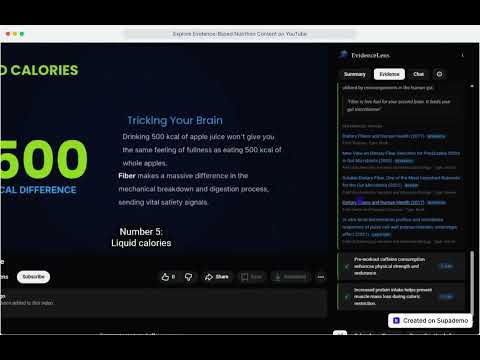
EvidenceLens — YouTube™向けAI要約・主張チェック のアイテム メディア 3 のスクリーンショット
EvidenceLens — YouTube™向けAI要約・主張チェック のアイテム メディア 4 のスクリーンショット
アイテムの動画サムネイル
EvidenceLens — YouTube™向けAI要約・主張チェック のアイテム メディア 2 のスクリーンショット
EvidenceLens — YouTube™向けAI要約・主張チェック のアイテム メディア 3 のスクリーンショット
EvidenceLens — YouTube™向けAI要約・主張チェック のアイテム メディア 4 のスクリーンショット
アイテムの動画サムネイル
EvidenceLens — YouTube™向けAI要約・主張チェック のアイテム メディア 2 のスクリーンショット
アイテムの動画サムネイル
EvidenceLens — YouTube™向けAI要約・主張チェック のアイテム メディア 2 のスクリーンショット
EvidenceLens — YouTube™向けAI要約・主張チェック のアイテム メディア 3 のスクリーンショット
EvidenceLens — YouTube™向けAI要約・主張チェック のアイテム メディア 4 のスクリーンショット

概要

YouTube™動画のAI要約、重要ポイント、研究に基づく主張チェック、出典付きQ&A。

EvidenceLensは、YouTube動画のAI要約と、研究に基づくファクトチェックを行えるツールです。文字起こしをもとにしたわかりやすい要約と重要ポイントを読めるほか、1億件を超える学術文献を収めた研究インデックスと照らし合わせて、動画内の重要な主張を確認できます。 インストールしたら、文字起こしが利用できるYouTubeの動画再生ページを開いてください。動画の横にあるEvidenceLensから、要約の閲覧、主張のチェック、追加の質問ができます。 • 動画要約:主な内容、構成、重要ポイントを整理 • 主張チェック:研究が支持・反証している点、不明確な点を出典付きで確認 • 動画について質問:文字起こしに基づく回答を出典情報とともに表示 YouTubeの動画再生ページで直接利用でき、12言語とライト・ダークテーマに対応しています。AIの結果は不完全または誤っている場合があります。利用前に引用元をご確認ください。 YouTubeはGoogle LLCの商標です。EvidenceLensはGoogle LLCと提携しておらず、Google LLCの承認も受けていません。

詳細

  • バージョン
    1.4.6
  • 更新:
    2026年10月18日
  • サイズ
    215KiB
  • 言語
    12 言語
  • デベロッパー
    ウェブサイト
    メール
    support@evidence-lens.com
  • 非取引業者
    このデベロッパーは取引業者として申告していません。EU 加盟国の消費者とこのデベロッパーとの間に締結された契約には、消費者の権利が適用されません。

プライバシー

拡張機能を管理し、組織での使用状況を確認できます

EvidenceLens — YouTube™向けAI要約・主張チェック から、お客様のデータの収集と使用に関する以下の情報が開示されています。 詳しくは、デベロッパーの privacy policy をご確認ください。

EvidenceLens — YouTube™向けAI要約・主張チェック は次を扱います。

個人を特定できる情報
財務状況や支払いに関する情報
認証に関する情報
個人的コミュニケーション
位置情報
ウェブ履歴
ユーザーのアクティビティ
ウェブサイトのコンテンツ

このデベロッパーは、お客様のデータについて以下を宣言しています

  • 承認されている以外の用途で第三者に販売しないこと
  • アイテムの中心機能と関係のない目的で使用または転送しないこと
  • 信用力を判断する目的または融資目的で使用または転送しないこと

サポート

質問や提案、問題がある場合は、デベロッパーのサポートサイトにアクセスしてください。

関連アイテム

Kontinuity

5.0

Track AI coding costs. Prevent context drift. Never lose the thread.

Stashly - Fast work bookmark manager

5.0

Fast work bookmark manager — save, group & access links instantly.

Divine DevTools

5.0

Visual DOM Inspector and AI Side Panel for web app development with Skills integration.

tokenzip

5.0

Save 30–85% of your AI tokens automatically. Same answers, lower cost.

Trixy

5.0

Prediction market intelligence

Greater Fool: Investing Terms Explained

5.0

Highlight any confusing investing or finance term on any page and get a plain-English explanation instantly.

Focably – Pomodoro Timer + Site Blocker

5.0

Focably helps users block distracting websites during focus sessions.

nodx Lens

5.0

文字を選択、範囲を囲む、Shift を 2 回 → AI が説明・検索・価格比較、ページへの書き込みまで。無料で始められます。

JobTailor AI|職務経歴書の最適化・応募アシスタント

5.0

転職活動向けのChrome拡張機能。どの求人ページでも、求人票に合わせた職務経歴書のAI最適化、ATSマッチ度の判定、カバーレター作成、面接対策、応募管理ができます。

Magpie UI — AI Inspector & Code Exporter

5.0

AI-powered UI inspector: export clean HTML, CSS, Tailwind and React, then explain, clean, audit and adapt CSS with AI.

CaptureIt

5.0

Full page screenshots, video recording, and cropping - all in one extension

Focusly – Block YouTube Creators, Shorts & Distracting Websites

4.8

Block YouTube creators, channels & Shorts - and any distracting website. Set daily limits, schedules and focus sessions.

Kontinuity

5.0

Track AI coding costs. Prevent context drift. Never lose the thread.

Stashly - Fast work bookmark manager

5.0

Fast work bookmark manager — save, group & access links instantly.

Divine DevTools

5.0

Visual DOM Inspector and AI Side Panel for web app development with Skills integration.

tokenzip

5.0

Save 30–85% of your AI tokens automatically. Same answers, lower cost.

Trixy

5.0

Prediction market intelligence

Greater Fool: Investing Terms Explained

5.0

Highlight any confusing investing or finance term on any page and get a plain-English explanation instantly.

Focably – Pomodoro Timer + Site Blocker

5.0

Focably helps users block distracting websites during focus sessions.

nodx Lens

5.0

文字を選択、範囲を囲む、Shift を 2 回 → AI が説明・検索・価格比較、ページへの書き込みまで。無料で始められます。

検索
検索をクリア
検索を終了
Google アプリ
メインメニュー
