

Event Validator – GA4 & dataLayer Inspector

Overview
Inspect dataLayer and gtag events, compare payloads, review GA4 requests and validate selected events on EventValidator.com.
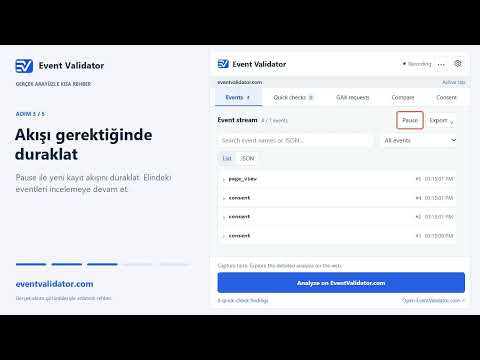
Check your GA4 tracking without digging through a long dataLayer in the console. Event Validator captures dataLayer and gtag events so you can inspect what a website sends. Open it as a popup, a side panel or an Event Validator panel in Chrome DevTools. Use it to: - Search event names and JSON values while events arrive. - Open an event in a full-width detail view with its parameters and raw JSON. - Inspect ecommerce item arrays with product names, IDs, search and 20-item pages. - Compare two event payloads to see changed, added or missing parameters. - Review captured consent commands and local quick-check findings. - Optionally observe GA4 requests, including selected payload parameters and request status. - Copy or download the events in your current filter, with optional best-effort masking. - Send selected events to EventValidator.com for detailed web analysis. Getting started: open a website, reload the page if it was already open when you installed the extension, then perform the action you want to check. Open Event Validator and select an event. A short guide and a clearly labeled sample purchase are available from Settings. English and Turkish interfaces, light and dark themes, separate capture history for each tab, and pause/resume controls are included. Capture and inspection run locally. There is no automatic background upload of captured events. Opening web analysis is an explicit action; captured event data is transferred to the destination editor, not put in its URL. Additional source-site sharing is off by default. Review payloads before exporting or sending them because a website can include personal data in its events. Masking is best-effort. GA4 request observation is optional and off by default. A captured event or request does not confirm that GA4 received or reported it. Chrome's internal pages and the Chrome Web Store cannot be inspected. Extension privacy policy: https://docs.google.com/document/d/10Sll_a2hAq2EVP_I47_5QD8VOl1WOqa6G6sB9hmLNlU Help and contact: https://eventvalidator.com/contact
5 out of 59 ratings
Details
- Version4.3.1
- UpdatedNovember 23, 2026
- Size114KiB
- Languages2 languages
- DeveloperWebsite
Email
info@eventvalidator.com - Non-traderThis developer has not identified itself as a trader. For consumers in the European Union, please note that consumer rights do not apply to contracts between you and this developer.
Privacy

Event Validator – GA4 & dataLayer Inspector has disclosed the following information regarding the collection and usage of your data. More detailed information can be found in the developer's privacy policy.
Event Validator – GA4 & dataLayer Inspector handles the following:
This developer declares that your data is
- Not being sold to third parties, outside of the approved use cases
- Not being used or transferred for purposes that are unrelated to the item's core functionality
- Not being used or transferred to determine creditworthiness or for lending purposes
Support
For help with questions, suggestions, or problems, please open this page on your desktop browser