

Event Multiselect for Google Calendar
23 件の評価
)
概要
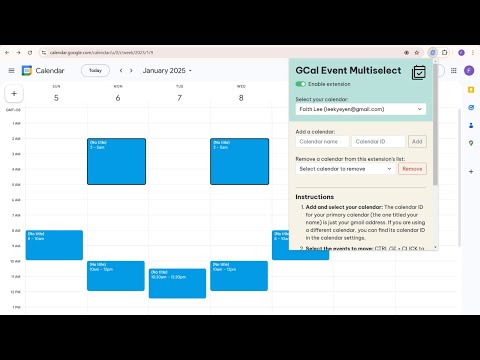
Select and bulk move/delete multiple Google Calendar events.
If you use Google Calendar for time boxing, you can use this extension to move or delete multiple events at the same time. Example use cases: • You have your whole schedule for the day planned out, but a delay happens, causing you to have to shift all the rest of the day's events backwards by the same amount of time. • You have a daily schedule of recurring events and would like to break from the schedule for a day, but dread deleting all the scheduled events one by one. How to use: 1. Add and select your calendar: The calendar ID for your primary calendar (the one titled your name) is just your gmail address. If you are using a different calendar, you can find its calendar ID in the calendar settings. 2. Select the events to move: CTRL/⌘ + CLICK to select individual (non "All day") events. If you have a block of back-to-back events you'd like to move, select the first event in the block, then SHIFT + CLICK the last event to select all the events in between as well. Note that the first time you select an event, a Google consent screen will appear for you to give the extension permission to access and edit your calendar events. 3a. Move the events: Move one of the selected events, then press CTRL/⌘ + ENTER to move the rest. 3b. Delete the events: Press CTRL/⌘ + DEL to delete all the selected events. (Please be patient, it might take a while for the selection borders and event changes to appear. ☺)
5 点満点で 2.723 件の評価
詳細
- バージョン0.0.0.3
- 更新:2026年3月16日
- 提供元Faith Lee
- サイズ373KiB
- 言語English
- デベロッパー
メール
leekyeyen@gmail.com - 非取引業者このデベロッパーは取引業者として申告していません。EU 加盟国の消費者とこのデベロッパーとの間に締結された契約には、消費者の権利が適用されません。
プライバシー

Event Multiselect for Google Calendar から、お客様のデータの収集と使用に関する以下の情報が開示されています。 詳しくは、デベロッパーの privacy policy をご確認ください。
Event Multiselect for Google Calendar は次を扱います。
このデベロッパーは、お客様のデータについて以下を宣言しています
- 承認されている以外の用途で第三者に販売しないこと
- アイテムの中心機能と関係のない目的で使用または転送しないこと
- 信用力を判断する目的または融資目的で使用または転送しないこと
サポート
質問や提案、問題がある場合は、パソコンのブラウザでこのページを開いてください