

Escriba for Google Meet™

Overview
Transcribes Google Meet calls to Markdown, with the name of each speaker. No bot joins the call and nothing leaves your computer.
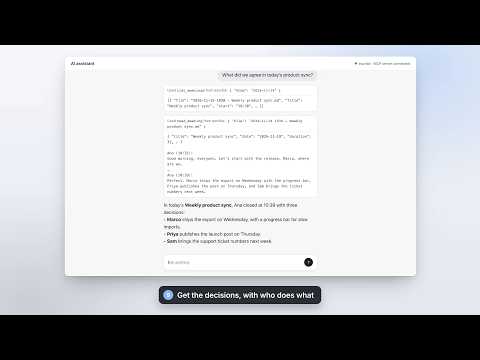
Escriba writes a Markdown transcript of your Google Meet calls, with the name of each speaker. It reads the captions Meet already generates: no bot joins the call, no audio is recorded and nothing is sent anywhere. How it works - Join a meeting. Escriba turns Meet's captions on and hides them from the screen, so the video keeps its full size. The extension icon shows REC. - Each turn is saved with the speaker's name, as Meet shows it, and the time. - When you leave the call or close the tab, the transcript is saved as a .md file in your Downloads folder (Downloads/transcripciones-meet/) and in the browser. - If the browser closes unexpectedly, the transcript is saved the next time it opens. From the extension icon - Pause and resume the transcript at any time. - See the caption language and change it in Meet. - Copy your most recent transcripts. Transcripts page - Search every saved transcript by title, person or text. - Read, copy, download again or delete them. - Settings: transcribe automatically when you join a meeting (on by default), and a warning when the caption language is not your browser's language. Language Escriba transcribes in the language Meet's captions are set to. Meet uses one language at a time and does not detect it by itself, so choose the language of the meeting in Meet's caption settings. Good to know - Only what is said after you join, and while captions are on, is captured. - The meeting chat is not saved. - If transcription stops for more than 20 seconds (for example, captions were turned off or Meet changed), the icon shows ! and a system notification appears. - You are responsible for telling the other participants that the meeting is being transcribed, and for following the laws on recording and transcription where you are. Ask your AI about your meetings (optional) A separate, open-source MCP server lets AI apps such as Claude or Cursor list, search and read the transcripts in your Downloads folder, so you can ask what was agreed in a meeting. It is not part of this extension and is installed on its own: https://github.com/AbdielOtzoy/escriba/tree/main/mcp It only reads those files on your computer; the AI app you connect it to receives what it reads. Privacy Everything stays on your computer. Escriba makes no network requests, has no analytics, ads or accounts, and loads no remote code. Transcripts kept in the browser are deleted if you remove the extension; the files in Downloads stay. Open source (MIT license): https://github.com/AbdielOtzoy/escriba Privacy policy: https://abdielotzoy.github.io/escriba/privacy Escriba is not made or endorsed by Google. Google Meet is a trademark of Google LLC. Use of this trademark is subject to Google Permissions.
0 out of 5No ratings
Details
- Version2.2.0
- UpdatedNovember 22, 2026
- Offered byabdielotzoy@gmail.com
- Size40.13KiB
- Languages2 languages
- Developerabdielo
chimaltenango San Juan Comalapa San Juan Comalapa 04004 GTEmail
abdielotzoy@gmail.com - Non-traderThis developer has not identified itself as a trader. For consumers in the European Union, please note that consumer rights do not apply to contracts between you and this developer.
Privacy

Escriba for Google Meet™ has disclosed the following information regarding the collection and usage of your data. More detailed information can be found in the developer's privacy policy.
Escriba for Google Meet™ handles the following:
This developer declares that your data is
- Not being sold to third parties, outside of the approved use cases
- Not being used or transferred for purposes that are unrelated to the item's core functionality
- Not being used or transferred to determine creditworthiness or for lending purposes
Support
For help with questions, suggestions, or problems, visit the developer's support site