

Erasio - Automate Google Flow, Gemini and Google Vids

Overview
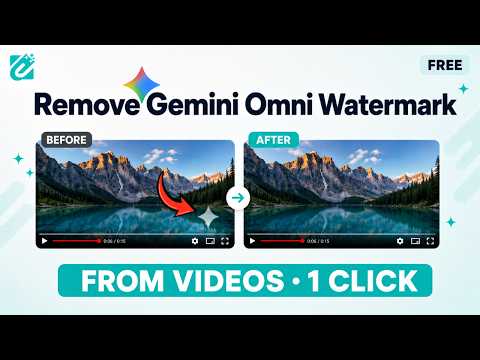
Automate Google Flow, Gemini and Google Vids: run batches of prompts, then remove the watermark from every image and video.
Remove Gemini watermarks and automate prompt batches across Google Flow, Gemini and Google Vids. Erasio is a browser extension for processing AI-generated media and automating repetitive generation tasks. It combines local watermark removal with prompt automation in one side panel. WATERMARK REMOVAL Erasio can remove the visible sparkle overlay from supported images and videos that you generated yourself. • Automatically process supported downloads • Preview the original and cleaned result before downloading • Adjust mask size, position, strength, opacity and edge blending • Process images and MP4 videos locally in your browser • Batch-process multiple files and download them together • Insert cleaned clips directly into Google Vids Supported media includes PNG, JPG and WebP images and MP4 video at 720p or 1080p. AUTOMATION Erasio can run a list of your own prompts through supported Google AI pages sequentially and save the resulting files. Flow Auto Pro Run prompt lists using multiple Flow generation modes, including text-to-video, frame-to-video, ingredients-to-video, text-to-image and image-to-image. You can import prompts from a text file or spreadsheet and optionally provide reference media. Gemini Auto Run prompts sequentially and collect the results. Text prompts can also be processed in batches and exported into a Word document. Media generation modes are supported as well. Vids Auto Generate clips from a prompt list and optionally place completed clips into your Vids document as individual scenes. Text-to-voice can also be used to turn scripts into narration. Automation features are currently in Beta. Because they interact with Google's own web interfaces, changes made by Google may occasionally require an extension update or configuration refresh. PRIVACY Media processing happens locally on your device. Your images and videos are not uploaded to Erasio or stored on Erasio servers. Automation enters your prompts directly into the supported Google pages. Prompts and generated content are not sent to Erasio. Erasio only contacts its own servers for account and credit information, export usage, and configuration information required by the extension. ACCOUNT AND CREDITS Watermark removal uses: • 1 credit per image • 3 credits per video Automation uses 1 credit per prompt. If watermark removal is also performed on the generated result, the normal media-processing credit is added. A free account includes daily usage and access to the automation features. Paid plans provide additional credits and unlock higher-volume processing. An account is required to run automated batches. If a batch reaches the available credit limit, the run stops and reports where it stopped. Completed results remain available. SETTINGS Erasio includes settings for: • Language • Automatic downloads • Notifications • Dark mode • Automatic processing • Preview behavior • Per-site enable/disable controls • Resetting settings • Guided tour • Release notes LANGUAGES English, Arabic, German, Spanish, French, Hindi, Italian, Japanese, Korean, Portuguese, Russian, Turkish, Urdu and Simplified Chinese. CURRENT LIMITS • Video input is MP4 at 720p or 1080p. • Upscaled 1080p and 4K Flow clips are not currently supported for watermark removal. • Processing time depends on video length and device performance. • Automated runs require the relevant Google page to remain open until the batch finishes. • Some automation features require the Google tab to remain in the foreground when starting a run. • Chrome's "Ask where to save each file before downloading" option should be disabled for uninterrupted automated downloads. RESPONSIBLE USE Erasio is intended for media you created or have permission to use. Do not use it to misrepresent ownership or authenticity. Erasio targets the visible sparkle overlay and is not designed to detect or remove invisible provenance signals such as SynthID. SUPPORT Documentation and support are available at erasio.io/contact Erasio is an independent tool and is not affiliated with, sponsored by, or endorsed by Google LLC. Gemini, Google AI Studio, Google Flow, Google Vids and Chrome are trademarks of Google LLC.
4.5 out of 5171 ratings
Details
- Version1.3.1
- UpdatedOctober 21, 2026
- FeaturesOffers in-app purchases
- Size884KiB
- Languages13 languages
- Developer
- Non-traderThis developer has not identified itself as a trader. For consumers in the European Union, please note that consumer rights do not apply to contracts between you and this developer.
Privacy

Erasio - Automate Google Flow, Gemini and Google Vids has disclosed the following information regarding the collection and usage of your data. More detailed information can be found in the developer's privacy policy.
Erasio - Automate Google Flow, Gemini and Google Vids handles the following:
This developer declares that your data is
- Not being sold to third parties, outside of the approved use cases
- Not being used or transferred for purposes that are unrelated to the item's core functionality
- Not being used or transferred to determine creditworthiness or for lending purposes
Support
For help with questions, suggestions, or problems, please open this page on your desktop browser