

Erasio - Automate Google Flow, Gemini and Google Vids

Overview
Automate Google Flow, Gemini and Google Vids: run batches of prompts, then remove the watermark from every image and video.
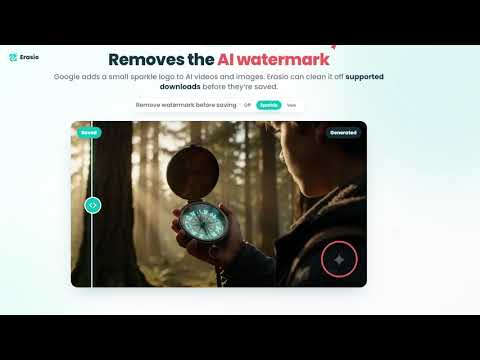
Remove Gemini and Veo watermarks and automate prompt batches across Google Flow, Gemini and Google Vids. Erasio is a browser extension for processing AI-generated media and automating repetitive generation tasks. It combines local watermark removal with prompt automation in one side panel. WATERMARK REMOVAL Erasio can remove the visible watermark overlay from supported images and videos that you generated yourself. • Automatically process supported downloads • Preview the original and cleaned result before downloading • Adjust mask size, position, strength, opacity and edge blending • Process images and MP4 videos locally in your browser • Batch-process multiple files and download them together • Insert cleaned clips directly into Google Vids Supported media includes PNG, JPG and WebP images and MP4 video at 720p or 1080p. AUTOMATION Erasio can run a list of your own prompts through supported Google AI pages sequentially and save the resulting files. Flow Auto Pro Run prompt lists using multiple Flow generation modes, including text-to-video, frame-to-video, ingredients-to-video, text-to-image and image-to-image. You can import prompts from a text file or spreadsheet, optionally provide reference media, and re-run only a selected range of prompts. Gemini Auto Run prompts sequentially and collect the results. Text prompts can also be processed in batches and exported into a Word document. Media generation modes are supported as well. Vids Auto Generate clips from a prompt list and optionally place completed clips into your Vids document as individual scenes. Text-to-voice can also be used to turn scripts into narration. Automation features are currently in Beta. Because they interact with Google's own web interfaces, changes made by Google may occasionally require an extension update or configuration refresh. OUTPUT OPTIONS You choose before a run how its results are saved: • Numbered file names, so files sort in the same order as your prompts • Save the whole batch as a single ZIP file • Merge the generated video clips into one video, in prompt order • Upload media: after a merged video is saved, Erasio can open the upload page of the sites you select (such as YouTube, TikTok and Facebook) and attach the video for you Upload media works with the accounts you are already signed in to in your own browser. Erasio does not add titles or captions and does not publish anything. You review the post and publish it yourself. While a file is being attached, Chrome shows a notice that Erasio is controlling the tab. This is expected and ends when the file is attached. PRIVACY Media processing happens locally on your device. Your images and videos are not uploaded to Erasio or stored on Erasio servers. Automation enters your prompts directly into the supported Google pages. Prompts and generated content are not sent to Erasio. Merging and ZIP creation happen locally in your browser. When Upload media is used, your video goes only to the sites you select, from your own browser and accounts. It is not sent to Erasio. Erasio only contacts its own servers for account and credit information, export usage, and configuration information required by the extension. ACCOUNT AND CREDITS Watermark removal uses: • 1 credit per image • 3 credits per video Automation uses 1 credit per prompt. If watermark removal is also performed on the generated result, the normal media-processing credit is added. Numbering, ZIP, merging and uploading do not use extra credits. A free account includes daily usage and access to the automation features. Paid plans provide additional credits and unlock higher-volume processing. An account is required to run automated batches. If a batch reaches the available credit limit, the run stops and reports where it stopped. Completed results remain available. SETTINGS Erasio includes settings for: • Language • Automatic downloads • Notifications • Dark mode • Automatic processing • Preview behavior • Per-site enable/disable controls • Resetting settings • Guided tour • Release notes LANGUAGES English, Arabic, Danish, German, Spanish, French, Hindi, Italian, Japanese, Korean, Norwegian, Portuguese, Russian, Swedish, Turkish, Urdu, Vietnamese, Simplified Chinese and Traditional Chinese. CURRENT LIMITS • Video input is MP4 at 720p or 1080p. • Upscaled 1080p and 4K Flow clips are not currently supported for watermark removal. • In Flow Auto Pro, ZIP and merging apply to 720p and 1k downloads. Higher resolutions are saved by Flow as separate files. • Merging runs prompts one at a time so the clips stay in order. • Upload media requires merging to be on and you to be signed in to each selected site. Some sites accept only one video per post or have their own length limits. • Processing time depends on video length and device performance. • Automated runs require the relevant Google page to remain open until the batch finishes. • Some automation features require the Google tab to remain in the foreground when starting a run. • Chrome's "Ask where to save each file before downloading" option should be disabled for uninterrupted automated downloads. RESPONSIBLE USE Erasio is intended for media you created or have permission to use. Do not use it to misrepresent ownership or authenticity. Erasio targets the visible watermark overlay and is not designed to detect or remove invisible provenance signals such as SynthID. SUPPORT Documentation and support are available at erasio.io/contact Erasio is an independent tool and is not affiliated with, sponsored by, or endorsed by Google LLC or any other company named here. Gemini, Veo, Google AI Studio, Google Flow, Google Vids, YouTube and Chrome are trademarks of Google LLC. Other product names are trademarks of their respective owners.
4.5 out of 5176 ratings
Details
- Version1.3.2
- UpdatedNovember 23, 2026
- FeaturesOffers in-app purchases
- Size1.27MiB
- Languages18 languages
- Developer
- Non-traderThis developer has not identified itself as a trader. For consumers in the European Union, please note that consumer rights do not apply to contracts between you and this developer.
Privacy

Erasio - Automate Google Flow, Gemini and Google Vids has disclosed the following information regarding the collection and usage of your data. More detailed information can be found in the developer's privacy policy.
Erasio - Automate Google Flow, Gemini and Google Vids handles the following:
This developer declares that your data is
- Not being sold to third parties, outside of the approved use cases
- Not being used or transferred for purposes that are unrelated to the item's core functionality
- Not being used or transferred to determine creditworthiness or for lending purposes
Support
For help with questions, suggestions, or problems, please open this page on your desktop browser