

Erasio – أداة إزالة علامة Gemini Omni المائية (الصور والفيديو)

نظرة عامة
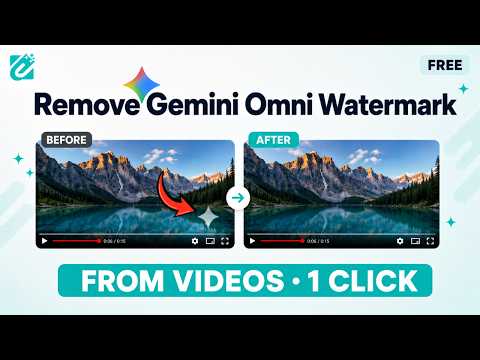
أزل علامات Gemini المائية من الصور والفيديو فورًا بدقة الذكاء الاصطناعي
Erasio removes the visible sparkle watermark from AI-generated images and videos, directly in your browser. It does one thing: clean the visible overlay off media you generated yourself, without exporting to a separate editor and without uploading your files anywhere. WHERE IT WORKS Erasio adds watermark removal to media you generate on: • Gemini • Google AI Studio • Google Flow • Google Vids You can also clean files already saved on your device — drag and drop them into the side panel, paste a screenshot from your clipboard, or pick a file. Supported input: PNG, JPG and WebP images, and MP4 video at 720p or 1080p. WHAT YOU CAN DO Clean downloads automatically When Erasio is on and you download supported media, it removes the watermark before the file is saved. Preview before you download By default Erasio shows you the cleaned result next to the original, so you can download it or open the side panel and adjust the removal first. You can switch this off to download immediately. Fine-tune any result The side panel gives you a live before/after preview and controls for mask size, position, strength, opacity and edge blending, each with an in-panel explanation of what it does. Save your settings and they are reused next time. Clean images and video Images are processed in a moment. Video runs a full local pipeline — read the clip, clean every frame, re-encode — so longer clips take longer and speed depends on your device. Batch clean (paid plans) Select several images and videos at once, remove every watermark in one pass, and download them together as a single ZIP. Insert clean clips in Google Vids On Google Vids, Erasio can remove the watermark and place the clean clip straight into your project. HOW IT WORKS Most cleanup tools inpaint — they delete the watermarked area and generate replacement pixels, so the result is invented detail. Erasio does not. Because the sparkle is a known overlay composited at a known opacity, Erasio reverses that blend mathematically to recover the pixels underneath. On a clean detection the recovered area is the original image data, not a guess. Results vary with the source. If a mark is faint or sits over busy detail, use the side panel controls to adjust the detection and mask, then re-run. PROCESSING IS LOCAL Your images and videos are processed entirely on your device, inside your browser. They are never uploaded to Erasio or to any third-party server, and they are not stored remotely. Erasio does contact erasio.io for account and credit information only: signing in, checking how many credits you have left, and recording that an export used credits. No media, and no page content, is sent with those requests. ACCOUNT AND CREDITS Erasio uses credits. Videos cost more credits than images. • Without an account you get a small daily allowance to try it. • A free Erasio account gives you your own daily credits. • Paid plans provide a larger credit balance and unlock batch multi-select. Accounts and payments are handled on erasio.io. The extension itself never takes payment; the upgrade button opens the website in a new tab. If you are signed in on erasio.io, the extension picks up that session automatically. SETTINGS • Language • Auto-download results • Show notifications • Dark mode • Automatic in-page removal on or off • Skip preview and download automatically • Enable or disable Erasio on Google Flow — useful if Flow's own watermark toggle is available to you • Reset to defaults • Replay the guided tour LANGUAGES English, Arabic, German, Spanish, French, Hindi, Italian, Japanese, Korean, Portuguese, Russian, Turkish, Urdu and Simplified Chinese, with right-to-left layout for Arabic and Urdu. CURRENT LIMITS • Video input is MP4 at 720p or 1080p. • Upscaled 1080p and 4K clips from Google Flow are not supported yet. • Video processing time scales with clip length and your device's speed. ON THE WEB Bulk processing, extra export formats and additional output options are available on the Erasio web app at erasio.io. RESPONSIBLE USE Erasio is intended for cleaning media you created and have the rights to use. Please do not use it on other people's work, or to pass AI-generated media off as something it is not. Erasio only targets the visible sparkle overlay; it is not designed to detect or remove invisible provenance signals such as SynthID. SUPPORT Guide: erasio.io/guide Privacy policy: erasio.io/privacy Report an issue: erasio.io/contact Erasio is an independent tool. It is not affiliated with, sponsored by, or endorsed by Google LLC. Gemini, Google AI Studio, Google Flow, Google Vids and Chrome are trademarks of Google LLC.
4.4 من 5159 تقييمًا
التفاصيل
- الإصدار1.2.4
- تم التحديث3 سبتمبر 2026
- الميزاتتتوفر عمليات الشراء داخل التطبيق
- الحجم721KiB
- اللغات13 لغة
- مطوّر برامج
- غير تاجرلم يعرِّف هذا المطوِّر نفسه بصفته جهة تجارية. بالنسبة إلى المستهلكين في الاتحاد الأوروبي، يُرجى العِلم أنّ حقوق المستهلك لا تسري على العقود المُبرمة بينك وبين هذا المطوِّر.
الخصوصية

تم الإفصاح من قِبل "Erasio – أداة إزالة علامة Gemini Omni المائية (الصور والفيديو)" عن المعلومات التالية المتعلّقة بجمع بياناتك واستخدامها. لمعرفة مزيد من التفاصيل، يُرجى الاطّلاع على privacy policy لدى المطوّر.
تعالج الإضافة "Erasio – أداة إزالة علامة Gemini Omni المائية (الصور والفيديو)" ما يلي:
يُقِرّ هذا المطوِّر بأنّ بياناتك:
- لا يتم بيعها لأطراف ثالثة خارج إطار حالات الاستخدام المُتفَق عليها.
- لا تُستخدَم أو تُنقَل لأغراض غير متعلِّقة بالوظيفة الرئيسية للعنصر.
- لا تُستخدَم أو تُنقَل لتحديد الأهلية الائتمانية أو لأغراض الإعارة.
دعم
للحصول على مساعدة بخصوص الاستفسارات أو الاقتراحات أو المشاكل، يُرجى فتح هذه الصفحة على متصفّحك المتوافق مع أجهزة الكمبيوتر المكتبي