

EQ Toolkit - Audio equalizer

Overview
Audio equalizer and volume booster for any tab: boost bass, tune sound, save presets, mute tabs, use shortcuts and auto-start.
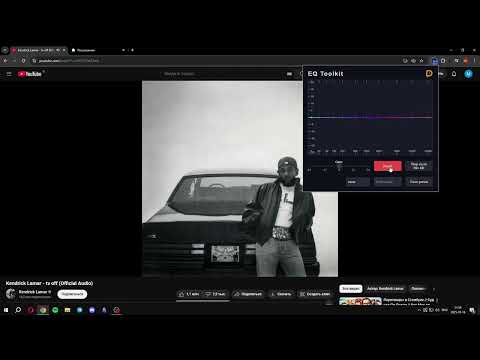
EQ Toolkit is a free, open-source audio equalizer and volume booster for Chrome. Tune sound on any tab, boost bass, adjust volume, save presets, and improve browser audio for music, videos, streams, podcasts, and calls. Use EQ Toolkit when browser audio is too quiet, bass is weak, voices are unclear, or different websites need different sound settings. The extension gives you per-tab audio control with a clean graphic equalizer and practical tools for everyday listening. Key features: - Audio equalizer for browser tabs - Volume boost and gain control from -24 dB to +24 dB - Bass boost, treble tuning, and custom frequency shaping - Adjustable EQ with 5-9 control points - Create, save, import, and export your own equalizer presets - Separate equalizer settings for different tabs - Mute or unmute tab audio - Auto-start rules for selected domains or exact URLs - Choose a preset for each auto-start rule - Control key actions from the keyboard with shortcuts. - Configurable keyboard shortcuts for mute/unmute and enable/disable EQ - Window mode for sites where regular tab audio capture is limited - Optional spectrum visualization - Dark and light themes - Localized interface with 19 supported languages EQ Toolkit works with audio and video on websites such as music players, video platforms, streaming services, online radio, podcasts, and conference calls. The extension is free and open-source. EQ Toolkit does not collect, sell, or transfer your personal data.
4.2 out of 532 ratings
Details
- Version2.4.0
- UpdatedSeptember 27, 2026
- Size610KiB
- Languages18 languages
- DeveloperWebsite
Email
me@maitrog.ru - Non-traderThis developer has not identified itself as a trader. For consumers in the European Union, please note that consumer rights do not apply to contracts between you and this developer.
Privacy

This developer declares that your data is
- Not being sold to third parties, outside of the approved use cases
- Not being used or transferred for purposes that are unrelated to the item's core functionality
- Not being used or transferred to determine creditworthiness or for lending purposes
Support
For help with questions, suggestions, or problems, visit the developer's support site