

Epoclip
2 ratings
)
Overview
Save and organize YouTube video clips seamlessly
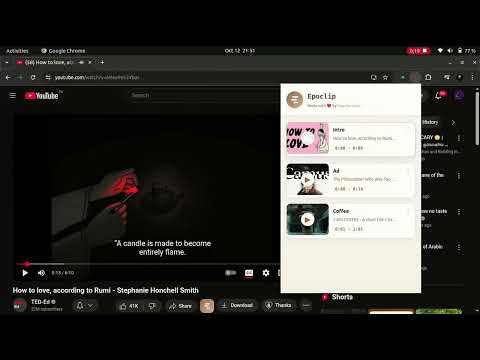
🧩 Epoclip – Save and Organize YouTube Video Clips Seamlessly Tired of rewatching entire YouTube videos just to find that one great moment? Epoclip makes it effortless to capture, save, and organize your favorite video clips from YouTube — all directly from your browser. With just one click or a simple shortcut (Ctrl + Shift + X), Epoclip lets you mark the exact part of a video you want to remember, store it with a custom title or note, and revisit it anytime. Whether you’re studying, researching, or collecting entertainment highlights, Epoclip helps you turn YouTube into your own personal video library. ✨ Key Features 🎬 Instant Clip Saving: Capture memorable moments from YouTube videos instantly without leaving the page. 🧠 Smart Organization: Add titles, notes, or tags to each saved clip for easy browsing later. ⚡ Quick Access Popup: View, and manage all your clips in one simple popup interface. 🔄 Seamless Integration: Works directly on YouTube — no extra steps, no clutter. 💾 Local Storage: Your saved clips are securely stored in your browser using Chrome’s storage system. ⌨️ Keyboard Shortcut: Use Ctrl + Shift + X to quickly save clips as you watch. 🔒 Private & Secure: Epoclip runs entirely on your device; no external servers or tracking. 🎯 Why Install Epoclip? Epoclip is designed for creators, students, researchers, and anyone who learns or gets inspired from YouTube. Instead of saving entire videos or timestamps in random notes, Epoclip helps you: Keep only what matters most — the moments that inspire or teach you. Save time by jumping straight to the key parts of videos. Build a personalized video knowledge base you can revisit anytime. 🔐 Permissions Explained Storage: Saves your clips, titles, and notes locally in Chrome. Tabs & ActiveTab: Allows Epoclip to identify and interact with your current YouTube video. Scripting: Injects lightweight scripts into YouTube to capture timestamps and clip data. Host Permissions (youtube.com): Required so Epoclip can work seamlessly across YouTube pages. 🚀 Get Started Install Epoclip from the Chrome Web Store. Open any YouTube video. Press Ctrl + Shift + X or click the Epoclip icon to save a clip. Open the popup to view or organize your saved moments. Stop scrolling through timestamps and start curating your own library of YouTube insights with Epoclip.
5 out of 52 ratings
Details
- Version1.0.0
- UpdatedMarch 18, 2026
- Offered byTeam Wadil
- Size23.31KiB
- LanguagesEnglish
- Developer
Email
teamwadil@gmail.com - Non-traderThis developer has not identified itself as a trader. For consumers in the European Union, please note that consumer rights do not apply to contracts between you and this developer.
Privacy

This developer declares that your data is
- Not being sold to third parties, outside of the approved use cases
- Not being used or transferred for purposes that are unrelated to the item's core functionality
- Not being used or transferred to determine creditworthiness or for lending purposes