

GHL Workflows JSON Exporter
15 ratings
)
Overview
Export and import GHL workflow templates with a polished JSON editor. License support: https://ghlworkflowspro.fiftydevs.com
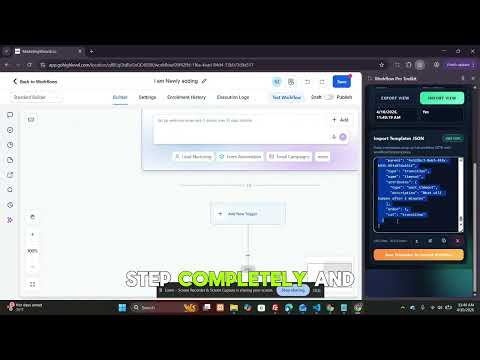
GET SUPPORT: Website: https://ghlworkflowspro.fiftydevs.com WhatsApp: +92 304 7074767 Email: 50vetstech@gmail.com Export and import GoHighLevel workflow templates as clean JSON , directly from your browser. GHL Workflows JSON Exporter gives GoHighLevel agencies and marketers a fast, reliable way to back up, migrate, and clone workflow automations without rebuilding them step by step. If you manage automations across multiple GoHighLevel sub-accounts, you already know the pain of recreating the same workflow logic for every new client. This extension solves that. Open any workflow inside GoHighLevel, export its templates as JSON in seconds, and import that same JSON into any other workflow , instantly restoring every step, trigger, and action. Why GoHighLevel Agencies Use This Extension? Manually rebuilding workflow automations is slow and error-prone, especially for multi-step sequences with custom data, webhooks, and conditional logic. GHL Workflows JSON Exporter captures the full workflow template as structured JSON, so you can back it up, version it, share it with your team, or paste it straight into a new workflow — all without touching GoHighLevel's export tools or third-party automation platforms. Key Features: - One-click export of workflow templates as clean, readable JSON - One-click import , paste or upload JSON to rebuild a workflow instantly - Secure license-based access with real-time verification - Live Workflow Context panel showing Location ID, Workflow ID, name, status, version, steps, and last updated time - Built-in JSON editor with line count and character count - Download exported JSON directly as a file, or copy to clipboard - Recent saved templates history for fast reuse across projects - Works directly inside the GoHighLevel workflow builder , no separate dashboard or tab switching Built For: - GoHighLevel agency owners managing automations across multiple sub-accounts - Marketers and consultants who template and reuse workflow logic for clients - Teams backing up critical GHL automations before making changes - Anyone migrating workflows between GoHighLevel locations or accounts How It Works - Export: 1. Open the target workflow inside GoHighLevel 2. Open the extension and switch to Export View 3. Click "Fetch export JSON" to load the current workflow's templates 4. Review the JSON, then download it as a file or copy it to your clipboard How It Works - Import: 1. Open the destination workflow inside GoHighLevel (new or existing) 2. Open the extension and switch to Import View 3. Paste your saved JSON, or upload a previously exported file 4. Click "Save Templates To Current Workflow" and confirm 5. The workflow reloads with every step, trigger, and action fully rebuilt Frequently Asked Questions: What exactly gets exported? The full workflow templates array , including triggers, actions, custom data fields, and webhook configurations , exported as structured JSON. Can I edit the JSON before importing it? Yes. The export and import views both include a JSON editor, so you can review or modify the template data before saving it to a workflow. Do I need a license to use this? Yes. Export, save, copy, and download actions require a verified license key, checked each time the panel opens. Does this work across different GoHighLevel sub-accounts? Yes. Export a workflow from one location, then import that JSON into a workflow in any other GoHighLevel location you have access to. Will this overwrite my existing workflow? Importing adds the templates from your JSON into the current workflow version. Always review the confirmation prompt before saving. Why Browser-Native Beats Manual Rebuilding: Most agencies either rebuild workflows by hand for every client or rely on GoHighLevel's limited built-in snapshot tools. GHL Workflows JSON Exporter works directly inside the page you're already on, giving you full visibility into the workflow's structure as portable, readable JSON , easy to store, version, share with developers, or drop into documentation. Install GHL Workflows JSON Exporter: If you manage GoHighLevel automations for yourself or clients, install GHL Workflows JSON Exporter and turn workflow backup, migration, and cloning into a fast, repeatable, browser-native process.
4.5 out of 515 ratings
Details
- Version1.1.8
- UpdatedOctober 7, 2026
- Offered byFiftyDevs
- Size90.86KiB
- LanguagesEnglish (United States)
- DeveloperMuhammad Sabir
Mohallah New Tariq Abad, St #6, WAPDA colony Multan 60000 PKEmail
sabirshahbzu@gmail.comPhone
+92 305 7301880 - TraderThis developer has identified itself as a trader per the definition from the European Union and committed to only offer products or services that comply with EU laws.
Privacy

GHL Workflows JSON Exporter has disclosed the following information regarding the collection and usage of your data. More detailed information can be found in the developer's privacy policy.
GHL Workflows JSON Exporter handles the following:
This developer declares that your data is
- Not being sold to third parties, outside of the approved use cases
- Not being used or transferred for purposes that are unrelated to the item's core functionality
- Not being used or transferred to determine creditworthiness or for lending purposes
Support
For help with questions, suggestions, or problems, please open this page on your desktop browser