


Overview
Built by a recruiter. See how well your resume matches the job you're viewing, then tailor it and prepare for the interview.
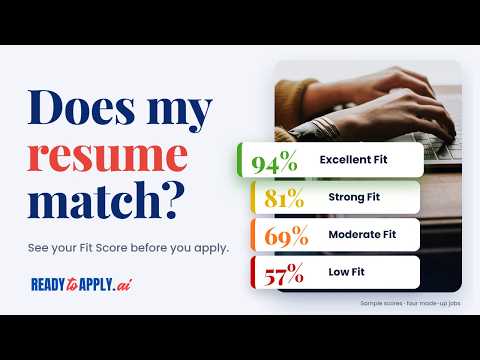
Know how well your resume matches a job before you apply, and see your application the way a recruiter sees it. BUILT BY A RECRUITER Hundreds of roles filled. Thousands of interviews. More resumes read by hand than I could count. That's my career in recruitment so far, leading end-to-end recruitment campaigns in Canada, the US, Asia, and Australia, for roles from entry level to executive, in fields as different as tech, healthcare, engineering, education, and the trades. Ready to Apply is built on what that experience taught me: what a posting is really asking for, how a resume should read, and the questions recruiters ask in interviews, with the answers they want to hear. It works in any field, including yours. Most job seekers never get to see this side of hiring. Now you can. — Jeff, the recruiter who built Ready to Apply The analyses run on AI that follows this approach, using only your resume and the job you're viewing. Nothing is made up: every point traces back to your resume or the posting. WHAT YOU GET • Fit Score: your resume against what the job actually asks for, scored the way a recruiter decides who makes the shortlist: the skills it requires, the industry experience, and the nice-to-haves that make you stand out. Every point shows its evidence, and a weak match is called a weak match, so you can decide where your time is best spent. • Tailored Resume (with a Fit Score of 60% or higher): your resume rewritten for this job, the way recruiters and hiring managers want to read it. It uses the job's language only where your experience earns it, and never invents experience you don't have. When it needs information only you can provide, it asks rather than makes assumptions. • Interview Prep (with a Fit Score of 60% or higher): the questions to expect for this role, the way a recruiter asks them in interviews, and how to answer each one from your own experience. Where your resume has no evidence for something the job asks, it tells you, so it doesn't catch you off guard in the room. Ready to Apply reads the job posting you're viewing and opens your Fit Score on readytoapply.ai with the posting already filled in. No copying, no pasting, no switching between tabs. HOW IT WORKS 1. Open a job posting and click the Ready to Apply icon. 2. Check what it found: the job title, company, location and description. 3. Click "See how well you match this job." Ready to Apply opens in a new tab with the posting in place. 4. Add your resume, agree to the terms, and get your Fit Score. 5. Scored 60% or higher? Your Fit Score comes with an action plan, and you can tailor your resume to the job (Tailored Resume) and prepare for the interview (Interview Prep). YOUR RESUME LIBRARY Save your resume once. Use it for every job. ✓ Save up to 10 named resumes and choose the best fit for each job. ✓ Paste, upload (PDF, Word, .txt), or save directly from Resume Cleanup or Tailored Resume. ✓ Resume Cleanup is always free. No job description needed. ✓ Files are checked in your browser before saving. A Ready to Apply tab briefly opens to read them. ✓ Download your resumes anytime. ✓ Fit Score starts automatically after a 5-second countdown you can cancel. Agree to the terms just once. YOUR FIT SCORES Your Fit Score history, all in one place. ✓ Keep your last 100 scores, including dates, job details, resumes used, and links to full analyses. ✓ Sort by date or score, and see how each saved resume performed. ✓ Get a heads-up when you revisit a job you've already scored. ✓ Job descriptions are saved, but posting URLs never are. ✓ Turn history off, or delete individual scores or your entire history anytime. WHAT IT COSTS The extension is free, its library and Fit Score history included. Each Fit Score, Tailored Resume or Interview Prep uses 1 credit on Ready to Apply. You get 3 free credits to start, renewed every 30 days. No card, no sign-up. More credits: readytoapply.ai/pricing YOUR PRIVACY • We read a page only when you click Ready to Apply. • We never change the page or apply for you. • We don't see your browsing history. • It takes only the job posting from the page you click on: never your profile, your messages or your other tabs. • Your saved resumes and your Fit Score history stay on this computer, in this Chrome profile. They aren't synced, and nothing leaves your browser until you run the Fit Score. • Delete any resume or score, or everything at once, from the extension's page. • The extension itself sends nothing to our servers and has no analytics. Privacy Policy: https://readytoapply.ai/privacy WORKS ON • Job boards such as LinkedIn and Indeed, and company career pages around the world • Anywhere else: select the job description, right-click, and choose "Ready to Apply: see how well you match this job." Questions or feedback: https://readytoapply.ai/contact
0 out of 5No ratings
Details
- Version1.1.0
- UpdatedNovember 3, 2026
- Size152KiB
- LanguagesEnglish (United States)
- DeveloperWebsite
Email
hello@readytoapply.ai - Non-traderThis developer has not identified itself as a trader. For consumers in the European Union, please note that consumer rights do not apply to contracts between you and this developer.
Privacy

Ready to Apply: Resume vs. Job Match has disclosed the following information regarding the collection and usage of your data. More detailed information can be found in the developer's privacy policy.
Ready to Apply: Resume vs. Job Match handles the following:
This developer declares that your data is
- Not being sold to third parties, outside of the approved use cases
- Not being used or transferred for purposes that are unrelated to the item's core functionality
- Not being used or transferred to determine creditworthiness or for lending purposes
Support
For help with questions, suggestions, or problems, visit the developer's support site