

Listing2Sheets — Export Zillow Listings to Google Sheets
1 rating
)
Overview
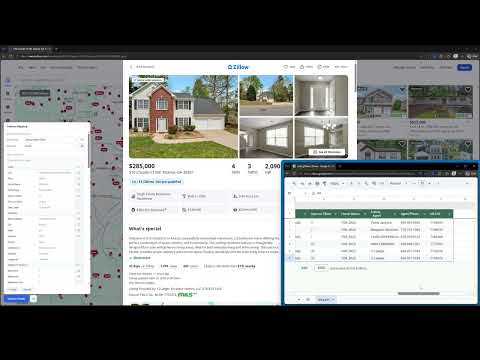
Export Zillow real estate listings directly to Google Sheets with one click
Stop copying Zillow data by hand. Listing2Sheets adds a one-click export button directly to Zillow listing pages and search results, sending property data straight into your Google Sheet — formatted exactly the way you want it. Whether you're analyzing comps, building an investment pipeline, or tracking properties for a client, Listing2Sheets removes the data entry and gets you to the analysis faster. ⚡ SINGLE LISTING EXPORT Open any Zillow property detail page and click "Send to Sheets." The full listing is appended as a new row instantly. No forms, no copy-pasting, no reformatting. You choose what data is sent and which columns it lands in. 📊 BULK EXPORT FROM SEARCH RESULTS On any Zillow search page, select the listings you want and send them all at once — an entire page of results in a single click, up to 1,000 rows per export. A bulk export counts as one export per listing selected, up to a maximum of 10 — so sending a full page of 40 listings uses 10 of your monthly exports, not 40. Ideal for building comparison tables, running market scans, or populating a CRM. 📋 WHAT DATA IS EXPORTED You choose exactly which fields to include and which spreadsheet column each one maps to. Available fields include: • Price, list status, days on market, and listing type • Full address, county, and GPS coordinates • Bedrooms, bathrooms, living area, lot size, and year built • Zestimate, rent Zestimate, tax assessed value, property tax rate, and HOA fee • Listing agent, phone number, broker, and MLS ID • Price history and annual tax history • Nearby school names, ratings, grade levels, and distances • Property features: heating, cooling, appliances, flooring, parking, roof, foundation, and more Set your column layout once and every export after that lands exactly where you need it. Saved mapping profiles — for sending different data to different sheets — are available on the Pro and Business plans. 🚀 HOW TO SET UP 1. Install the extension and create a free account at listing2sheets.com 2. Log in from the extension popup 3. Link your Google account to authorize Sheets access 4. Navigate to any Zillow listing 5. Click "Send to Sheets" — you're done 🔒 PRIVACY Listing data passes through Listing2Sheets only to write it into your sheet. It is not saved to our database, never sold, and never shared with third parties. To run your account we store your email address, your Google authorization, and which sheets you have linked. Google access uses the drive.file scope, which means Listing2Sheets can only reach the specific spreadsheets you choose — never the rest of your Drive. 💳 PLANS Free: 100 exports per month, no credit card required. Paid: higher monthly limits — see listing2sheets.com/pricing Install for free and export your first listing in under two minutes. Listing2Sheets is an independent tool. It is not affiliated with, endorsed by, or sponsored by Zillow.
5 out of 51 rating
Details
- Version1.0.7
- UpdatedSeptember 24, 2026
- FeaturesOffers in-app purchases
- Offered byListing2Sheets
- Size80.66KiB
- LanguagesEnglish
- Developer
Email
contact@listing2sheets.com - Non-traderThis developer has not identified itself as a trader. For consumers in the European Union, please note that consumer rights do not apply to contracts between you and this developer.
Privacy

Listing2Sheets — Export Zillow Listings to Google Sheets has disclosed the following information regarding the collection and usage of your data. More detailed information can be found in the developer's privacy policy.
Listing2Sheets — Export Zillow Listings to Google Sheets handles the following:
This developer declares that your data is
- Not being sold to third parties, outside of the approved use cases
- Not being used or transferred for purposes that are unrelated to the item's core functionality
- Not being used or transferred to determine creditworthiness or for lending purposes
Support
For help with questions, suggestions, or problems, visit the developer's support site