

Environment Marker

Przegląd
Use the Environment Marker extension and prevent screw-ups with the (programming) environments.
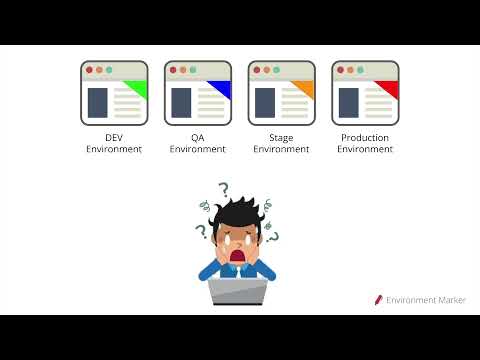
This extension helps you visually distinguish between different environments by adding a colored label to specified websites based on URL configurations. It supports regular expressions (including wildcards), a color picker, and positioning preferences. Why Use Environment Marker? In IT projects, working with multiple environments—such as development, QA, staging, and production—is common. However, since these environments often look identical, mistakes can happen. Have you ever intended to run a "quick test" in the development environment, only to realize too late that you were actually in production? Misconfigurations and accidental changes can easily occur because the only visible difference is the discreet URL in the browser's address bar. That is where Environment Marker comes in. This free and open-source Chrome extension lets you define your project’s environment URLs and assign a colored label in the browser window to identify them at a glance. No more screw-ups in the production environment! Features: ✅ Customizable labels – Choose label colors with a color picker. ✅ Regular expression support – Use regex patterns to match URLs dynamically. ✅ Flexible label positioning – Place the label in any corner: Top-right, Top-left, Bottom-right, Bottom-left or Moldure. ✅ Quick Config mode – A fast and easy setup option. ✅ Export & Import settings – Backup and restore configurations effortlessly. How to Use: - After installation, go to Chrome Settings > Extensions > Manage Extensions OR - Click the red pencil icon next to the address bar. - Open the Options menu under Environment Marker. - Configure your environments and click Save. Latest Release – v1.2.1 Important: Before updating, export your settings for backup. Go to Chrome Settings > Extensions > Manage Extensions, open the extension’s Options menu, and use the Export feature. What’s New? ✔ Minor bug fixes. ✔ Added support for ribbon transparency. Environment Marker is open-source, and contributions are welcome! GitHub: https://github.com/geovanneb/envmarker
4,8 na 559 ocen
Szczegóły
- Wersja1.2.1
- Zaktualizowano11 marca 2025
- Rozmiar160KiB
- JęzykiJęzyki: 11
- DeweloperWitryna
E-mail
geovanneb@gmail.com - Osoba niebędąca przedsiębiorcąTen deweloper nie określił, że jest przedsiębiorcą. Pamiętaj, że prawa konsumentów nie obowiązują w przypadku umów zawartych między tym deweloperem a konsumentami z Unii Europejskiej.
Prywatność

Ten wydawca oświadcza, że Twoje dane
- nie są sprzedawane osobom trzecim (z wyjątkiem uzasadnionych przypadków)
- nie są używane ani przesyłane w celach niezwiązanych z podstawową funkcją produktu,
- nie są używane ani przesyłane w celu ustalenia zdolności kredytowej lub udzielania pożyczek.
Pomoc
Jeśli masz pytania, sugestie lub problemy, otwórz tę stronę w przeglądarce na komputerze