

Envi – Environment Hub & Tools

Overview
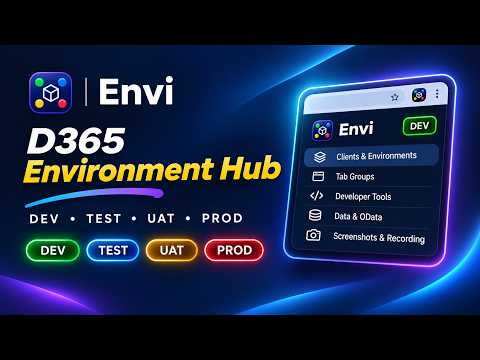
Every client. Every environment. One place. Environment markers, tab groups, alerts and tools for any web app and Dynamics 365.
Envi – Every client. Every environment. One place. Switching between DEV, TEST, UAT and PROD environments shouldn't be confusing. Envi helps developers, consultants, testers and support teams organize client environments, recognize where they're working, fix known errors faster and access their everyday tools in one click. Whether you work with Microsoft Dynamics 365 Finance & Operations, Supply Chain Management, Business Central, Microsoft CRM (Dataverse) or other web applications, Envi keeps your environments organized and easy to navigate. WHAT'S NEW IN 2.4 • Playbooks: when an error appears on the page, Pip, Envi's helper, peeks in and shows you the fix. • UAT tests: run test scripts step by step with Pass, Fail, Blocked or Skip, screenshots as evidence, and HTML, Excel or CSV reports. • Notes: a side panel notepad that tags clients, environments, screens, tables and more with @. • Modes: choose what Envi shows with the All, Developer and Consultant Modes, or create your own. • Accounts: keep several sign-in accounts per client or environment, with a one-click password manager shortcut. • A customizable Home, a capture bar that's always one click away, and the option to open the side panel from the toolbar button. • Fixes for Business Central containers on http, BC table names, page themes on CRM and screenshots in incognito windows. ENVIRONMENT AWARENESS • Automatically recognize configured environments. • Display color-coded DEV, TEST, UAT and PROD markers directly on web pages. • Choose from tea bag, milestone, corner ribbon and classic pill markers. • Add a red production warning frame to help avoid mistakes. • Configure friendly alerts for sensitive screens. CLIENT & ENVIRONMENT MANAGEMENT • Organize unlimited clients and environments, grouped by application type. • Quickly navigate between environments, with Open next to the environment picker in every section. • Open multiple related pages in colored browser tab groups, including links to other sites. • Keep the sign-in accounts you use per client or environment, with Copy and a Passwords button. Envi never stores or reads passwords. • Import environments from bookmarks, Excel or CSV. • Export configurations and sync them using your browser account. • Use Envi from the popup or the side panel, which stays open while you work. PLAYBOOKS: FIXES FOR KNOWN ERRORS • Get the fix the moment a known error appears on the page. • Follow clear steps with copy boxes for paths, values and queries. • Save a new error as a playbook in one click, and limit it to specific screens and environment types. • Rank the fixes that work with "Did this fix it?". • Start with built-in playbooks for common F&O, Business Central and CRM errors, refreshed daily. UAT TESTING • Turn recorded steps into a test script, write one, or import steps from Excel or CSV. • Run tests step by step and mark each step Pass, Fail, Blocked or Skip, with comments and screenshots. • See where each step happens: Envi highlights the button or field on the page and opens the right screen. • Add evidence automatically on failure: page messages and a screenshot. • Download a self-contained HTML report (prints to PDF), or the results as Excel or CSV. • Share test scripts with other testers as files. SCREENSHOTS & RECORDING • Capture screenshots of the visible page. • Capture full pages, including supported Dynamics 365 grids. • Annotate screenshots with arrows, highlights, text and redaction. • Record your screen and download MP4 videos, with WebM fallback where needed. • Automatically document actions with the built-in steps recorder, also while you record your screen. • Use the capture bar to take a screenshot, full page or recording from anywhere in Envi. NOTES • Jot things down while you work, and tag clients, environments, screens, tables, data entities, queries, tools, accounts, playbooks and tests with @. • Click a tag to open what it points to. • Add to-dos and tick them off from the list. • Search, filter and pin notes. • Copy a note, download it as Markdown or save it as PDF. DYNAMICS 365 DEVELOPER TOOLS • Open table browsers, forms and menu items. • Build Dynamics 365 F&O OData queries. • Inspect screen and control metadata. • Access cache utilities and runnable classes with production safeguards. • Open Business Central pages, reports, administration tools and tables by number or name. • Open Microsoft CRM tables, new records, advanced settings, Web API, users, solutions, system jobs and the plug-in trace log. • Create custom shortcuts and save frequently used tools. MODES: SEE ONLY WHAT YOU NEED • Switch between the All, Developer and Consultant Modes. • Create your own Mode with any mix of features. • Hidden features keep their data, and safety features such as markers, the production warning and alerts are always on. PERSONALIZE YOUR EXPERIENCE • Apply dark, dim, sepia or high-contrast page themes. • Customize environment markers and their positions. • Choose what Home shows: tab groups, favourites, other environments and recent items. • Save favourite environments, tools and queries. • Use the performance timer to record and compare activities. • Use keyboard shortcuts for screenshots, notes and the timer. PRIVATE BY DESIGN • No Envi account, developer-operated server, advertisements or analytics. • Configuration is stored in your browser, with optional browser sync (enabled by default). • Screenshots and recordings remain on your device until you choose to share them. • Recorded steps remain in your browser session until cleared or the session ends. • UAT test runs and notes are stored on your device only. • Playbooks are matched in your browser, and nothing is sent anywhere. • Website permissions are requested when needed for configured environments and certain capture features. Envi is an independent developer utility and is not affiliated with or endorsed by Microsoft. Privacy Policy: https://hardik-patel-t.com/envi/privacy
0 out of 5No ratings
Details
- Version2.4.0
- UpdatedNovember 10, 2026
- Offered byhardik1845patel@gmail.com
- Size910KiB
- LanguagesEnglish
- Developer
Email
hardik1718patel@gmail.com - Non-traderThis developer has not identified itself as a trader. For consumers in the European Union, please note that consumer rights do not apply to contracts between you and this developer.
Privacy

Envi – Environment Hub & Tools has disclosed the following information regarding the collection and usage of your data. More detailed information can be found in the developer's privacy policy.
Envi – Environment Hub & Tools handles the following:
This developer declares that your data is
- Not being sold to third parties, outside of the approved use cases
- Not being used or transferred for purposes that are unrelated to the item's core functionality
- Not being used or transferred to determine creditworthiness or for lending purposes
Support
For help with questions, suggestions, or problems, visit the developer's support site