

Enterprise Authentication & NetLog Inspector
3 ratings
)
Overview
Troubleshoot SAML, OAuth/OIDC, OAM/WebGate, Kerberos/WNA, NTLM, X.509, and Chromium NetLog authentication evidence.
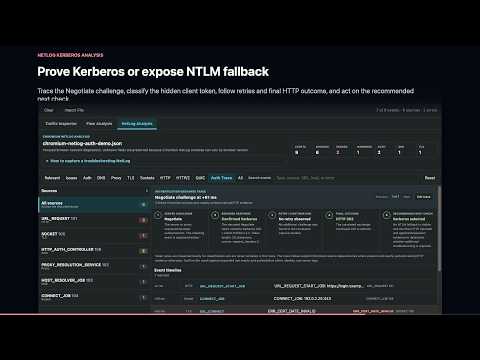
Enterprise Authentication & NetLog Inspector adds a focused authentication troubleshooting panel to Chrome DevTools. It helps identity, middleware, application, and support engineers understand what happened between the browser, WebGate, Oracle Access Manager, identity providers, service providers, authorization servers, and protected applications. ### One panel for the complete browser-visible authentication flow - Capture requests and responses from the active inspected tab. - Start or stop processing without clearing the existing trace. - Follow redirects across hosts while preserving host-specific URL colors. - Receive prioritized next actions tied to the exact browser-visible evidence when a flow fails or requires review. - See HTTP method, status meaning, duration, response size, and slow-request emphasis. - Search request and response content and filter SAML, OAM/WebGate, or static-resource traffic. - Import browser HAR files, panel JSON exports, or Chromium NetLog dumps for offline analysis. - Use a dedicated NetLog Analysis workspace to correlate sources and inspect authentication, DNS, proxy, TLS, socket, HTTP/2, and QUIC errors with raw event parameters. - Trace authentication challenge exchanges through the browser response, retries, and final HTTP outcome. When NetLog exposes client-token bytes, classify Kerberos versus NTLM fallback locally using NTLMSSP, Kerberos OID, and AP-REQ evidence without displaying the token; distinguish inconclusive, redacted, and challenge-only captures. - Trace TLS connections through endpoint setup, handshake, certificate validation, TLS/ALPN negotiation, connection reuse, QUIC fallback, and the final browser-visible outcome. - Open a contextual investigation from every NetLog finding, including DNS, proxy, socket, HTTP, HTTP/2, and QUIC failures, with linked source evidence and category-specific next actions. - Export captured sessions as JSON for repeatable troubleshooting. - Export sanitized or full-diagnostic Markdown assessment reports with evidence, prioritized next actions, timelines, correlation keys, and protocol-specific log guidance. ### Chromium NetLog authentication and connection diagnostics - Import NetLog JSON captured from `chrome://net-export` and analyze it locally in a dedicated **NetLog Analysis** workspace. - Start with categorized findings for authentication, DNS, proxy, TLS, sockets, HTTP, HTTP/2, and QUIC instead of manually searching a large raw event dump. - Follow linked Chromium sources and event timelines while retaining unknown fields as expandable raw evidence. - Open **Trace exchange** for HTTP authentication evidence to follow the server challenge, browser authorization, retries, continuation, and final HTTP outcome. - Classify browser-visible Negotiate client-token evidence as Kerberos, NTLM fallback, undetermined SPNEGO, challenge only, or redacted using NTLMSSP, Kerberos mechanism OID, and AP-REQ indicators. Reusable token values remain hidden. - Open **Trace TLS connection** to review endpoint setup, handshake events, certificate-validation evidence, TLS version, cipher, key-exchange group, ALPN negotiation, connection reuse, QUIC fallback, and the final visible outcome. - Use a contextual investigation action on every DNS, proxy, socket, HTTP, HTTP/2, QUIC, and uncategorized finding to isolate related evidence and receive category-specific next actions. - Distinguish missing or redacted browser evidence from a confirmed success or failure; the analyzer does not invent fields that the NetLog did not capture. ### Oracle OAM and WebGate - Identify OAM, WebGate, and FED traffic using URLs, headers, bodies, and cookies. - Recognize `/oam/server`, `/fed/sp`, `/fed/idp`, `obrar.cgi`, `obreq.cgi`, `obrareq.cgi`, and credential-collection endpoints. - Highlight `OAM_ID`, `OAMAuthnCookie`, `ObSSOCookie`, `ORA_OSFS_SESSION`, and related authentication artifacts. - Correlate the browser-visible OAM/WebGate flow in Flow Analysis, with expandable OAM Details for request IDs, cookie transitions, redirect loops, failures, and the final application return. - Switch between a request-focused Traffic Inspector and a full-width Flow Analysis workspace for correlated session assessment. - Flag ECID and RID values on failing requests when Oracle correlation headers are visible, with guidance to use the ECID for further OAM, WebGate, OHS, WebLogic, identity-domain, and server-log troubleshooting. ### SAML federation - Detect SAMLRequest and SAMLResponse values in URLs, forms, bodies, and redirect headers. - Decode HTTP-POST and HTTP-Redirect binding messages when browser support permits. - Format and color decoded SAML XML for faster inspection. - Summarize issuer, destination, bindings, NameID policy, conditions, audience, subject, session, attributes, status, signatures, and assertion details. - Extract embedded X.509 certificate subject, issuer, serial number, validity dates, and thumbprints. ### OAuth and OpenID Connect - Extract OAuth/OIDC parameters and Bearer tokens from URLs, fragments, headers, forms, and JSON bodies. - Decode JWT headers and claims, including issuer, subject, audience, scopes, timestamps, and token identifiers. - Highlight active, expiring, expired, and not-yet-valid token states. - Correlate OIDC authorization, callback, token, UserInfo, discovery, and JWKS traffic using state when available. - Check browser-visible state, nonce, PKCE, audience, issuer, and token lifetime signals. - Clearly distinguish decoded token content from cryptographic signature validation. ### Okta and Microsoft Entra ID - Recognize Okta and Microsoft Entra ID using confidence-based combinations of official authority domains, provider endpoints, headers, issuer metadata, cookies, and error formats. - Extract Okta organization, authorization-server ID, provider errors, and `X-Okta-Request-Id` when browser-visible. - Extract Microsoft Entra tenant information, `AADSTS` errors, trace ID, correlation ID, and provider request ID when browser-visible. - Direct troubleshooting toward the Okta System Log or Microsoft Entra sign-in logs using the captured provider correlation evidence. ### Windows Native Authentication and X.509 - Identify browser-visible `WWW-Authenticate`, `Authorization`, and `Proxy-Authenticate` challenges. - Recognize Negotiate/SPNEGO, Kerberos, and NTLM schemes. - Highlight NTLM prominently when a flow falls back from expected Kerberos/WNA behavior. - Tag `/oam/CredCollectServlet/WNA` and `/oam/CredCollectServlet/X509` requests. - Display forwarded client-certificate headers and parse certificate material when available. - Correlate the protected-resource request, WNA challenge, browser response, protocol selection, repeated 401s, final authorization, and session-cookie outcome in Flow Analysis with expandable WNA Details. ### Privacy by design All analysis runs locally inside the extension. Captured traffic, cookies, tokens, SAML messages, authentication headers, and imported HAR or Chromium NetLog data are not sent to the developer or to third parties. Users remain responsible for protecting imported and exported traces because authentication and network data can be sensitive. ### Important scope The extension analyzes traffic visible to Chrome DevTools. Server-to-server exchanges, domain-controller traffic, Kerberos ticket caches, private signing keys, and backend logs are outside that browser-visible scope. JWT and certificate information is decoded and summarized; cryptographic trust validation is not performed. Product website: https://ksudhir.github.io/oracle-sso-devtools/ Getting Started: https://ksudhir.github.io/oracle-sso-devtools/getting-started/ Documentation: https://ksudhir.github.io/oracle-sso-devtools/docs/ Support: https://github.com/ksudhir/oracle-sso-devtools/issues Open source: https://github.com/ksudhir/oracle-sso-devtools Created by Sudhir Kulkarni
5 out of 53 ratings
Details
- Version3.0.1
- UpdatedJuly 30, 2026
- Offered bysudhir.kulkarni
- Size132KiB
- LanguagesEnglish (United States)
- Developer
Email
ksudhir@gmail.com - Non-traderThis developer has not identified itself as a trader. For consumers in the European Union, please note that consumer rights do not apply to contracts between you and this developer.
Privacy

This developer declares that your data is
- Not being sold to third parties, outside of the approved use cases
- Not being used or transferred for purposes that are unrelated to the item's core functionality
- Not being used or transferred to determine creditworthiness or for lending purposes
Support
For help with questions, suggestions, or problems, visit the developer's support site