

Enhancer for Gemini
1 rating
)
Overview
Supercharge your Google Gemini experience with a prompt library, favorite responses, and quick notes.
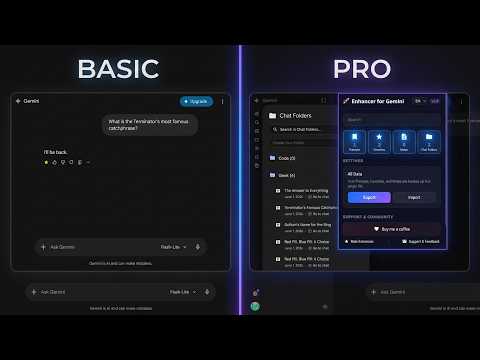
Enhance your Google Gemini workflow and boost your productivity with the ultimate companion extension! If you use Google Gemini daily for coding, writing, or research, you know how easily great prompts get lost, chats pile up, and important answers disappear into a sea of endless scrolling. "Enhancer for Gemini" is a lightweight, secure, and native-feeling extension designed to bring structure, speed, and clean organization to your AI interactions without ever disrupting your workspace. 🚀 CORE FEATURES: 📁 Smart Chat Folders Organize your chaotic chat history into neat, project-based folders. Group your conversations by topic, client, or project, and find exactly what you need in seconds. ⭐ Favorite Answers Found a flawless piece of code or a perfectly structured summary? Save individual Gemini responses to your Favorites container with a single click. Never lose a brilliant AI output again. 🔖 Personal Prompt Library Stop rewriting or copy-pasting your complex prompts from external text files. Save your most frequently used prompts directly inside the interface and inject them into the chat input field instantly. 📝 Quick Notes Inspiration strikes mid-conversation? Jot down ideas, reminders, or follow-up tasks right inside the sidebar without leaving your current Gemini chat window. 🧹 Advanced Bulk Delete Keep your workspace pristine. Effortlessly select multiple conversations at once with an intuitive checkbox-style overlay and delete them safely in bulk. 🎨 Native UI/UX Integration Designed to respect Google's Material Design system. The extension seamlessly adapts to Gemini's Dark and Light themes automatically, feeling like a built-in feature. 🔒 PRIVACY & SECURITY FIRST: • 100% Private: Your prompts, notes, and favorite answers are stored strictly on your local browser engine (Local Storage). • No External Servers: We do not track, collect, or transmit any of your personal data or chat histories. • Lightweight: Zero impact on browser performance or loading speeds. Transform Google Gemini into a highly organized, professional workstation. Download "Enhancer for Gemini" today!
5 out of 51 rating
Details
- Version1.2
- UpdatedJune 15, 2026
- Offered byberkeguvenc
- Size590KiB
- Languages2 languages
- Developer
Email
berke.guvenc@outlook.com - Non-traderThis developer has not identified itself as a trader. For consumers in the European Union, please note that consumer rights do not apply to contracts between you and this developer.
Privacy

Enhancer for Gemini has disclosed the following information regarding the collection and usage of your data. More detailed information can be found in the developer's privacy policy.
Enhancer for Gemini handles the following:
This developer declares that your data is
- Not being sold to third parties, outside of the approved use cases
- Not being used or transferred for purposes that are unrelated to the item's core functionality
- Not being used or transferred to determine creditworthiness or for lending purposes
Support
For help with questions, suggestions, or problems, please open this page on your desktop browser