


Overview
Enable copying, text selection, and right-click menus on restricted webpages.
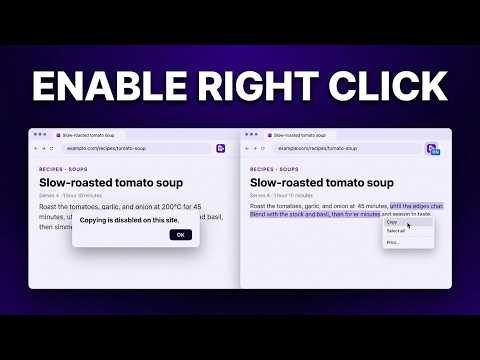
Enable copying, text selection, and right-click menus on restricted webpages. Enable Copy and Right Click is a lightweight, open-source extension that restores normal copy, text selection, and right-click behavior on webpages that restrict these actions. Click the extension icon in the toolbar or use the keyboard shortcut to enable copying and right click on the current tab. Tip: pin the extension in Chrome's Extensions menu (the puzzle-piece icon) to keep its icon on the toolbar. You can also add trusted websites to the Automatic Sites list. The extension will then enable copy and right click automatically whenever you visit those sites. KEY FEATURES • Enable copying and text selection on restricted webpages • Enable right-click context menus • Enable copy, cut, paste, text selection, and drag actions • One-click activation from the toolbar • Keyboard shortcut for quick activation • Automatic activation on user-selected sites • Works with accessible iframes where browser permissions allow • Shows an ON badge after manual activation • No popup menus • No analytics or tracking • No remote code or network requests DEFAULT KEYBOARD SHORTCUTS • Windows, Linux, ChromeOS, GooglebookOS, and Android: Alt+C • macOS: Command+Shift+Y The keyboard shortcut performs the same action as clicking the extension icon. CHANGE THE KEYBOARD SHORTCUT 1. Open the Chrome menu and select Extensions → Manage Extensions. 2. Select Keyboard shortcuts in the sidebar. 3. Find Enable Copy and Right Click and enter your preferred shortcut. AUTOMATIC SITES Open the extension options page and add a domain such as: example.com The extension will ask for permission only for the website you add. Once permission is granted, copy, text selection, and right click will be enabled automatically on that site. You can remove an automatic site at any time from the options page. OPEN THE OPTIONS PAGE 1. Right-click the extension icon in the toolbar. 2. Select Options. PRIVACY • No analytics or tracking • No data collection • No browsing history collection • No network requests • No remote code • No external JavaScript • Automatic-site preferences are stored locally in your browser • Site permissions are requested only when you explicitly add a site All copy and right-click restoration happens locally in your browser. PERFORMANCE The extension is lightweight and event-driven. It performs no continuous background work while idle. Manual activation runs only when you click the toolbar icon or use the keyboard shortcut. Automatic activation runs only on websites you have explicitly added. There is no polling, background network activity, analytics SDK, remote configuration, or persistent page-monitoring loop. OPEN SOURCE Enable Copy and Right Click is open source and licensed under the MIT License. View the source code, report issues, or contribute on GitHub: https://github.com/himanshu-mahendra-jain/web-extensions
Details
- Version1.0.3
- UpdatedOctober 30, 2026
- Offered byHimanshu Mahendra Jain
- Size73.58KiB
- Languages52 languages
- DeveloperHimanshu Mahendra Jain
D-1509/1510, Vardhman Kings Court, Gandhi Path West, Vaishali Nagar Jaipur, Rajasthan 302021 INEmail
himchi@proton.mePhone
+91 97027 18302 - TraderThis developer has identified itself as a trader per the definition from the European Union and committed to only offer products or services that comply with EU laws.
Privacy

This developer declares that your data is
- Not being sold to third parties, outside of the approved use cases
- Not being used or transferred for purposes that are unrelated to the item's core functionality
- Not being used or transferred to determine creditworthiness or for lending purposes


