

WPSniffer - WordPress Theme, Plugin & Hosting

Overview
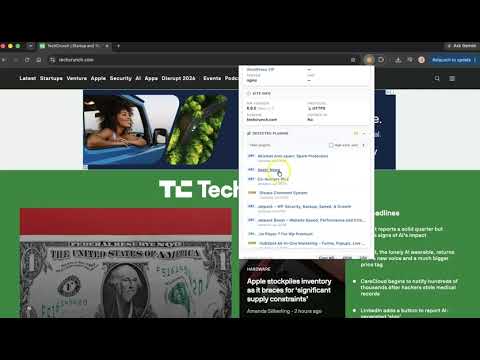
Instantly detect which WordPress theme, plugins, hosting, and page builder any site uses. One click shows you the full tech stack.
Visit any WordPress site and click the WPSniffer icon. In one click you get the full tech stack: theme, plugins, host, page builder, CDN, WordPress version, and PHP version. No account required. Nothing uploaded. Works on any public WordPress site. WHAT WPSNIFFER DETECTS WordPress Theme Detector See which theme any WordPress site is using. WPSniffer identifies 400+ themes by reading theme file paths directly, so you get an accurate result even when sites try to hide it. WordPress Plugin Checker Find out which plugins a WordPress site is running, with install counts and last-updated dates. Detects WooCommerce, Yoast SEO, Elementor Pro, and hundreds of others. Page Builder Detector See which page builder a site uses: Elementor, Divi Builder, Gutenberg, and others. Useful before quoting a project. WordPress Hosting Detector Find the hosting provider behind any WordPress site. Detects WP Engine, Kinsta, SiteGround, and others, plus CDN layers like Cloudflare. Technical Details Check the WordPress version and PHP version. Also works on Japanese hosts: Xserver, ConoHa WING, Sakura Internet, Lolipop. WHO IT'S FOR - Developers checking a site's setup before quoting a project - Designers who spot a theme they want to identify - Agencies doing competitive research on WordPress sites - WordPress consultants recommending tools to clients - Anyone who has ever asked "what theme is this website using?" ALSO INCLUDED When WPSniffer detects a theme, plugin, or host you use, it shows a direct link to the official page or current promotion. Scan history lets you revisit past results. Export reports as Markdown, JSON, or CSV.
3.7 out of 584 ratings
Details
- Version4.99
- UpdatedSeptember 30, 2026
- Size86.5KiB
- Languages2 languages
- DeveloperWebsite
Email
hello@andyforsberg.com - Non-traderThis developer has not identified itself as a trader. For consumers in the European Union, please note that consumer rights do not apply to contracts between you and this developer.
Privacy

This developer declares that your data is
- Not being sold to third parties, outside of the approved use cases
- Not being used or transferred for purposes that are unrelated to the item's core functionality
- Not being used or transferred to determine creditworthiness or for lending purposes
Support
For help with questions, suggestions, or problems, please open this page on your desktop browser