

MyQuota: AI Usage Tracker for Claude, Gemini & Codex Limits

Overview
Track AI limits across 10+ providers, with reset times where shown, remaining Codex credits and estimated Claude cost. No account.
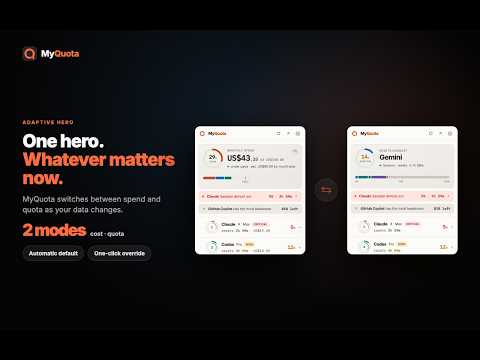
A limit should never stop work without warning. MyQuota, an AI usage tracker, puts the next AI limit and its reset time in one toolbar view; for Claude, it can also show estimated spend from priced usage. MyQuota supports 10+ AI providers; one click shows every one you use and keeps the tightest limit first. When a limit is close, quota leads; when Claude spend is available, cost can lead. Usage is parsed in your browser. There is no MyQuota account or server. Settings and each provider's latest figures may sync across your own Chrome browsers through Chrome Sync; your 90-day history stays on your device. 🎮 TRY IT BEFORE YOU INSTALL IT Run the live simulator at https://myquota.ai/#playground — pick a scenario, drag the sliders, and watch the popup and dashboard react in real time. It's fully simulated and reads nothing from your accounts. 📊 WHAT YOU GET • One toolbar glance — live quota and session meters for every AI assistant you use, sorted so the one closest to its limit is first. • Know before you're cut off — an urgency chip names the provider nearest its limit and the minutes you have left. • Reset countdowns — see exactly when each session, weekly, or monthly window refills. • Claude spend, projected — an end-of-month estimate when Claude reports priced usage. • Budget alerts — desktop notifications for configured quota thresholds and Claude spend warnings when priced usage is available. • 90-day history — per-provider trends on device, exportable to CSV or JSON in one click. • Adaptive view — cost or quota is promoted automatically as your data changes, with a one-click override when both matter. • Always visible — open the dashboard as a floating window, pin the popup into Chrome's side panel, or keep a resizable Pulse Window on supported provider pages. • Cross-device sync — settings and latest snapshots follow you across your own Chrome browsers. ⚡ WHY NOT JUST CHECK THE PROVIDER'S OWN USAGE PAGE Checking usage can mean switching among provider pages, each with its own sign-in and update schedule. MyQuota brings supported quota readings together in one popup, dashboard and optional on-page widgets. Depending on the provider, a refresh may read its usage endpoint in the background with your signed-in browser session or use data from an open provider page. Refresh availability and timing vary by provider and permissions. 🔒 WHY MYQUOTA IS THE PRIVACY-SAFE CHOICE MyQuota has no server. That is not a promise about what we do with your data — there is nowhere for it to go. Everything is parsed and stored in your own browser, so we never receive your prompts, completions, email, or usage numbers. The only things that ever leave your machine are your settings and each provider's latest usage figures, synced across your own Chrome devices through Google's standard chrome.storage.sync — the same mechanism Chrome already uses for your bookmarks. Your 90-day history stays on the device. 🚀 HOW TO USE 1. Install and pin MyQuota to your toolbar (⌘+Shift+U / Ctrl+Shift+U). 2. Enable access to the provider sites you want to monitor. Depending on the provider, MyQuota reads usage from an open provider page or refreshes its usage endpoint in the background. 3. Click the MyQuota icon to see your latest available reading; refresh timing varies by provider and permissions. 4. Click "Dashboard" to configure alerts, review 90-day history, or set a budget for Claude spend. 🤖 SUPPORTED PROVIDERS ✓ Claude — session and weekly token quotas, Max/Pro/Free plan detection, and estimated spend when priced usage is available ✓ ChatGPT — five-hour session windows, seven-day rolling limits, and remaining prepaid credit count ✓ Gemini — session usage and plan limits across multiple signed-in accounts ✓ Gemini Notebook — session and weekly limits ✓ Cursor — premium and on-demand request allocations Several further AI coding, chat and research assistants are supported as well — see the full, current list at https://myquota.ai/#playground, or screenshots. 🔑 PERMISSIONS — WHAT AND WHY • "Read and change data on [provider sites]" — MyQuota reads usage data from your existing signed-in provider session, as you browse and, for some providers, with quiet checks in the background. It never reads conversations or sends usage data to a MyQuota server. When enabled, Pulse Window renders a resizable local usage overlay on supported provider pages. • "Storage" — Saves settings and 90-day usage history locally on your device via IndexedDB. • "Alarms" — Schedules a background refresh (every 5–60 min, configurable) so quota data stays current even when the popup is closed. • "Notifications" (optional) — Desktop alerts when you cross a configured quota threshold or Claude budget. • "Context menus" — Adds a right-click shortcut to jump directly to a provider's usage page. ⚖️ TRADEMARKS & AFFILIATION MyQuota is an independent, third-party tool and is not affiliated with, endorsed by, or sponsored by any of the supported AI providers. Provider names are used solely to identify the services monitored. 💬 SUPPORT & FEEDBACK https://myquota.ai/support Version 0.6.83
5 out of 59 ratings
Details
- Versionv0.6.86
- UpdatedOctober 30, 2026
- Size553KiB
- Languages55 languages
- DeveloperWebsite
Email
myquotainfo@gmail.com - Non-traderThis developer has not identified itself as a trader. For consumers in the European Union, please note that consumer rights do not apply to contracts between you and this developer.
Privacy

This developer declares that your data is
- Not being sold to third parties, outside of the approved use cases
- Not being used or transferred for purposes that are unrelated to the item's core functionality
- Not being used or transferred to determine creditworthiness or for lending purposes
Support
For help with questions, suggestions, or problems, visit the developer's support site