


Overview
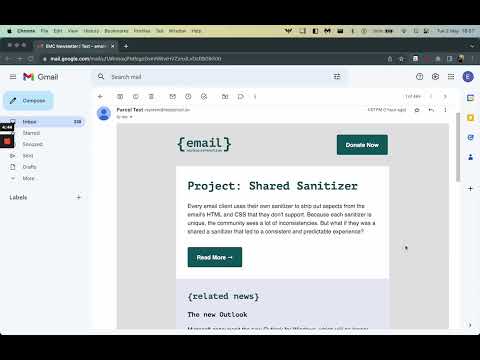
Display emails in a more readable format
Simplify Email Reading with Email Reader View Streamline your email reading experience. Email Reader View is designed to help you focus on the content that matters most, and it's compatible with popular web based email services, including: * Gmail * Yahoo Mail * AOL Mail * Outlook.com Customizable Styles for a Tailored Experience With Email Reader View, you have the power to personalize the styles of emails you receive to match your preferences. Customize various aspects of your reading experience, including: * Background Color: Set a background color to enhance readability. * Content Width: Define a maximum width for content, ensuring optimal readability. * Text Color: Choose the color of the text to suit your visual preferences. * Link Color: Customize the color of link text for easy identification. * Text Alignment: Align text as per your language and reading habits. * Font Selection: Pick from options like serif, sans-serif, monospace, or cursive. You can also use specific fonts by configuring them in your Chrome settings. * Font Size: Adjust text size to your comfort level, even beyond the provided range in Chrome settings. * Line Height: Set the spacing between lines of text for improved readability. * Word Spacing: Define the space between words for enhanced legibility. * Letter Spacing: Customize letter spacing to match your preferences. * Image Control: Choose to hide images and display alt text for an uncluttered reading experience. By removing distractions and/or altering colors and text sizes, this extension can be helpful for people who have: * Blurred Vision * Protanopia * Deuteranopia * Tritanopia * Achromatopsia * Dyslexia * ADD/ADHD Make email reading easier and more accessible for everyone with Email Reader View. Install now and tailor your email reading experience exactly as you’d like it to be.
5 out of 51 rating
Details
- Version1.0.1
- UpdatedNovember 29, 2023
- Offered byEmail Markup Consortium
- Size29.78KiB
- LanguagesEnglish (United States)
- Developer
Email
admins@emailmarkup.org - Non-traderThis developer has not identified itself as a trader. For consumers in the European Union, please note that consumer rights do not apply to contracts between you and this developer.
Privacy

This developer declares that your data is
- Not being sold to third parties, outside of the approved use cases
- Not being used or transferred for purposes that are unrelated to the item's core functionality
- Not being used or transferred to determine creditworthiness or for lending purposes
Support
For help with questions, suggestions, or problems, please open this page on your desktop browser