


Overview
Extract and collect email addresses from webpages instantly. Skips your own inbox automatically. Free and autosaving.
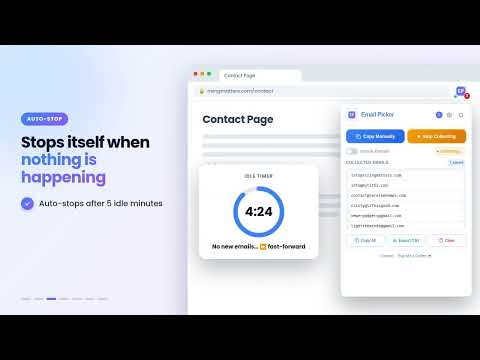
Email Picker is a powerful and free Chrome extension that helps you manually or automatically detect, collect, save, and manage email IDs from any web page you visit. Whether you are a marketer, blogger, contact for business promotion, data researcher, or just someone who needs quick access to contact details, Email Picker makes it simple, fast, and reliable. Key Features One-Click Copy: Instantly extract visible email IDs from the current page and copy them with a single click. Try the domain filter for copying emails along with the domain name. - Autosaving Mode: Keep opening or browsing webpages, and this Email Picker will automatically collect emails in the background as you move from one page to another. You can apply a domain filter for the copy email id along with the domain name.. - When an email is found on the open webpage, it is added to your list, and the icon shows how many emails have been collected so far. If a webpage doesn't have any email address, you'll see a "none" notification. - Smart Auto-Stop: Autosaving Mode looks out for itself too — it pauses automatically if it goes 5 minutes without finding a new email, and always stops after 60 minutes, so it never runs longer than it needs to. - Smart Panel: All extracted emails are displayed neatly in a panel inside the extension - no need to search through source code. - Search & Quick Edit: Search your collected list instantly, and click directly on any email or domain to correct it on the spot — no need to delete and redo it. - Unique Results: Duplicate email IDs are automatically filtered out, so you only get clean, unique lists. - Export Options: Save your collected emails to a CSV (Excel) file for later use. - Clear Data Anytime: With the built-in Clear button, you can reset your panel and start fresh whenever you like. - Highlight Active Mode: Buttons for Copy and Autosaving glow when active, so you always know what's running. - Instant Feedback: A quick beep lets you know when a page has no emails on it, and a badge flash on the toolbar icon does the same during Autosaving Mode — so you're never left guessing. - Toolbar Counter: The extension icon shows a live badge of how many emails you've collected, at a glance. - Lightweight & Fast: Email Picker runs smoothly without slowing down your browser. -Works Everywhere: Extracts from normal pages, dynamic (Ajax) sites, and even cloaked emails hidden in the page code. It can detect and copy emails from major popular services, and business or custom domain emails found on company websites. It works as a free bulk email extractor, email finder, and contact scraper. Why Choose Email Picker? Unlike heavy and expensive tools, Email Picker is a free, lightweight, and easy-to-use alternative to services like Hunter, Snov.io, or Clearbit Connect. It focuses only on what you need - finding, copying, and saving email addresses without the clutter. Privacy Note - Email Picker only extracts email addresses from pages you visit. - Your own inbox is protected by default. It skipped automatically, so your personal contacts and messages are never collected. You can turn scanning on for any specific provider from the Settings panel if you choose to. - No ads. - No spam. - No tracking beyond what's necessary to make the extension work. Perfect for: Bloggers, Recruiters, Marketers, Sales Teams, Researchers, and anyone who needs to find email addresses fast. With Email Picker, you'll never waste time searching for and copying email addresses one by one. Just keep browsing and opening webpages, and the extension will automatically find and collect emails for you using its smart automation features. It works as a free and bulk email extractor, email finder, and contact scraper tool.
5 out of 52 ratings
Details
- Version3.3
- UpdatedOctober 6, 2026
- Size37.23KiB
- LanguagesEnglish
- DeveloperWebsite
Email
newergadgets@gmail.com - Non-traderThis developer has not identified itself as a trader. For consumers in the European Union, please note that consumer rights do not apply to contracts between you and this developer.
Privacy

Email Picker has disclosed the following information regarding the collection and usage of your data. More detailed information can be found in the developer's privacy policy.
Email Picker handles the following:
This developer declares that your data is
- Not being sold to third parties, outside of the approved use cases
- Not being used or transferred for purposes that are unrelated to the item's core functionality
- Not being used or transferred to determine creditworthiness or for lending purposes
Support
For help with questions, suggestions, or problems, please open this page on your desktop browser