


Overview
Email link checker for campaigns: find broken links, missing utm, merge tags and accessibility issues before you send.
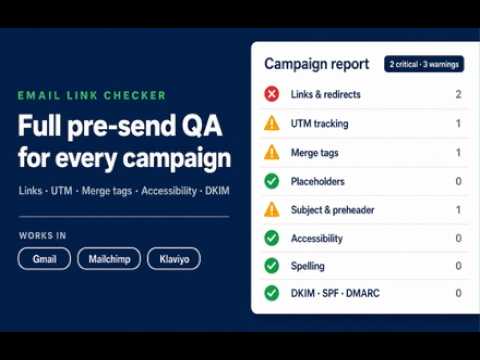
🔍 Email link checker is a pre-send qa panel for marketing campaigns. Open the message you are about to send, run one check, and read the report before it goes out. You cannot fix a link in an email that already landed. 🚀 Quick start tips 1. Install the email link checker extension by the Add to Chrome button. 2. Open your campaign in Gmail, Mailchimp or Klaviyo. 3. Click the toolbar icon and press Check campaign. 4. Read the report in the side panel and jump from any finding to the element it came from. 📊 Every finding gets one of four statuses ➤ critical: an error you have to fix before sending. ➤ warning: a risk, or a deviation from your own brand rules. ➤ passed: the rule ran on this campaign and it held. ➤ unverifiable: the preview did not contain the data, so there is no green result for that rule. Here are 🔟 reasons to use this email link checker tool 1️⃣ Broken link checker for email: 4xx, 5xx, timeouts and network failures on every destination. 2️⃣ Empty href, bare anchors, malformed encoding, http links, staging and localhost destinations. 3️⃣ The full redirect path, with the original url and the final url for each link. 4️⃣ Email utm checker rules: required utm_source, utm_medium and utm_campaign on tracked links. 5️⃣ Utm consistency across the whole campaign, plus casing, whitespace and duplicated parameters. 6️⃣ Email merge tag checker for Mailchimp, Klaviyo, Liquid, HubSpot and Salesforce style tokens. 7️⃣ Copy placeholders: lorem ipsum, TODO, example.com and whatever else survived the last edit. 8️⃣ Subject line, preheader, unsubscribe surface, call to action and Gmail clipping risk. 9️⃣ Email accessibility checker rules: alt text, accessible link names, language, heading order. 🔟 Email spell checker in English, with your own brand dictionary, so product names stay clean. 🔗 Link and destination checks ▸ The panel pulls text links, buttons and linked images out of the visible campaign. ▸ Each row shows the label, the original url, the redirect chain and the final url. ▸ It matches every destination domain against your allowlist, so a wrong domain never ships. ▸ It sorts mailto, tel and anchors into their own group, and they never count as broken links. ▸ It never opens an unsubscribe or preferences endpoint on its own. 📈 The same campaign link checker rules in every platform • Your brand rules stay yours: allowed domains, required utm values, brand terms. • The same email campaign checker logic runs in each supported editor and on the delivered message. • Every platform has its own native checks. This email campaign qa standard stays the same in all of them. • You can keep one email utm checker profile per client, and the report names the profile it used. • Every finding points at the element, the rule and the evidence behind it. 📬 Test Inbox for the delivered message 1. Ask the panel for a temporary test address. 2. Send your normal test campaign to it from your platform. 3. The panel parses the raw MIME: multipart structure, charset, CID images, attachments. 4. It checks the final tracking urls again, because platforms rewrite links on the real send. 5. It verifies DKIM cryptographically, and reports trusted SPF evidence and DMARC alignment. 6. It reports List-Unsubscribe and List-Unsubscribe-Post as found or as missing. 7. The email link checker then runs every link rule again on what actually arrived. 📱 Preview and rendering risks - Desktop and mobile previews render in a sandboxed frame. - Overflow and hidden content come from the rendered markup, not from a rendering forecast. - Basic css and html rules cover the markup patterns that usually break. - Image source, dimensions and empty linked images arrive with the element attached. 🤝 Where this newsletter link checker works today 📌 Gmail: an email link checker for the rendered test message you sent to yourself. 📌 Mailchimp: the editor and the preview, so it also works as a mailchimp link checker. 📌 Klaviyo: the editor and the preview, as a klaviyo link checker for flows and campaigns. 📌 Any other page: a selected preview mode that returns unverifiable when the data is missing. 🧰 Who runs a pre send email checker before every campaign ◆ Lifecycle and crm managers who ship the same flow to thousands of people. ◆ Email developers who need an html email checker on the exact markup they built. ◆ Accessibility owners who want an email accessibility checker during the review. ◆ Agencies that check email links before sending on behalf of a client. ◆ Founders who send the newsletter themselves and have no second pair of eyes. 🔒 What leaves your browser 🔹 Nothing runs until you start a check yourself. 🔹 Page content, html and copy stay in the browser. 🔹 Only eligible destination urls go out, and only when you check url status. 🔹 The email link checker never sends, schedules or edits your campaign, and never reads your inbox history. 🔹 Shared reports are redacted, expire in 24 hours and carry no recipient tokens. ⚖️ What this email preflight checker does not do 💡 It does not render your campaign in dozens of mail apps. 💡 It does not predict inbox placement and gives no deliverability score. 💡 It does not support Outlook Web yet. 🧐 Frequently asked questions 📌 How do I install it? 💡 Press Add to Chrome, open a campaign, and the email link checker opens in the side panel. 📌 How does the email link checker find broken links? 💡 It follows each destination through its redirect chain and reports the final status code. A failure of the checking service is reported separately from a 404 on your side. 📌 Can I use it as an email template checker inside my editor? 💡 Yes. In Mailchimp and Klaviyo the email template checker runs on the editor preview, long before anything is sent. 📌 Does it replace the native link checker of my platform? 💡 It works next to it: one email qa tool, the same rules everywhere, plus the delivered message. 📌 Does it work as an html email checker on my own markup? 💡 Yes, the html email checker rules run on the rendered preview and on the delivered message. 📌 Does the extension need my account credentials? 💡 No. There is no sign up, no login and no access to your platform account. 📌 Why do some rules say unverifiable? 💡 The preview did not contain the data. You get an explicit gap to check on the delivered message instead of a green result the panel cannot back. 📌 Can I share a report with a client? 💡 Yes. A redacted 24 hour link carries the findings without the message content. 📌 How many checks can I run? 💡 This is a public beta, every check is unlocked and there are no plan limits. 🎯 One run of the email link checker per campaign catches the broken links, the empty utm tags and the raw merge tags before your subscribers do.
0 out of 5No ratings
Details
- Version1.1.0
- UpdatedOctober 19, 2026
- Size847KiB
- Languages53 languages
- DeveloperWebsite
Email
info@learnfreecourses.com - Non-traderThis developer has not identified itself as a trader. For consumers in the European Union, please note that consumer rights do not apply to contracts between you and this developer.
Privacy

Email Link Checker: Campaign QA & UTM Check has disclosed the following information regarding the collection and usage of your data. More detailed information can be found in the developer's privacy policy.
Email Link Checker: Campaign QA & UTM Check handles the following:
This developer declares that your data is
- Not being sold to third parties, outside of the approved use cases
- Not being used or transferred for purposes that are unrelated to the item's core functionality
- Not being used or transferred to determine creditworthiness or for lending purposes
Support
For help with questions, suggestions, or problems, visit the developer's support site