


Overview
Find and extract email addresses from Google search results with ease.
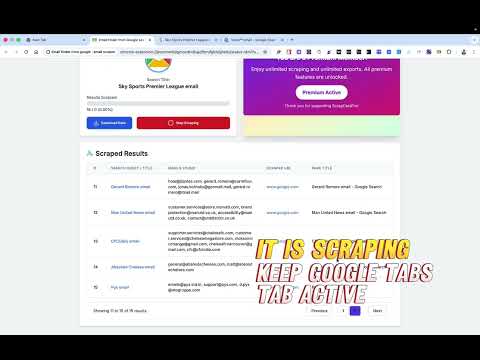
📨 Google Search Email Extractor – Scrape Bulk Emails Instantly! Extract emails directly from Google search results with ease. This Chrome extension helps you collect, organize, and export email addresses from websites listed in Google search results — no coding or setup required. ⚙️ Key Features: ✅ Bulk Email Extraction – Automatically scrape emails from multiple Google search result pages. ✅ CSV Upload – Add your own list of queries using a CSV file and let the tool run automatically. ✅ Smart Query Builder – Prepare and customize your search queries easily for precise results. ✅ Multi-Format Export – Export collected data in CSV, XLSX, or JSON formats. ✅ Fast & Lightweight – Works directly from your browser with minimal resource usage. ✅ Google sign in to get started and use this tool 🚀 Perfect For: 💼 Digital Marketers: Build targeted lead lists fast. 🏢 Agencies & Businesses: Automate email collection for outreach campaigns. 📊 Researchers & Freelancers: Collect contact data from Google search efficiently. 🔒 Privacy & Security: Your data stays on your device. The extension doesn’t store or share your search queries or results — ensuring complete privacy. 💡 How It Works: 1️⃣ upload a csv and prepare a query based on colums . 2️⃣ Click Start Scraping — the extension visits Google results and extracts emails. 3️⃣ Download all results in your preferred format (CSV, XLSX, or JSON). Start saving hours of manual work today — ✨ Install Email finder from google get leads in seconds!
0 out of 5No ratings
Details
- Version2.0
- UpdatedNovember 18, 2025
- Size1.36MiB
- LanguagesEnglish
- Developer
- Non-traderThis developer has not identified itself as a trader. For consumers in the European Union, please note that consumer rights do not apply to contracts between you and this developer.
Privacy
Email finder from google : email scraper has disclosed the following information regarding the collection and usage of your data. More detailed information can be found in the developer's privacy policy.
Email finder from google : email scraper handles the following:
This developer declares that your data is
- Not being sold to third parties, outside of the approved use cases
- Not being used or transferred for purposes that are unrelated to the item's core functionality
- Not being used or transferred to determine creditworthiness or for lending purposes
Support
For help with questions, suggestions, or problems, please open this page on your desktop browser