


Overview
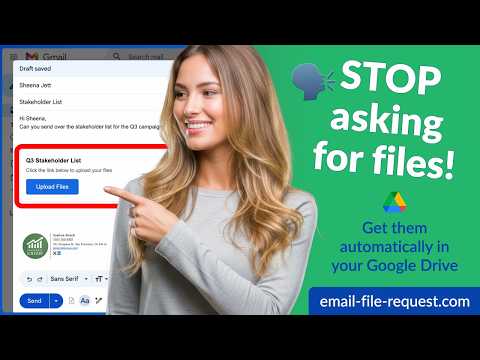
Request files from anyone and receive them directly in your Google Drive. Powered by cloudHQ.
File Request for Gmail by cloudHQ lets you request files from anyone and receive them directly in your Google Drive. It adds a simple file request feature to Gmail so you can ask clients, customers, teammates, students, or vendors to upload files without the usual back and forth. Instead of asking people to reply with attachments, you can send a file request by email with a secure upload link. Recipients can upload files to the folder you choose in Google Drive, making it easier to collect documents, photos, forms, contracts, creative assets, and other important files in one place. FEATURES ★ Request files directly from Gmail ★ Send a file request by email in just a few clicks ★ Receive uploads directly in Google Drive ★ Create a simple upload link for clients, customers, and teammates ★ Keep incoming files organized in the Drive folder you choose ★ Insert file requests into Gmail compose without leaving your inbox ★ Reuse existing file requests when needed ★ Manage your file requests from one dashboard ★ Great for document collection, client onboarding, approvals, and content gathering ★ Built for anyone who needs an easy way to request a file by email WHY USE FILE REQUEST FOR GMAIL? Email is one of the easiest ways to ask people for files, but regular attachments can be messy, hard to track, and limited by size. File Request for Gmail gives you a cleaner way to request files in email and collect everything in one place. If you have used tools like Dropbox File Request, Filemail, WeTransfer, or Jotform File Upload, this gives you a similar file request workflow directly inside Gmail, with Google Drive as the destination. This is especially useful when you need people outside your company to upload files quickly, without giving them access to your Drive. PERFECT FOR • Sales teams collecting documents from leads and clients • Account managers gathering signed forms and onboarding files • Recruiters receiving resumes, portfolios, and hiring documents • Customer support teams requesting screenshots and attachments • Designers and marketers collecting creative assets • Schools and educators receiving assignments and forms • Small businesses collecting invoices, IDs, receipts, and proofs • Anyone looking for an easy Google Drive file request tool inside Gmail USE CASES • Request files from clients by email • Collect documents in Google Drive • Ask customers to upload files without Gmail attachment limits • Send an upload link from Gmail • Organize incoming files automatically • Replace messy attachment threads with a simple file request workflow HOW IT WORKS 1. Install the extension and open Gmail 2. Click Compose to start a new email 3. Open File Request for Gmail inside the compose window 4. Create a new file request and choose a Google Drive folder 5. Insert your upload request into the email 6. Send the message to anyone 7. Receive uploaded files directly in your Google Drive COMING SOON Right now, File Request for Gmail supports Google Drive. Support for very large uploads is coming soon, making it even easier to receive large files by email when regular attachments are not enough. cloudHQ. Helping your productivity, one click at a time. Website: https://www.email-file-request.com/ Pricing: https://www.email-file-request.com/pricing Support: https://support.cloudhq.net/category/browser-extensions/email-file-request/ Blog: https://blog.cloudhq.net/ Google Workspace, Google Drive, Google Sheets, and Gmail are trademarks of Google LLC. Use of these trademarks is subject to Google Permissions. cloudHQ is a trademark of cloudHQ LLC. https://www.cloudhq.net/trademark
5 out of 59 ratings
Details
- Version1.0.0.7
- UpdatedAugust 18, 2026
- Size579KiB
- Languages11 languages
- DevelopercloudHQWebsite
2247 29th Avenue San Francisco, CA 94116 USEmail
support@cloudhq.netPhone
+1 415-509-6721 - TraderThis developer has identified itself as a trader per the definition from the European Union and committed to only offer products or services that comply with EU laws.
- D-U-N-S064785518
Privacy

Email File Request by cloudHQ has disclosed the following information regarding the collection and usage of your data. More detailed information can be found in the developer's privacy policy.
Email File Request by cloudHQ handles the following:
This developer declares that your data is
- Not being sold to third parties, outside of the approved use cases
- Not being used or transferred for purposes that are unrelated to the item's core functionality
- Not being used or transferred to determine creditworthiness or for lending purposes
Support
For help with questions, suggestions, or problems, visit the developer's support site