


Overview
Email extractor for any web page. Bulk-visit up to 1,000 URLs and auto-check contact pages when a homepage has none.
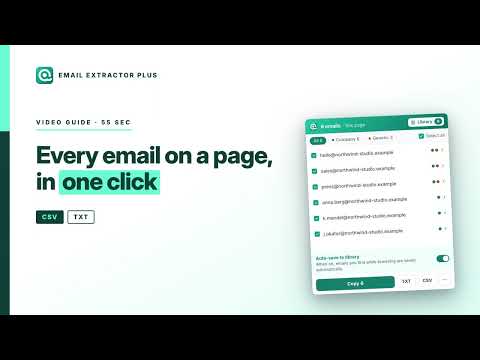
Email Extractor Plus is an email extractor for any web page. Open a site, click once, and every email address on that page is listed, tagged and ready to copy. Paste up to 1,000 URLs and it visits them for you. When a homepage shows no email, it looks inside that site's contact, about or imprint page and keeps going — so you stop losing the leads that were never on the front page. Built for sales, recruiting and agency teams who build prospect lists from directories, maps, association rosters and search results. WHAT IT DOES One-click extraction on any website Open any page and the toolbar badge already shows how many emails are on it. Click the icon to see the list, copy it, or export it. Nothing to configure, no site-specific setup. Bulk visits across a list of URLs Paste up to 1,000 addresses, or let the extension collect every link on the page you are looking at and queue them for you. It works through the list in its own window, shows live progress and the domain it is on, and you can stop or resume at any time. Close the window by accident and the queue is still there. Contact page discovery Company home pages usually do not show an email. When a page comes back empty, Email Extractor Plus looks for the site's contact, about, team or imprint page — in several languages — and scans that instead. It stays on the same domain, goes one level deep, and never wanders. This is the part most extractors skip, and it is where most business emails actually live. Every address is sorted for you Each result is labelled as a role address (info@, sales@, support@), a free provider address (Gmail, Outlook, QQ and the like), or a business address. Addresses found in mailto links are marked as such, and anything discovered on a contact page is flagged too. Filter by label before you export, so you are not cleaning a spreadsheet by hand afterwards. Nothing gets thrown away silently The top-level domain list is kept up to date, so an address at a .dev, .app or .io domain is not quietly discarded. Anything on an unfamiliar domain is kept and flagged for you to judge, never dropped without telling you. Export the way you work TXT, CSV or XLSX. The spreadsheet carries eight columns: email, source URL, starting URL, page title, company domain, when it was found, its labels, and which batch it came from. You can tell where every row came from months later. Your saved library Turn on auto-save and every address is kept in a searchable library — filter by label, by domain or by batch, remove what you do not want, export any slice of it. The library lives in your account, with a copy on this device so that searching and exporting stay instant and keep working offline. Out of the way when you want it A global on/off switch parks the extension without uninstalling it, and the toolbar icon goes grey so you can see at a glance that it is off. Ctrl+Shift+1 (Command+Shift+1 on Mac) copies every email on the current page straight to your clipboard. BUILT TO BE ACCURATE Most extractors run a regular expression over the raw HTML of a page. That is why they hand you image alt text, tracking IDs and fragments of JavaScript alongside real addresses. Email Extractor Plus reads the text of the page the way a person sees it, node by node. Markup never enters the results. It also reads the live page, which means addresses that a site renders with JavaScript are picked up — the kind that server-side tools fetching raw HTML never see. On long pages it only re-scans what actually changed, so infinite-scroll directories and social feeds stay responsive instead of freezing while you scroll. Addresses disguised with [at] and [dot], or (at) and (dot), are recognised and restored. YOUR LIBRARY AND YOUR DATA The page you are on is read inside your browser to find the addresses on it. The page itself never leaves your computer. When an address is saved to your library, that record goes to your account: the address, the page it was found on, the page title, the domain and its labels. That is what lets the library survive a reinstall and come back on another computer. A copy stays on this device, which is why search, filtering and export are instant and keep working offline. Cloud sync is on by default. How much the library can hold depends on your plan. Delete a record and it is deleted from your account as well, freeing that space again. You can switch cloud sync off in Settings: that stops any further uploading — it does not delete what was already uploaded, and it does not raise the storage limit. If you are not signed in, the library is attached to an anonymous identifier created on this device, and there is no way to reconnect it to a new installation. Signing in attaches the library to your account instead, which is what makes it recoverable. We never sell your data and never share it with third parties. The extension needs access to all sites because you decide which page to extract from — there is no way to know in advance which sites those will be. That access is used for one thing: reading the page you are on to find email addresses. FEATURES • Unlimited extraction on any page you visit • Collect every link on the current page • Bulk visits across a list of URLs • Contact page discovery, on bulk runs and on demand • Auto-save to your searchable library • Export to TXT, CSV or XLSX WHO IT IS FOR Sales and SDR teams building outbound lists from industry directories and trade show exhibitor pages. Recruiters collecting contact details from company sites and association member rosters. Agencies and freelancers gathering leads from map listings and local business directories, where every result is a company website rather than an email address. Anyone who has ever opened forty tabs, hunted for the contact page on each one, and copied addresses into a spreadsheet by hand. PLEASE USE IT RESPONSIBLY Email Extractor Plus collects addresses that are already published on public web pages. It does not break into anything, does not bypass logins, and does not touch private data. How you use those addresses is up to you, and it is subject to the law where you and your recipients are — GDPR, CAN-SPAM and their equivalents. Sending unsolicited bulk mail is illegal in many places. Please check your obligations before you send. SUPPORT Questions, problems or feature requests: https://extractor.plus/contact-us/
0 out of 5No ratings
Details
- Version8.7.1
- UpdatedSeptember 30, 2026
- Size550KiB
- Languages14 languages
- DeveloperWebsite
Email
contact@extractor.plus - Non-traderThis developer has not identified itself as a trader. For consumers in the European Union, please note that consumer rights do not apply to contracts between you and this developer.
Privacy

Email Extractor Plus — Bulk Email Scraper for Any Website has disclosed the following information regarding the collection and usage of your data. More detailed information can be found in the developer's privacy policy.
Email Extractor Plus — Bulk Email Scraper for Any Website handles the following:
This developer declares that your data is
- Not being sold to third parties, outside of the approved use cases
- Not being used or transferred for purposes that are unrelated to the item's core functionality
- Not being used or transferred to determine creditworthiness or for lending purposes
Support
For help with questions, suggestions, or problems, visit the developer's support site