

Email Extractor - Pro Email Scraper from Oimi

Visão geral
Extract emails from web pages, links, texts, social media, and wherever you want!
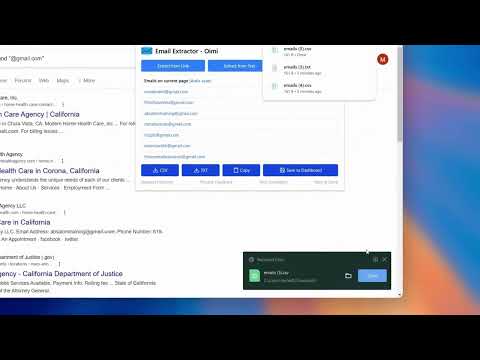
Email Extractor - Pro Email Scraper from Oimi is a powerful and user-friendly browser extension designed to simplify the process of extracting email addresses from web pages. Whether you're gathering contacts for your business, research, or networking, Oimi Email Extractor streamlines the task, saving you time and effort. Key Features That Set Email Extractor - Pro Email Scraper from Oimi Apart: 1. Auto-Scan Web Pages: Auto-scan any web page for emails. 2. CSV Export: Export collected emails in CSV format. 3. TXT Export: Export collected emails in TXT format. 4. Save to Dashboard: Save emails to dashboard and filter from there. You can also export your emails from dashboard. 5. Duplicate Filter: Cleanup duplicates and export the unique ones only. How to Use: 1. Add to Chrome: Add this extension to your Chrome browser from the Chrome Web Store. 2. Visit a Web Page: Visit your desired web page and open the extension. 3. Choose Export Format: Export extracted emails as CSV or TXT files with just a click, adapting to your workflow. 4. Save to Dashboard: Keep your email collection organized and secure by saving directly within this extension. 5. Filter Duplicates: Let this extension optimize your list by effortlessly removing duplicate entries. Privacy: Rest easy knowing that Email Extractor - Pro Email Scraper from Oimi operates locally on your device. Your data is processed with the utmost privacy and security, ensuring that your valuable information remains confidential. However, we do not store any emails collected by you. Upgrade your email discovery experience with Email Extractor - Pro Email Scraper from Oimi, where efficiency meets simplicity, and your contact lists reach new heights! Changelog: 2.2.2 - Minor bug fixes 2.2.1 - Updated the name 2.2.0 - Introduced more premium features 2.1.0 - Introduced subscription models - Introduced cloud email saving - Integrated with more tools of Oimi 2.0.2 - Fixed some minor bugs 2.0.1 - Fixed some minor bugs 2.0.0 - Added 'Auto-scan' functionality instead of manual page scanning - Added 'Extract from Links' and 'Extract from Text' options - Redesigned the whole product with new UI and theme - Integrated sign in and sign up options with Google or email and password 1.1.0 - Reduced header padding in the pop-up - Adjusted button sizes in the pop-up - Added hover effects to buttons in the pop-up - Added download indicators to "CSV" and "TXT" buttons in the pop-up - Included options for "Request New Features," "Provide Feedback," "Visit Developer," and "Rate in the Store" in the pop-up - Readjusted table width in the pop-up - Updated developer's website link 1.0.0 - Initial release
4 de 516 notas
Detalhes
- Versão2.2.2
- Atualização30 de março de 2026
- RecursosOferece compras no aplicativo
- Tamanho172KiB
- IdiomasEnglish (United States)
- Desenvolvedor
- Não negocianteEsse desenvolvedor não se identificou como comerciante. Caso você seja da União Europeia, observe que os direitos do consumidor não se aplicam a contratos firmados entre você e esse desenvolvedor.
Privacidade

Email Extractor - Pro Email Scraper from Oimi divulgou as informações a seguir sobre a coleta e o uso dos seus dados. Para mais detalhes, consulte estas informações do desenvolvedor: privacy policy.
Email Extractor - Pro Email Scraper from Oimi processa o seguinte:
O desenvolvedor declara que seus dados
- Não são vendidos a terceiros, exceto nos casos de uso aprovados
- Não são usados ou transferidos para fins não relacionados à função principal do item
- Não são usados ou transferidos para informações de crédito ou empréstimo
Suporte
Para receber ajuda com perguntas, sugestões ou problemas, abra esta página no seu navegador para computador