

Email Extractor and Saver
1 rating
)
Overview
Extracts emails from web pages, saves them immediately, and displays all saved emails
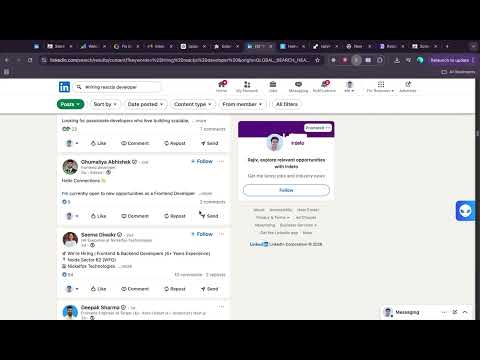
Email Extractor and Saver is a simple and efficient Chrome extension that helps you quickly find and save email addresses from any webpage you visit. 🔹 What this extension does • Scans the current webpage for visible email addresses • Instantly displays extracted emails • Saves emails locally in your browser • Lets you view and manage your saved email list • Works on any website you choose 🔹 Why install Email Extractor and Saver? ✔ Save time collecting emails manually ✔ Lightweight and fast performance ✔ No external data transmission ✔ Simple and clean interface ✔ Full user control over saved data 🔹 How it works 1. Open any webpage 2. Click the extension icon 3. Extract emails instantly 4. Save and manage them locally 🔒 Privacy First All extracted emails are stored locally using Chrome storage. No data is sent to external servers, and we do not sell or share user data. ⚠️ Note This extension only extracts publicly visible email addresses from webpages the user chooses to scan. Users are responsible for complying with applicable laws and website terms. --- If you have questions or need support, please contact: Rajiv Khanduja Email: rajivkhanduja2@gmail.com Website: https://rajivkhanduja.site LinkedIn: https://linkedin.com/in/rajiv-khanduja
5 out of 51 rating
Details
- Version1.2
- UpdatedMarch 6, 2026
- Offered byRajiv khanduja
- Size12.02KiB
- LanguagesEnglish
- DeveloperRajiv khanduja
House number 5392 jainpuri Rewari Haryana Rewari, Haryana 123401 INEmail
rajivkhanduja2@gmail.com - Non-traderThis developer has not identified itself as a trader. For consumers in the European Union, please note that consumer rights do not apply to contracts between you and this developer.
Privacy

This developer declares that your data is
- Not being sold to third parties, outside of the approved use cases
- Not being used or transferred for purposes that are unrelated to the item's core functionality
- Not being used or transferred to determine creditworthiness or for lending purposes
Support
For help with questions, suggestions, or problems, please open this page on your desktop browser