

VidScope — Tech Stack Extractor for YouTube

Overview
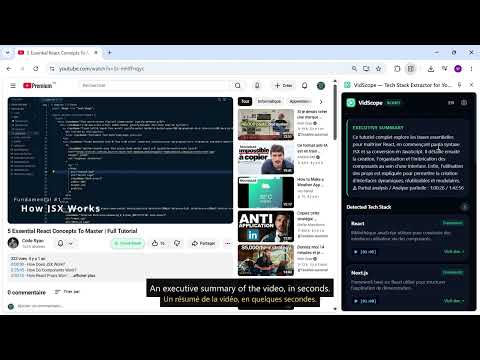
Extract every tool, framework, and library mentioned in technical YouTube videos, with verified documentation links.
Stop scrubbing through 2-hour coding tutorials just to figure out what libraries, frameworks, or database solutions the instructor used. VidScope sits quietly beside your YouTube player and extracts the complete technical stack: seconds for a short video, a few minutes for a multi-hour course. KEY FEATURES • Instant Tech Stack Extraction: Detects every framework, library, cloud provider, and tool mentioned in any technical YouTube video. • Click-to-Seek Timestamps: Click any timestamp in the side panel to instantly jump to the exact moment in the video where the tool is demonstrated. • Verified Documentation Links: Direct, verified links to official documentation so you never have to search Google for the right repository or package. • Executive Summary: A concise debrief explaining the architecture, setup, and key takeaways of the tutorial. • Scout PDF Reports: Export and download clean, professional technical summary reports in one click. • Zero Distraction Side Panel: Keeps playing the video on your main screen while displaying notes and tools on the side. HOW TO USE 1. Open any coding or tech tutorial on YouTube. 2. Click the "⚡ Scout Stack" button under the video or open the VidScope extension icon. 3. Click "Extract Tech Stack" to generate the full breakdown. 4. Click timestamps to navigate the video or export the full Scout PDF report. PRIVACY & PERMISSIONS VidScope only activates on YouTube video pages and only sends data when you click "Extract Tech Stack": the URL of that video and, if you entered one, your optional Pro license key. It does not read your browsing history, track other sites, or sell your information. Analyses are cached locally in your browser (chrome.storage) and can be removed by uninstalling the extension. Full details: https://vidscope.fr/confidentialite SUPPORT & FEEDBACK Questions or ideas? Contact us at contact@lafabriknumerique.fr or visit https://vidscope.fr.
0 out of 5No ratings
Details
- Version1.0.0
- UpdatedOctober 1, 2026
- Offered byLa Fabrik Numérique
- Size38.06KiB
- LanguagesEnglish
- DeveloperGEORGE WILLIAM
18 RUE DE L'OISEAU BLANC SAINT-LEGER-SUR-ROANNE 42155 FREmail
contact@lafabriknumerique.frPhone
+33 6 68 58 85 42 - TraderThis developer has identified itself as a trader per the definition from the European Union and committed to only offer products or services that comply with EU laws.
- D-U-N-S261536290
Privacy

VidScope — Tech Stack Extractor for YouTube has disclosed the following information regarding the collection and usage of your data. More detailed information can be found in the developer's privacy policy.
VidScope — Tech Stack Extractor for YouTube handles the following:
This developer declares that your data is
- Not being sold to third parties, outside of the approved use cases
- Not being used or transferred for purposes that are unrelated to the item's core functionality
- Not being used or transferred to determine creditworthiness or for lending purposes
Support
For help with questions, suggestions, or problems, visit the developer's support site