


Overview
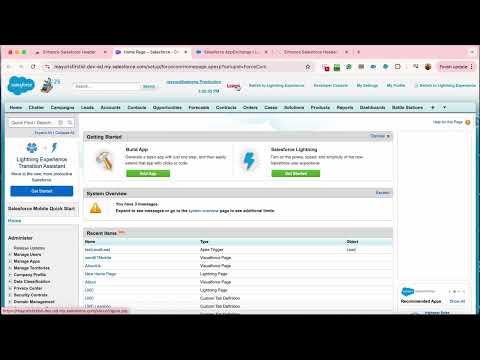
This extension displays logged in Org/User name, current time and Logout, Dev Console, My Settings and My Profile as separate links.
Would you like instant access to Developer Console, My Settings, My Profile, or a quick logout with just a single click? Tired of digging through Salesforce's dropdown every time? Enhance Salesforce Header places all your My Profile items as individual clickable links directly in the Salesforce Classic header - no extra clicks, no dropdowns. It also shows your logged-in org name (colour-coded red for Production, green for Sandbox), username, live clock, and current SF API version directly in the header - invaluable when managing multiple orgs. Version 5.2.0 Updates: - Org name colour-coded red for Production, green for Sandbox - always know which org you are in - Click org name, username, or clock to copy to clipboard instantly - Username tooltip shows your Salesforce Profile name on hover - SF API version and release name shown in the header (e.g. API 63.0 Spring '25) - Search/filter box to find header links quickly on the settings page - Export and import settings as JSON - back up or restore your config across machines - Reset to defaults button with confirmation - Dark mode for options page and quality report page - manual toggle plus auto-detects system preference - Review prompt after 10 SF Classic page visits - subtle, dismissible permanently - Fixed version display - now reads dynamically from manifest Version 5.1.0 Updates: - Loading indicator appears instantly in the header while extension fetches data - Settings changes (hide/show pills, reorder, compact mode) apply instantly to open Salesforce tabs without page reload - New toggle: Run on Setup pages - turn Off to hide the bar on Salesforce Setup pages. Applies in real time - Satrang branding tooltip on hover over the header bar - toggleable from settings - Sticky header on options and quality report pages - Pill list on options page auto-populates when you visit a Classic page - no manual refresh needed Version 5.0.1 Updates: - Settings page fully redesigned with Salesforce brand colours - no more Bootstrap dependency - All 9 AppExchange app cards added with YouTube thumbnails and direct links - Header links now shown as pill badges - hide, show, drag to reorder, or switch to compact mode (initials only) via the settings page - Fixed page freeze on load (synchronous requests replaced with async) - Fixed duplicate bar injection, clock memory leak, and eval() via setInterval - Quality Report page added - view all build and runtime checks in one place To explore all our Salesforce AppExchange apps, please visit: https://satrangtech.com/products.htm For detailed release notes, please visit: https://docs.google.com/document/d/1idtmf_1LbfmV71ImUahautJfHJn-7CqkBBofFbJJSkA/edit
4.6 out of 55 ratings
Details
- Version5.2.0
- UpdatedJune 2, 2026
- Size98.21KiB
- LanguagesEnglish
- DeveloperSatrang TechnologiesWebsite
1403-1404 Accord Classic Peru Baug, Jay Prakash Nagar, Goregaon East Mumbai, Maharashtra 400063 INEmail
chirag+chromestore@satrangtech.com - Non-traderThis developer has not identified itself as a trader. For consumers in the European Union, please note that consumer rights do not apply to contracts between you and this developer.
Privacy

This developer declares that your data is
- Not being sold to third parties, outside of the approved use cases
- Not being used or transferred for purposes that are unrelated to the item's core functionality
- Not being used or transferred to determine creditworthiness or for lending purposes
Support
For help with questions, suggestions, or problems, please open this page on your desktop browser