


Overview
Select a page section, ask in place, and complete browser actions with Harness.
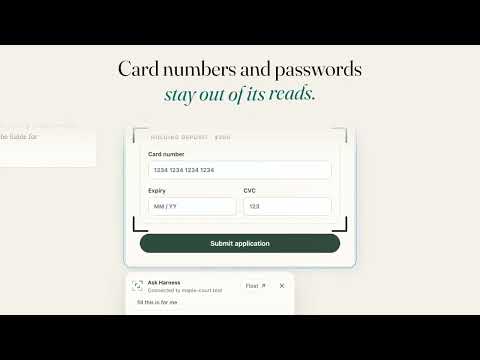
Ask about the page you're on without leaving it. Hold hotkey + click any section of a webpage to ask Harness about it: summarize it, explain it, compare it, or pull out what matters. The answer appears right on the page. Choose Float to continue the same conversation in the Harness companion window while you keep browsing. Harness can also do things in your browser when you ask: fill in forms and editors, click through pages, open and switch tabs, and download files for the task. Chrome shows its debugging banner while Harness controls a tab, and Stop ends the task at any time. Stop cannot undo something a website has already received. What it reads, and when • When you ask in the Harness companion, it uses the page you're on, on sites you have allowed. You can keep one page fixed or pause page context at any time. • It reads the page's text, links and form fields, and a screenshot if screenshots are on. Password, hidden and payment fields are left out of normal page reads. • What it reads goes through Harness to the AI model you choose, to answer you or complete your request. Harness does not sell it or use it for advertising. • Setup asks you to agree before it follows your current page or runs browser automation. Browser automation and site tools each have their own switch in the extension's settings. What you need • A Harness account, with your signed-in Harness tab open in Chrome. Model choice and any usage charges depend on your Harness plan. • Desktop Chrome 125 or later. Chrome's own pages and the Chrome Web Store can't be read or controlled, and some sites limit what automation can do. Privacy details: https://tryharness.ai/privacy
0 out of 5No ratings
Details
- Version0.5.27
- UpdatedOctober 27, 2026
- Size1.03MiB
- LanguagesEnglish
- DeveloperWebsite
Email
saltorious@tryharness.ai - Non-traderThis developer has not identified itself as a trader. For consumers in the European Union, please note that consumer rights do not apply to contracts between you and this developer.
Privacy

Harness · point & ask has disclosed the following information regarding the collection and usage of your data. More detailed information can be found in the developer's privacy policy.
Harness · point & ask handles the following:
This developer declares that your data is
- Not being sold to third parties, outside of the approved use cases
- Not being used or transferred for purposes that are unrelated to the item's core functionality
- Not being used or transferred to determine creditworthiness or for lending purposes
Support
For help with questions, suggestions, or problems, visit the developer's support site