

Strava Collage
2 ratings
)
Overview
Strava Collage - Turn Activities into Collages, GIFs & Videos
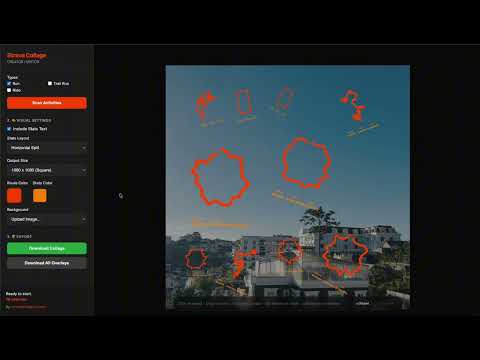
Strava Collage turns your Strava activities into polished collages, recap cards, and animated exports. Use it to combine multiple Strava routes into one visual story for a week, a month, a race block, or any set of activities you choose. It works with your existing Strava browser session, so you can scan activities directly while logged in. What you can create - Route collages from selected activities - Recap cards with total sessions, distance, and moving time - Transparent PNG overlays for editing in Canva, Photoshop, or other design tools - Animated GIF, MP4, and WebM exports with routes appearing one by one Features: - Fetch activities directly from Strava in your browser session - Filter by activity type, including Run, Ride, Trail Run, and Swim - Filter by date range and minimum distance - Arrange routes automatically, then fine-tune position, scale, and rotation by hand - Add recap overlays, free text, stats, PRs, and custom styling - Apply visual effects such as neon glow, cinematic blur, brightness, and background filters - Export in square, portrait, story, 1080p, or 4K layouts - Process everything locally in your browser for a fast, private workflow How it works 1. Log in to Strava in your browser 2. Open Strava Collage 3. Scan the activities you want to include 4. Arrange routes automatically or adjust them manually 5. Add a recap overlay or text if needed 6. Export your collage as an image or animation Good for - Weekly and monthly training recaps - Race build-up summaries - Milestone posts - Year-in-review visuals - Sharing on Instagram, X, and other social platforms Strava Collage helps you turn training data into a clean, shareable visual summary you can keep or post.
5 out of 52 ratings
Details
- Version1.12.1
- UpdatedSeptember 14, 2026
- Offered bychuongtran
- Size1.08MiB
- LanguagesEnglish
- DeveloperTran Hoang Chuong
Phường An Lạc Ehome3 Hồ Chí Minh, Thành phố Hồ Chí Minh 70000 VNEmail
chuongtrh@gmail.com - Non-traderThis developer has not identified itself as a trader. For consumers in the European Union, please note that consumer rights do not apply to contracts between you and this developer.
Privacy

This developer declares that your data is
- Not being sold to third parties, outside of the approved use cases
- Not being used or transferred for purposes that are unrelated to the item's core functionality
- Not being used or transferred to determine creditworthiness or for lending purposes