

Discord Exporter - Token Copy & Token Login

Overview
Discord chat/file/member export plus free Discord token copy and Discord token login.
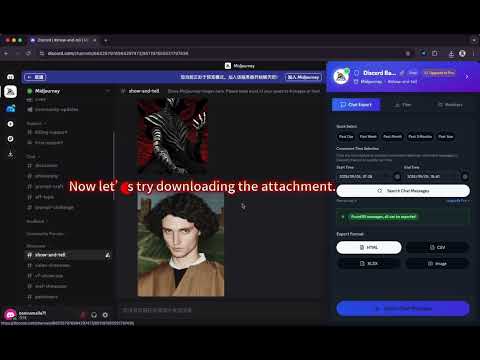
Discord Exporter is a Chrome extension built for Discord export, Discord chat export, Discord message export, Discord member export, and Discord file export. Search Discord messages, export Discord chats by date range, batch download attachments, and save Discord member lists from the servers and channels you can access. Install Discord Exporter to: • Search and preview Discord chats before export • Export Discord chats for moderation, backups, compliance, research, support, and community operations • Use a built-in Discord attachment downloader to batch save images, files, videos, and other shared media • Export Discord members in clean formats such as CSV, Excel, JSON, HTML, and image-ready outputs • Keep one practical Discord export workflow directly inside Discord Why people choose it: • Faster and cleaner than copying messages or collecting member lists by hand • Helpful for moderators, community managers, researchers, support teams, operations teams, and power users • Built for repeatable Discord export work where search speed, clearer output, and control matter If you need one reliable Discord export tool to search, export, and organize chats, attachments, and members, Discord Exporter gives you a simple way to get the job done. Free Discord token copy and Discord token login: • Discord token copy: open a logged-in Discord tab, open the extension popup, and click “Copy Discord Token”. The popup requests the separately extracted best_discord_exporter_token from the Discord content script and copies it to your clipboard. • Discord token login: open the popup, paste a Discord token into “Token Login”, and click “Login with Token”. The extension opens Discord, writes the token to localStorage in the format Discord expects, clears old session data, and redirects to /channels/@me. Quick tutorial: 1. To copy a token, keep Discord open and logged in, then click “Copy Discord Token” in the popup. 2. To login with a token, paste the token into the popup field and click “Login with Token”. 3. The token copy and token login tools are free features, alongside Discord chat export, Discord file export, and Discord member export.
3.5 out of 58 ratings
Details
- Version1.1.5
- UpdatedSeptember 18, 2026
- FeaturesOffers in-app purchases
- Size4.22MiB
- Languages55 languages
- DeveloperWebsite
Email
news@reforgeextensions.com - Non-traderThis developer has not identified itself as a trader. For consumers in the European Union, please note that consumer rights do not apply to contracts between you and this developer.
Privacy

This developer declares that your data is
- Not being sold to third parties, outside of the approved use cases
- Not being used or transferred for purposes that are unrelated to the item's core functionality
- Not being used or transferred to determine creditworthiness or for lending purposes
Support
For help with questions, suggestions, or problems, visit the developer's support site