

MultiAI: Ask AI agent anything as you browse (GPT, Gemini, Claude & 4 more)

Overview
Chat with GPT, Claude, Gemini and more in Chrome's side panel. Ask about any page, compare answers, and use one multiai.co account.
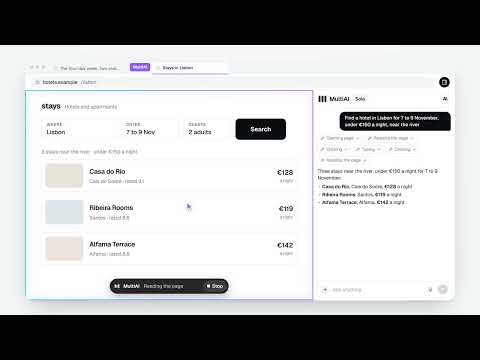
The leading AI models in one conversation, beside whatever you are reading, and able to work in your browser when you ask. MultiAI puts today's leading AI models in a Chrome side panel that runs on your multiai.co account: the same conversations, models and credit balance, live in both places. The current model lineup is at multiai.co/models. WHAT IT DOES - Ask about the page you are on. The answer arrives beside the page instead of in another tab. - Let MultiAI use your browser. Ask it to find, compare or fill something in, and it opens pages, reads them, clicks, types and scrolls in its own "MultiAI" tab group, never your other tabs. A glowing border and a Stop button show where it is working, and its own pointer shows each click. - It fills in whole forms in one go, hovers, double-clicks, drags and drops, uses sliders and maps, and uploads a file you attached to your message. - Say "this page" from the side panel and, once you allow it, MultiAI works in the tab you are on. - Start a browser task from a chat on multiai.co, and choose which of your computers does the work. - Find out why a page is broken: its console errors and, with your permission, the requests it made. - Record a task as a GIF to share. - Shortcuts: save an instruction, run it with /name, or have it run every day or week. - Speak instead of typing. Your words fill the message box; nothing is sent until you send it. - Choose the model per question with the same model picker as multiai.co: browse by category, provider or price, and set each model's thinking level on its chip. New models appear as soon as they are on multiai.co, without an update. - Models search the web and read pages when a question needs it, show each step as it runs, and list the sources they used. Watch a model think, or keep its thinking folded away. - Ask several models at once and read them side by side, or run Debate mode: every model answers and one combined answer is written, with an optional round where each model first reads the others and revises. - The + menu brings your saved prompts, skills and your team's documents into any question, and you can answer with one of your personas. - Right-click a selection to ask about it, explain it, summarize it, translate it or improve it, or switch on a button that appears whenever you select text. - Type "mai" in the address bar to ask from anywhere. Ctrl+Shift+Y opens the panel; Ctrl+Shift+U asks about the selected text, or about the whole page when nothing is selected. - Attach files and images, or paste and drop them into the message box. - Try a failed answer again, let a cut-off answer finish, or edit your question and send it again. - Search your chat history, rename a chat, download it as text, Markdown, Word or PDF, or open it on multiai.co. - It looks like multiai.co and follows your settings there: accent colour, chat font and text size, in light or dark. - Using your own API keys? Those models are marked in the picker, and their answers show a key instead of credits. - Conversations are shared with multiai.co, so anything you start here continues there, and the other way round. YOU STAY IN CONTROL - MultiAI acts on a website only when you ask it to, and asks you once on the page before it first works on a website. One yes covers ordinary sites; switch browsing off in the extension's settings to take it back. - It asks again when a task moves on to another website, and every time on mail, banking, payment, account and password-manager sites. - Buying, paying, sending, posting, deleting, signing up, uploading a file, pressing Enter to send or submit, and typing into password or card fields always wait for you to press Allow. - It never works on multiai.co itself, Chrome's own pages or the Chrome Web Store. PRIVACY - No advertising. Usage analytics help us improve MultiAI; your conversations are never part of them. The extension talks to multiai.co, and, only while you dictate, to our speech-to-text provider. - Page content is read only for a task you asked for, and is handled like any message you send. - Signing in happens on multiai.co, never inside the extension. The extension holds its own revocable credential: see every connected browser, and disconnect any of them, in Settings on multiai.co. A MultiAI account is required. New accounts get free credits. Plans are managed on multiai.co. MultiAI is an independent product. It is not affiliated with, sponsored by or endorsed by any AI model provider.
0 out of 5No ratings
Details
- Version1.7.1
- UpdatedOctober 28, 2026
- FeaturesOffers in-app purchases
- Size1.54MiB
- LanguagesEnglish
- DeveloperWebsite
Email
contact@writey.co - Non-traderThis developer has not identified itself as a trader. For consumers in the European Union, please note that consumer rights do not apply to contracts between you and this developer.
Privacy

MultiAI: Ask AI agent anything as you browse (GPT, Gemini, Claude & 4 more) has disclosed the following information regarding the collection and usage of your data. More detailed information can be found in the developer's privacy policy.
MultiAI: Ask AI agent anything as you browse (GPT, Gemini, Claude & 4 more) handles the following:
This developer declares that your data is
- Not being sold to third parties, outside of the approved use cases
- Not being used or transferred for purposes that are unrelated to the item's core functionality
- Not being used or transferred to determine creditworthiness or for lending purposes
Support
For help with questions, suggestions, or problems, visit the developer's support site