

FLOWR: Crossfade for YouTube Music
2 ratings
)
Overview
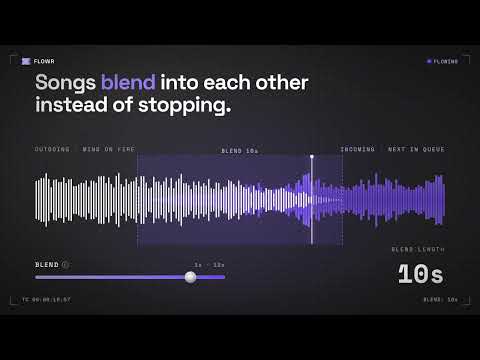
No more silence between songs. Smooth crossfades, pause fades and skip fades for YouTube Music.
No more silence between songs. YouTube Music stops one song, pauses, then starts the next. FLOWR closes that gap: the outgoing track washes out while the next one rises underneath it, like a DJ blending two records. ★ FREE TO USE · PRO FREE FOR 7 DAYS · NO CARD, NO SIGNUP HOW IT WORKS • Install, open music.youtube.com, press play. That's it, FLOWR is on by default. • Works on YouTube Music (music.youtube.com) in Chrome, Edge, Brave and other Chromium browsers. • Not for regular YouTube (youtube.com). FREE, FOREVER • Smooth fades when you pause, resume and skip • Gentle fade out and in at every song change • No ads, no account PRO (free for the first 7 days) • Gapless crossfades: no dead air between songs • Blend length from 1 to 12 seconds • Smart Outro: detects where a song really ends and skips the long fade-out • Intro trim: skips slow intros so the next song lands on time • Wash: a reverb tail that bridges the two tracks After 7 days you keep the free features. If you want the gapless crossfades, Pro is a one-time $1.99. No subscription. PRIVACY FLOWR only runs on music.youtube.com. It never reads what you listen to. It sends a few anonymous usage events (like "heard a crossfade") so I can fix what breaks, and you can switch them off in the popup. Full policy: https://flowr-dts.pages.dev/privacy Made by one person. Questions or bugs: nivenjay10@gmail.com
3 out of 52 ratings
Details
- Version1.5.2
- UpdatedOctober 26, 2026
- Offered bynivenjay10
- Size68.28KiB
- LanguagesEnglish
- Developer
Email
nivenjay10@gmail.com - Non-traderThis developer has not identified itself as a trader. For consumers in the European Union, please note that consumer rights do not apply to contracts between you and this developer.
Privacy

FLOWR: Crossfade for YouTube Music has disclosed the following information regarding the collection and usage of your data. More detailed information can be found in the developer's privacy policy.
FLOWR: Crossfade for YouTube Music handles the following:
This developer declares that your data is
- Not being sold to third parties, outside of the approved use cases
- Not being used or transferred for purposes that are unrelated to the item's core functionality
- Not being used or transferred to determine creditworthiness or for lending purposes
Support
For help with questions, suggestions, or problems, visit the developer's support site