


Overview
Manage Chrome bookmarks with 0 Tab shortcuts, smart tags, drag-to-move folders, and tab groups.
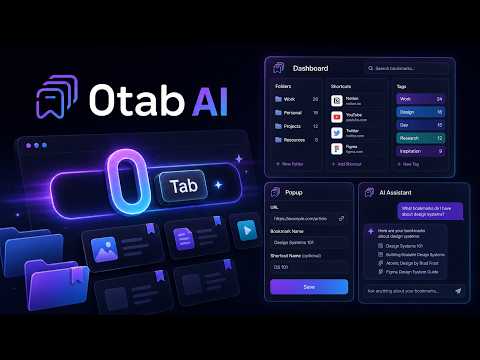
0tab AI gives each of your most-used pages a keyboard shortcut. Type 0, press Tab, type your code, press Enter. Any saved page, from anywhere in Chrome, in about two seconds. Help document: url.kavilrawat.in/0tabaihelp How to use 0tab AI. The complete guide to manage bookmarks more effectively! Most bookmark folders become a graveyard of things saved in optimism and never found again. The pages worth keeping are the ones you open every morning, and they deserve better than a dropdown. Getting started is simple. Click the 0tab icon on a page you use daily and give it a short code. Three or four letters is enough: "gh" for GitHub, "gm" for Gmail, "fig" for Figma. After a week, it's muscle memory. Folder shortcuts go further. Assign one code to a folder and it opens every bookmark inside at once, grouped in a Chrome tab group. A "standup" code could open your dashboard, Slack, and the sprint board together. A "client" code could restore their Notion, staging URL, and shared drive in one move. The dashboard opens with ⌘+Shift+0 on Mac or Ctrl+Shift+0 on Windows. It shows your full library, tracks what you actually use, and lets you clean up what you don't. Spotlight search (⌘K) reaches every shortcut, bookmark, folder, and action at once. The AI layer is optional but useful. The default engine is Gemini Nano, Chrome's on-device model: no API key, no internet, nothing leaves your device. If you prefer OpenAI, paste your key in Settings and pick your model. Either way, you get smart tags, name suggestions, hover descriptions, and semantic search that finds the half-remembered link without the exact title. The chat panel understands plain English. Ask it to find unused bookmarks, rename a shortcut, list everything tagged "design", or undo a deletion. Context carries across the conversation. 0tab also syncs two ways with Chrome's native bookmarks, so every shortcut lives in a real bookmark folder. There's a 30-day trash with one-click restore, duplicate detection, JSON import/export, and a history tool that surfaces sites you visit often but haven't saved. Everything is stored locally in Chrome: shortcuts, tags, usage history, and chat. With Gemini Nano, nothing leaves your device. With an OpenAI key, data goes to OpenAI only for the features you enable, using your own key, which never leaves your device. The only outbound request is to Google's favicon service when Chrome doesn't have an icon cached. No analytics, no tracking, no remote code. Source on GitHub: https://github.com/kavilrawat/0tab-AI
4.9 out of 58 ratings
Details
- Version6.4
- UpdatedAugust 4, 2026
- Size574KiB
- LanguagesEnglish
- DeveloperKavilWebsite
E 403 Sita Swapna Govind Nagar Mira Road Mira Road East Naya Nagar Mumbai Thane district, Maharashtra 401107 INEmail
kavilsuneilrawat@gmail.com - Non-traderThis developer has not identified itself as a trader. For consumers in the European Union, please note that consumer rights do not apply to contracts between you and this developer.
Privacy

This developer declares that your data is
- Not being sold to third parties, outside of the approved use cases
- Not being used or transferred for purposes that are unrelated to the item's core functionality
- Not being used or transferred to determine creditworthiness or for lending purposes
Support
For help with questions, suggestions, or problems, please open this page on your desktop browser