

PageChecklist – Required & Forbidden Text

Overview
Check any page against your own required and forbidden terms. Local, private and no sign-up.
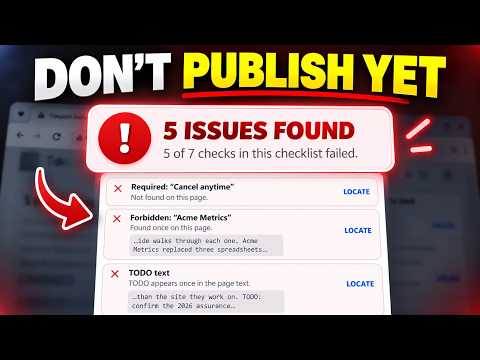
PageChecklist helps content managers, web teams, and QA reviewers check the page they are about to publish or approve. Save a checklist — required phrases, forbidden phrases, and a small set of automatic checks — then select it and click Scan page. PageChecklist answers with READY TO PUBLISH, or the number of issues found, and lists every check it ran: - Required phrases that are present, and required phrases that are missing - Forbidden phrases that were found - The number of matches for each phrase - Uppercase TODO or FIXME left in the page text - Lorem ipsum placeholder text - Links written to localhost, 127.0.0.1 or a .local host - Links whose host has a staging, stage, dev, test, uat, preview, qa or sandbox label Each automatic check can be switched on or off per checklist, every result shows the evidence it found, and clicking an issue scrolls to it on the page. Matches are highlighted in place, and Clear highlights restores the page exactly. READY TO PUBLISH means every check in the checklist you selected passed. It is not a claim that the page has been verified against anything else. Keep as many checklists as you need — one per site, per page type or per review — and switch between them in the popup. Matching is case-insensitive, supports common dash variations, and works across ordinary inline page elements. Privacy is built in: - Page content is processed only in the active tab after you click Scan page - Your checklists are stored locally in Chrome - No account or sign-up - No analytics or tracking - No network requests - No page content, URLs, or scan history are saved Known limitations: iframes and closed Shadow DOM roots are not scanned, links are checked by the address written in the page rather than by visiting them, and dynamically added text requires a new manual scan.
0 out of 5No ratings
Details
- Version1.1.0
- UpdatedAugust 31, 2026
- Offered byBrowser Product Lab
- Size39.5KiB
- LanguagesEnglish
- DeveloperMemento Software ApS
Vesterled 3 Tjæreborg 6731 DKEmail
browserproductlab@gmail.comPhone
+45 44 16 49 93 - TraderThis developer has identified itself as a trader per the definition from the European Union and committed to only offer products or services that comply with EU laws.
- D-U-N-S306293302
Privacy

PageChecklist – Required & Forbidden Text has disclosed the following information regarding the collection and usage of your data. More detailed information can be found in the developer's privacy policy.
PageChecklist – Required & Forbidden Text handles the following:
This developer declares that your data is
- Not being sold to third parties, outside of the approved use cases
- Not being used or transferred for purposes that are unrelated to the item's core functionality
- Not being used or transferred to determine creditworthiness or for lending purposes