


Overview
Drafts replies in Gmail and Outlook from your organization’s documents and past replies.
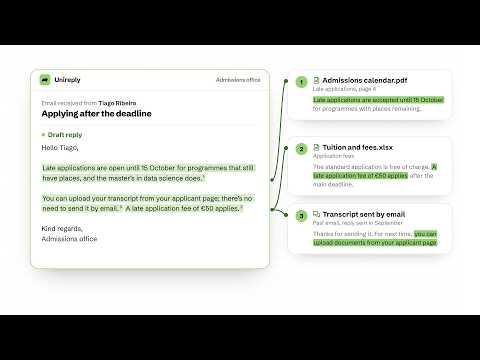
Unireply drafts replies to your emails in Gmail and Outlook on the web, from your organization’s documents and the replies your team has already sent. How it works • Open an email in Gmail or Outlook and reply to it. A Unireply button appears next to Send. • Click it. Unireply reads the whole conversation and writes a draft based on your organization’s documents (regulations, guides, FAQs) and on past emails and the replies your team sent. • The draft goes into the reply box, above your signature. Read it, change what you need and send it yourself. Ctrl+Z (⌘Z on a Mac) undoes it. • When you send a reply Unireply drafted, the text you sent is saved as an example for future replies and counted in your time saved. Unireply never sends an email. A person reads every draft and decides what is sent. In the extension’s window • Sign in with your Unireply account. • If you belong to more than one organization, choose the one replies are drafted from. • See your time saved and your place in your organization’s ranking. Who it is for Teams that answer many similar emails: academic services, town halls, customer support. You need a Unireply account in an organization. Access is granted by Unireply, not self-served; to request it, visit https://unireply.com. Personal data • The extension only runs on Gmail (mail.google.com) and Outlook on the web (outlook.live.com, outlook.office.com, outlook.office365.com, outlook.cloud.microsoft). • It sends the open conversation to Unireply when you click the Unireply button, and the text you sent when you send a reply it drafted. If it fails on the page, it sends an error report with a copy of the page so we can fix it; that copy is deleted after 30 days. • Before any processing, Unireply finds the names, email addresses, phone numbers and ID numbers in the email and replaces each one with a marker. The real values come back only in the draft you see. • Made in the European Union, designed for GDPR. Privacy policy: https://unireply.com/privacy Works in Chrome, Edge, Brave and other Chromium browsers.
0 out of 5No ratings
Details
- Version0.1.0
- UpdatedOctober 30, 2026
- Size173KiB
- Languages2 languages
- DeveloperUnruly Tomorrow, LdaWebsite
Rua de Oliveira Monteiro 316 1F Porto 4050-439 PTEmail
hello@unireply.comPhone
+351 918 829 817 - TraderThis developer has identified itself as a trader per the definition from the European Union and committed to only offer products or services that comply with EU laws.
Privacy

Unireply has disclosed the following information regarding the collection and usage of your data. More detailed information can be found in the developer's privacy policy.
Unireply handles the following:
This developer declares that your data is
- Not being sold to third parties, outside of the approved use cases
- Not being used or transferred for purposes that are unrelated to the item's core functionality
- Not being used or transferred to determine creditworthiness or for lending purposes
Support
For help with questions, suggestions, or problems, visit the developer's support site