

Kick Blocker
4 ratings
)
Overview
Block specific streamers and games on Kick.com
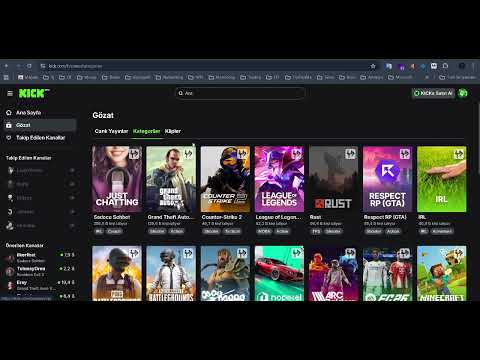
KICK BLOCKER - CHROME WEB STORE DESCRIPTION Block and hide unwanted streamers, game categories, and stream title keywords on Kick.com. Detailed Description: Kick Blocker is a lightweight and powerful browser extension that allows you to fully customize your viewing experience on Kick.com. Clean up your feed by hiding streamers you do not wish to watch, game categories you have no interest in, and specific title keywords with just a single click. Shape Kick.com exactly the way you want with advanced whole-word matching logic, multilingual support, and a user-friendly interface. KEY FEATURES: - Quick Block: Block streamers instantly without leaving the page using the quick block button located on the top-right corner of stream cards. - Streamer Blocking: Completely hide streams of unwanted creators from the homepage and listings. - Category and Game Blocking: Optimize your browse and category pages by hiding game genres that do not interest you. - Keyword Title Filtering: Filter out streams with specific words in their titles (e.g. "gambling", "subathon", "giveaway"). Powered by exact whole-word matching logic to avoid unintended filtering. - Sidebar Recommendation Hide: Blocked streamers are automatically hidden from the recommended channels list on the left sidebar. - Easy Management Panel: View and manage all your blocked streamers, games, and keywords from the extension popup, and easily unblock them whenever you want. - 12 Languages & Global Support: Full localization across 12 languages (English, Turkish, German, Russian, French, Italian, Polish, Japanese, Chinese, Portuguese, Korean, Greek) with automatic detection and a manual language switcher. - Integrated Help & Guidance: Instant access to a sleek vector SVG guide panel (`?`) and smart contextual empty-state tips for intuitive navigation. - Temporarily Enable/Disable: Pause or resume all blocking rules instantly with a single toggle switch. - Cross-Device Synchronization: Thanks to Chrome Storage Sync, your blocklist stays updated across all devices signed into your Chrome account. NEW FEATURES (v1.2.0, v1.3.0 & v1.4.0): - Keyword-Based Stream Title Blocking (v1.4.0): Granular filtering by stream title using intelligent whole-word token matching. - 12 Languages Support & Language Switcher (v1.4.0): Native interface translations across 12 major languages with dynamic font fitting. - Vector SVG Guidance Panel (v1.4.0): Built-in header help button (`?`) with clean SVG icons and contextual empty-state explanations. - Featured Streamer (Spotlight/Carousel) Blocking: Blocked streamers in the large main page carousel/spotlight section are now automatically skipped or hidden. - Data Portability (Import/Export): Backup your blocklist as a JSON file, download it to your computer, or import it to another device easily. - Copy to Clipboard: Copy your entire blocklist with a single click to share it. - Search and Filter inside Lists: Quickly find any blocked streamer, game, or keyword using the search bar within the popup. - List Sorting: Order your blocked lists alphabetically or by addition date. - Offline Game & Keyword Adding: You no longer need to have Kick.com open to add a game category or keyword to your blocklist. Add them anytime. - Bulk Clear: Clear all blocked streamers, game categories, or keywords from your list in one click. - Performance Optimizations: The updated MutationObserver and smart throttle algorithm reduce CPU usage to a minimum. Experience lag-free blocking during page navigation and infinite scrolling. PRIVACY & SECURITY: Kick Blocker does not send your data to any external servers. All blocklists are stored locally in your browser and sync securely via Chrome Storage Sync. No personal data is collected or tracked.
3.2 out of 54 ratings
Details
- Version1.4.0
- UpdatedJuly 27, 2026
- Offered byreisoglusoftware
- Size59.32KiB
- Languages12 languages
- Developer
Email
reisoglusoftware@gmail.com - Non-traderThis developer has not identified itself as a trader. For consumers in the European Union, please note that consumer rights do not apply to contracts between you and this developer.
Privacy

This developer declares that your data is
- Not being sold to third parties, outside of the approved use cases
- Not being used or transferred for purposes that are unrelated to the item's core functionality
- Not being used or transferred to determine creditworthiness or for lending purposes
Support
For help with questions, suggestions, or problems, please open this page on your desktop browser