

Epoch Buddy: Unix Timestamp & Date Converter
3 ratings
)
Overview
Instantly convert Unix/Epoch timestamps to human-readable dates and vice-versa directly in your browser. No more copy-pasting.
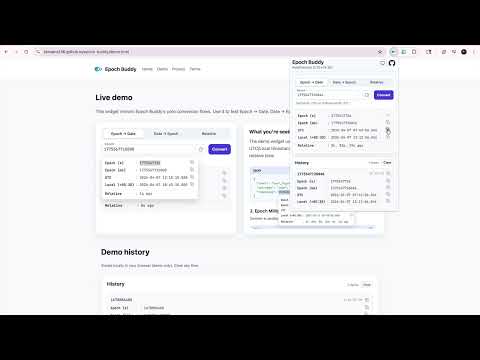
Stop copying epoch timestamps to random websites. Epoch Buddy converts Unix timestamps to human-readable dates instantly — right on any webpage or from the popup. Seconds, milliseconds, dates, relative time — all covered. Fast and private: all conversions happen locally; your inputs and results never leave your browser. WHY DEVELOPERS LOVE EPOCH BUDDY Epoch timestamps are everywhere: server logs, monitoring dashboards, API responses, database records, incident timelines, support tickets, and more. Every time you see a 10-digit or 13-digit number and wonder "what time was that?", Epoch Buddy gives you the answer in seconds — without leaving your tab and without any external site. FEATURES 1) Highlight-to-Convert on Any Webpage Select any epoch timestamp on any website and get an instant inline popup showing: - Epoch in seconds and milliseconds - One row per timezone you have configured (Local, UTC, or any IANA zone you pick in Settings — e.g. Asia/Kolkata, America/Los_Angeles) - Each row includes the UTC offset and full timestamp - Relative time (e.g. "3 hours ago" or "in 2 days") - One-click copy buttons for each value Long timezone labels wrap cleanly without breaking layout. Works on regular text, input fields, and text areas across every website. 2) Popup Converter with Three Powerful Modes Click the extension icon to open a clean, keyboard-friendly popup with three tabs. Your current timezone and UTC offset are shown in the header at a glance. A) Epoch to Date Paste or type any Unix epoch value (seconds or milliseconds). The input auto-fills with the current epoch and live-refreshes every second. Pause it by clicking in — it resumes when you clear the field. A dedicated clock button copies the current millisecond timestamp and fills the input field. Output: Epoch (s), Epoch (ms), one row per configured timezone with its UTC offset, and Relative time. B) Date to Epoch Enter a date and time using validated numeric fields (year, month, day, hour, minute, second, millisecond) with per-field error highlighting. Pick any of your configured timezones from the dropdown — not just Local and UTC. Time presets — Start of Day, End of Day, or Current Time — sit inline with the time fields for quick access. Click "Convert ISO String" to flip the form into ISO 8601 mode: paste an ISO string (e.g. 2026-03-19T12:00:00.000Z) and, when the string has no offset, pick any of your configured zones as the fallback. Click "Enter Date Manually" to flip back. Output: Epoch (ms), Epoch (s), Relative time. C) Relative to Epoch Build a timestamp relative to "now". Choose Ago or From Now, then enter any combination of Days, Hours, Minutes, Seconds, and Milliseconds. Overflow values are automatically normalized (e.g. 90 minutes becomes 1h 30m). Smart display shows only relevant units — no clutter. Output: Epoch (s), Epoch (ms), one row per configured timezone, and Relative time. 3) Conversion History Your last 10 conversions are saved locally with quick copy buttons. Each entry expands to show per-timezone rows for every zone you have configured. View them anytime in the History section. Clear all history with one click. Nothing is sent to any server — everything stays in your browser. 4) Timezone Settings Open the gear icon in the header to manage your timezones. Add any IANA zone (e.g. Europe/London, Asia/Tokyo, America/New_York), remove ones you do not need, and drag-and-drop to reorder them. Your configured list drives every output surface: the on-page popup, all three converter tabs, the history entries, and the ISO fallback-timezone dropdown — so your preferred zones always show up in your preferred order. 5) Dark Mode Full dark mode support that follows your system preference, or set it manually to Light, Dark, or System. The same polished, segmented theme picker is available both in the header menu and in the Settings page. Applied across the popup and the on-page conversion tooltip. 6) One-Click Copy Every converted value comes with a copy button. Hover over any result row in the on-page popup or click the copy icon in the extension popup. Copies to clipboard instantly. PRIVACY & PERFORMANCE - All conversions run locally — no conversion inputs or results are sent anywhere - Works fully offline: the converter itself never needs the network - No accounts, no sign-ups, no logins - Anonymous usage analytics (event counts only — no page content, no personal data, no conversion values) help us understand which features are used. You can disable analytics any time from the Settings screen. Details in the privacy policy. - Lightweight and blazing fast - Open source: https://github.com/ShivamS136/epoch-buddy SUPPORTED INPUTS - Unix epoch in seconds (10 digits, e.g. 1714000000) - Unix epoch in milliseconds (13 digits, e.g. 1714000000000) - Commas and underscores allowed (e.g. 1,714,000,000 or 1_714_000_000) - ISO 8601 strings (e.g. 2026-03-19T12:00:00.000Z) in Date → Epoch ISO mode PERFECT FOR - Backend & frontend developers debugging timestamps - DevOps & SRE teams during incident response - Log analysis in observability and monitoring tools - API development and testing - QA engineers validating timestamp fields - Database administrators inspecting epoch columns - Anyone tired of Googling "epoch to date converter" WHAT'S NEW IN v1.8.0 - First-time welcome tab: when you install Epoch Buddy — or update from an older version — a single welcome page opens once with a quick guided tour of what lives inside the toolbar menu (Epoch ↔ Date, Relative, ISO mode, history, multi-timezone) and browser-specific instructions for pinning the icon so it's always one click away. Shown only on the first install/update; never again on later updates. WHAT'S NEW IN v1.7.0 - New Settings → Analytics toggle: opt out of anonymous usage counts at any time. Only event names (like "epoch_to_date", "settings_opened") and a random install ID are ever sent — never your conversion values, the text you selected on a page, or any page content. See the privacy policy for the full list. - First-time notice for existing users explains the anonymous analytics and how to disable it in one click. WHAT'S NEW IN v1.6.0 - Settings page accessible from the header gear icon - Add any IANA timezone to your list (Europe/London, Asia/Tokyo, and hundreds more), remove ones you do not need, and drag-and-drop to reorder - Converter results, the on-page popup, and history entries all now show one row per configured timezone — no more being locked to Local and UTC - ISO-string fallback timezone picker now uses your configured zones, so you can resolve offset-less ISO strings against any zone you use - Theme picker in Settings matches the polished header menu (segmented control with Light / Dark / System icons) - Long timezone labels wrap gracefully in both the on-page popup and the extension popup — no more layout distortion for names like "America/Argentina/Buenos_Aires" WHAT'S NEW IN v1.5.0 - Popup feedback footer with a 5-star rating: tap “Rate Extension” / “Rate Add-on” to show stars, then choose a rating. Ratings 1–3 can open a pre-filled Google Form; 4–5 can open this browser’s store review page. - “Hide the footer” after you rate; stored only on your device until you reinstall the extension. WHAT'S NEW IN v1.4 - ISO 8601 string input mode in Date → Epoch (with fallback timezone selector) - Copy current epoch (ms) button in Epoch → Date that also fills the input field - Numeric input fields with per-field validation and error highlighting - Automatic normalization of overflow values in Relative tab - Time presets moved inline with time fields for a more compact layout - Current timezone and UTC offset shown in the popup header - Date fields require a value; time fields default to zero on blur WHAT'S NEW IN v1.3 - Relative to Epoch converter tab - Time presets (Start of Day, End of Day, Now) - Dark mode with system preference detection - Improved on-page popup positioning with smart arrows - Conversion history with quick copy
5 out of 53 ratings
Details
- Version1.8.2
- UpdatedJuly 25, 2026
- Offered byShivam Sharma
- Size182KiB
- LanguagesEnglish
- DeveloperShivam Sharma
Sector 15 Gurugram, Haryana 122001 INEmail
shivamshrm235@gmail.com - Non-traderThis developer has not identified itself as a trader. For consumers in the European Union, please note that consumer rights do not apply to contracts between you and this developer.
Privacy

Epoch Buddy: Unix Timestamp & Date Converter has disclosed the following information regarding the collection and usage of your data. More detailed information can be found in the developer's privacy policy.
Epoch Buddy: Unix Timestamp & Date Converter handles the following:
This developer declares that your data is
- Not being sold to third parties, outside of the approved use cases
- Not being used or transferred for purposes that are unrelated to the item's core functionality
- Not being used or transferred to determine creditworthiness or for lending purposes
Support
For help with questions, suggestions, or problems, visit the developer's support site