

HTML to Markdown Clipper

Overview
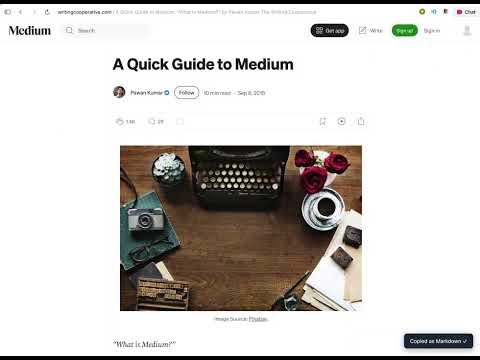
Click any element on a page to copy it as Markdown to your clipboard.
HTML to Markdown Clipper lets you pick any element on a webpage — just like the browser's inspect tool — and copy it as clean, formatted Markdown in one click. How to use: 1. Click the extension icon to activate element picker mode 2. Hover over any element — it highlights with a blue outline 3. Click to copy it as Markdown to your clipboard 4. Press ESC to cancel at any time What gets converted: - Headings, paragraphs, and line breaks - Bold, italic, strikethrough, and inline code - Links and images - Ordered and unordered lists (including nested) - Code blocks with language detection - Tables - Blockquotes Perfect for developers, writers, and anyone who works with Markdown — copy docs, blog posts, READMEs, or any page content without manual reformatting.
0 out of 5No ratings
Details
- Version1.0
- UpdatedMay 17, 2026
- Offered byCaptain
- Size651KiB
- LanguagesEnglish
- Developer
Email
thakurmukeshkumar785@gmail.com - Non-traderThis developer has not identified itself as a trader. For consumers in the European Union, please note that consumer rights do not apply to contracts between you and this developer.
Privacy

This developer declares that your data is
- Not being sold to third parties, outside of the approved use cases
- Not being used or transferred for purposes that are unrelated to the item's core functionality
- Not being used or transferred to determine creditworthiness or for lending purposes