


Overview
Search every playlist you own from YouTube's Save button, not just the 200 YouTube shows. Alt+S saves, Alt+P finds a playlist.
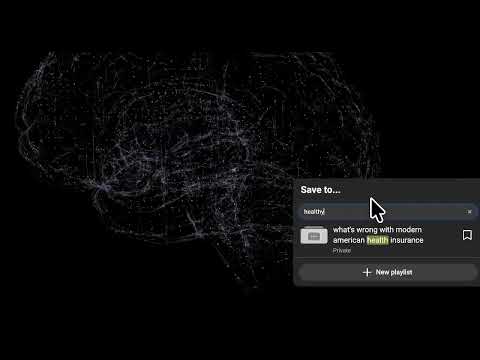
YouTube's "Save to playlist" menu has no search box, and it only loads 200 of your playlists. If you have more, the rest aren't further down the list. They aren't in it at all. YouTube Playlist Search fixes that. Click Save on any video and a searchable picker opens over every playlist you own. Type a few letters, press Enter, done. WHAT IT DOES • Search every playlist you own, with no 200-playlist cap. Words in any order; case and accents don't matter. • Works from every Save button: the watch page, the ⋮ menu on the home feed, search results, channel pages, subscriptions and history. • Alt+S saves the video you're on. Right-click any video link to save it without opening it. Works on Shorts too. • Alt+P finds and opens any of your playlists. • See which playlists already contain the video, including the ones past 200 that YouTube can't tell you about. • Sort by recent, A to Z, or Z to A. • Undo any save with Ctrl+Z. Create Private, Unlisted or Public playlists without leaving the picker. • Works with brand-channel accounts. • Light and dark mode, keyboard-driven, respects reduced motion. PRIVACY It talks only to YouTube, using the session you already have, and never to me or anyone else. No analytics, no third-party code. Free and open source (AGPL-3.0): https://github.com/codyhxyz/playlist-search-extension Desktop Chrome only. It doesn't work in the YouTube apps or on YouTube Music. Guides on finding your playlists, adding videos, and every YouTube playlist limit: https://playlist.codyh.xyz I built this because I have a few hundred playlists and got tired of scrolling. Hope it saves you the same scroll. Cody
4.6 out of 55 ratings
Details
- Version2.0.12
- UpdatedOctober 24, 2026
- Size2.7MiB
- LanguagesEnglish (United States)
- DeveloperWebsite
Email
extensions@codyh.xyz - Non-traderThis developer has not identified itself as a trader. For consumers in the European Union, please note that consumer rights do not apply to contracts between you and this developer.
Privacy

YouTube Playlist Search has disclosed the following information regarding the collection and usage of your data. More detailed information can be found in the developer's privacy policy.
YouTube Playlist Search handles the following:
This developer declares that your data is
- Not being sold to third parties, outside of the approved use cases
- Not being used or transferred for purposes that are unrelated to the item's core functionality
- Not being used or transferred to determine creditworthiness or for lending purposes
Support
For help with questions, suggestions, or problems, visit the developer's support site