

Tabatha: Visual Tab Switcher with Live Previews
8 ratings
)
Overview
Alt+Tab for Chrome tabs: live previews, instant search and recently closed tabs. Free, private, nothing leaves your computer.
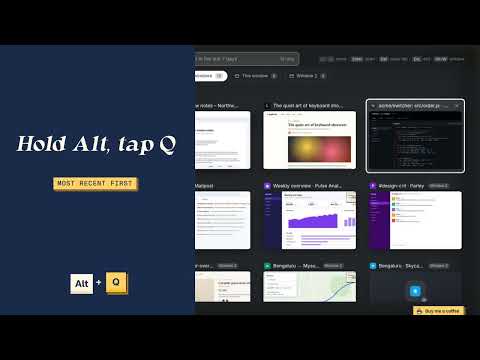
Too many tabs? Tabatha is a visual tab switcher for Chrome. Press Alt+Q to see live previews of every open tab, search across all your windows and reopen the tabs you just closed. It's Alt+Tab for your browser tabs, and a simple tab manager that never sends your tabs anywhere. Previews appear as you visit your tabs, or capture them all with one click. Chrome will say Tabatha can "read and change all your data on all websites". It needs that to take a small screenshot of each tab for its preview and to show the switcher on top of the page. It doesn't read or change your pages, and nothing leaves your computer. HOW IT WORKS • Tap Alt+Q and Tabatha stays open. No need to keep holding anything: use the arrow keys, type to search, or click with the mouse. Enter opens a tab, Esc or a click outside closes Tabatha. • Prefer Alt+Tab style? Hold Alt and tap Q again to move through your tabs, most recently used first, then let go to jump. • Alt+Shift+Q moves backwards. WHAT YOU GET • Live previews: see a screenshot of each tab, not just its title. • Search: start typing to filter open tabs and tabs you closed in the last 7 days, by title or address. • Act on many at once: search, then close, copy the links (plain or as Markdown), bookmark, group, move to a new window, put to sleep, pin or mute everything it found. Or tick the tabs you want (Ctrl+click, Shift+click for a range). • Close duplicates: one click closes pages you have open twice, keeping one of each. • Sort your way: most recently used (like Alt+Tab), newest, oldest, A–Z, or by site, with each site in its own section. Collapse any section with a click. • Stars: star a page to find it with the Starred filter, even after you close it. • All your windows: tabs from every Chrome window in one view, each labelled with its site and window. Press Alt+W (or click a window chip) to narrow it to one window. • Recently closed: reopen tabs and windows you closed in the last few hours, with a preview of what they looked like. Search reaches back 7 days, further than Chrome's own list. • Side panel: saved tab groups and your Chrome bookmarks, side by side with your tabs. Drag a tab onto a bookmark folder, rename or move bookmarks, or open one and take it out of your bookmarks. • Tab groups (optional): your Chrome tab groups appear as sections, with their names and colours. Close a group, or its whole window, and Tabatha keeps it in the side panel until you remove it; one click brings it back as a real tab group. Turn it on from the toolbar: Chrome then asks for one extra permission. • Capture previews: Chrome only lets extensions screenshot the tab on screen, so a tab you haven't looked at has no preview yet. Capture one from its card, or click "Capture" in the toolbar to flip through the rest for a few seconds and come back where you were. • Tidy up fast: press Delete (Cmd+Backspace on a Mac) or middle-click to close tabs straight from the switcher. • Sleeping tabs: tabs Chrome puts to sleep are marked Sleeping, with their last preview faded. • The number of open tabs on Tabatha's toolbar icon. • In English, Russian and Spanish, following your browser's language. • A short tour the first time you open Tabatha, and a "How it works" button whenever you want it again. • Help when you need it: the manual, answers and a feedback form at https://tabatha-vert.vercel.app (links in the switcher's footer). • Free, with a small Buy Me a Coffee button in the corner if you want to say thanks. • Works everywhere: on pages extensions can't draw on (New Tab, Chrome settings, the Web Store) Tabatha opens in its own small window instead. KEYBOARD SHORTCUTS Alt+Q: open Tabatha / next tab Alt+Shift+Q: previous tab Alt+W: switch window filter Alt+S: star the selected tab Alt+P: capture the selected tab's preview Enter: open the selected tab Arrow keys: move the selection Delete (Mac: Cmd+Backspace): close the selected tab Ctrl+click (Mac: Cmd+click): select tabs; Shift+click selects a range Esc: clear search or selection, or close Tabatha Ctrl+F: jump to search On a Mac, Alt is the Option key. You can change the shortcut at chrome://extensions/shortcuts. PRIVATE BY DESIGN • Previews never leave your computer. They are saved on your computer so they are still there after a restart: kept while the tab is open, and for 7 days after you close it. They are never uploaded anywhere. • The titles and addresses of tabs you closed are kept on your computer for 7 days (never uploaded) so you can find them again. • Saved tab groups and starred pages also stay on your computer, until you remove them. • Bookmarks (optional) stay in Chrome: Tabatha shows and changes them when you ask, and keeps no copy. • Old previews and entries are deleted automatically, and uninstalling Tabatha removes them. • No accounts, no analytics, no tracking, no ads. The extension is blocked from making any network requests at all. Its buttons (Help, Feedback, the Pro waitlist, Buy Me a Coffee) simply open a web page in a new tab when you click them, and nothing is sent unless you choose to send it there. • Tabatha does not run in Incognito windows. WHY IT ASKS FOR ACCESS TO ALL SITES Chrome can only take a screenshot of a tab, and show the switcher on top of a page, if the extension has access to that site. Tabatha uses that access only to capture the preview and draw the switcher. It never reads or changes what's on the page. QUESTIONS - Does Tabatha send my tabs or screenshots anywhere? No. Everything stays on your computer, and the extension is blocked from making network requests. - Why does a tab have no preview? Chrome only lets extensions screenshot the tab that is on screen, so a tab gets its preview the first time you look at it. Capture one from its card, or use "Capture" in the toolbar for the rest. If no tab ever gets one, check chrome://extensions > Tabatha > Site access is "On all sites"; Tabatha tells you if it isn't. - Why are tab groups and bookmarks separate permissions? They are optional, so Tabatha works fully without them. Chrome only asks when you turn them on. - Is there a paid version? No. Tabatha is free. A Pro version with extras for heavy tab users is being considered: the button in the corner adds you to the waitlist. - How do I change the Alt+Q shortcut? Open chrome://extensions/shortcuts. - Does it work on a Mac? Yes. Alt is the Option key. Open source: https://github.com/Vajrayu/tabatha
5 out of 58 ratings
Details
- Version1.3.6
- UpdatedOctober 20, 2026
- Size160KiB
- Languages3 languages
- Developer
Email
yuvarajvshetty@gmail.com - Non-traderThis developer has not identified itself as a trader. For consumers in the European Union, please note that consumer rights do not apply to contracts between you and this developer.
Privacy

Tabatha: Visual Tab Switcher with Live Previews has disclosed the following information regarding the collection and usage of your data. More detailed information can be found in the developer's privacy policy.
Tabatha: Visual Tab Switcher with Live Previews handles the following:
This developer declares that your data is
- Not being sold to third parties, outside of the approved use cases
- Not being used or transferred for purposes that are unrelated to the item's core functionality
- Not being used or transferred to determine creditworthiness or for lending purposes
Support
For help with questions, suggestions, or problems, visit the developer's support site