

EditResume Job Saver
2 ratings
)
Overview
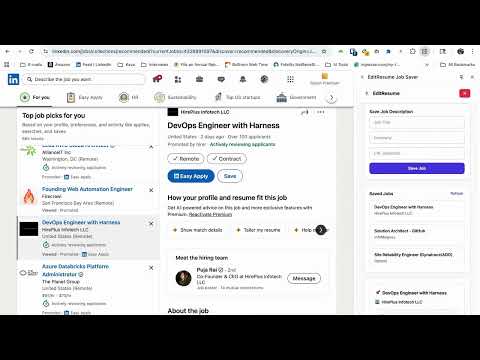
Save LinkedIn job descriptions to editresume.io and run matching.
# Chrome Web Store Listing Information ## Short Description (132 characters max) Save LinkedIn job descriptions to editresume.io and run AI-powered resume matching. ## Detailed Description ### Save Jobs Instantly EditResume Job Saver makes it easy to save job descriptions from LinkedIn directly to your editresume.io account. With one click, capture job details, company information, and requirements for later analysis. ### AI-Powered Resume Matching Once saved, use editresume.io's AI matching engine to see how well your resume matches each job. Get instant matching scores, keyword analysis, and personalized improvement suggestions. ### Seamless Integration The extension integrates seamlessly with your editresume.io account. Sign in once, and your saved jobs sync automatically across all your devices. ### Key Features - **One-Click Save**: Save job descriptions from LinkedIn job pages instantly - **Smart Extraction**: Automatically extracts job title, company, description, and metadata - **Resume Matching**: Match your resume against saved jobs with AI-powered analysis - **Cross-Device Sync**: Access your saved jobs from any device - **Privacy-Focused**: All data is stored securely and only shared with editresume.io ### How It Works 1. Browse LinkedIn job postings 2. Click the EditResume extension icon when viewing a job 3. Review and save the job description 4. Open editresume.io to see matching scores and improvement suggestions ### Perfect For - Job seekers tracking multiple opportunities - Professionals optimizing their resumes for specific roles - Recruiters analyzing job requirements - Career coaches helping clients with applications ### Privacy & Security - No LinkedIn account access required - Secure authentication with editresume.io - All data transmitted over HTTPS - Local storage for offline access Get started today and take control of your job search with EditResume Job Saver! ## Category Productivity ## Tags resume, job search, linkedin, career, job matching, ATS, resume builder, job tracker ## Screenshots Required 1. Extension popup showing saved jobs 2. LinkedIn job page with extension active 3. Job matching results on editresume.io 4. Extension settings page ## Promotional Images - Small promotional tile (440x280) - Large promotional tile (920x680) - Marquee promotional tile (1400x560) ## Support URL https://editresume.io ## Privacy Policy URL https://editresume.io/privacy (or use the PRIVACY_POLICY.md file hosted)
5 out of 52 ratings
Details
- Version1.0.10
- UpdatedMay 22, 2026
- Size98.58KiB
- LanguagesEnglish
- Developer
Email
tutachasan2@gmail.com - Non-traderThis developer has not identified itself as a trader. For consumers in the European Union, please note that consumer rights do not apply to contracts between you and this developer.
Privacy

This developer declares that your data is
- Not being sold to third parties, outside of the approved use cases
- Not being used or transferred for purposes that are unrelated to the item's core functionality
- Not being used or transferred to determine creditworthiness or for lending purposes