


Overview
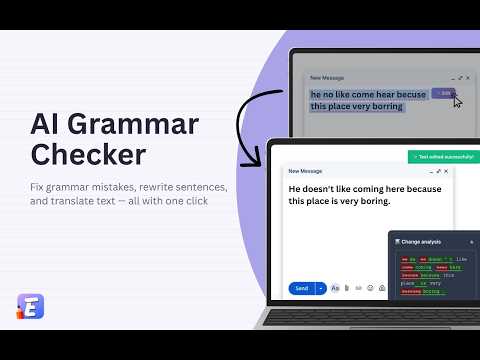
AI writing assistant: fix grammar, rewrite text, translate to 50+ languages. Works in email, docs, social media & any website.
EditOn AI — Free Grammar Checker & AI Writing Assistant Fix grammar mistakes, rewrite sentences, and translate text — all with one click. EditOn AI works wherever you type: email, documents, spreadsheets, notes, social media, and any website. ✨ KEY FEATURES • Fix grammar, spelling, and punctuation instantly • Rewrite and paraphrase text to improve clarity • Translate to 50+ languages without leaving the page • Adjust tone: formal for business, casual for social media • Expand or shorten text with one click • Create custom AI prompts for repetitive tasks • View changes with highlighted differences before applying ▶ HOW IT WORKS EditOn AI integrates directly into your browser with three flexible modes: 【 Mode 1: AI Edit Button 】 Select text on any page → Click the floating AI Edit Button → Text is corrected and replaced automatically. The fastest way to fix grammar on supported sites. 【 Mode 2: Edit On Page 】 Open the extension panel → Select text on the page → Click "Edit with AI" → Review changes and apply. Works on any website, even where direct replacement isn't supported. 【 Mode 3: Edit in Panel 】 Paste any text into the extension panel → Edit with AI → Copy the improved text. Perfect for working with text from any source. All modes show you exactly what changed, so you stay in control. 🌐 WORKS EVERYWHERE YOU WRITE EditOn AI works on any website where you can type text. Write better emails, edit documents, fix text in spreadsheets, improve your notes, polish social media posts, or correct messages — all without leaving the page. 🌍 TRANSLATION & LANGUAGES Translate text into 50+ languages instantly: English, Spanish, French, German, Chinese, Japanese, Korean, Portuguese, Italian, Russian, Arabic, Hindi, Vietnamese, Thai, Indonesian, and many more. Interface available in 11 languages: English, Spanish, Chinese (Simplified & Traditional), Japanese, Russian, Italian, Indonesian, Filipino, Malay, and Thai. 🎯 PERFECT FOR • Professionals — emails, reports, business communication • Students — essays, assignments, research papers • Content creators & bloggers — polished articles • Non-native speakers — sound more natural in any language • Social media managers — error-free posts • Anyone who writes online ⚡ BUILT FOR SPEED AND SIMPLICITY • Lightweight — doesn't slow down your browser • Clean interface — no distractions, no clutter • No tab switching — edit right where you write • Keyboard shortcuts — Ctrl+Shift+E for quick access • Dark and light theme support 🔧 CUSTOMIZATION Create your own AI editing commands: • Save frequently used prompts to your library • Organize prompts by categories • Apply custom edits with one click Examples: "Make it shorter", "Add bullet points", "Simplify for a 10-year-old", "Make it more persuasive" 💎 PRICING FREE — Use EditOn AI with generous free limits. No credit card required. STARTER — For regular writers who need more capacity PRO — For power users and professionals ULTRA — Maximum capacity for teams and heavy users Start free and upgrade only if you need more. 🔒 PRIVACY FIRST Your text stays private: • Text is processed securely and not stored permanently • No data selling, no advertising • GDPR compliant • You control your data By installing the extension, you agree to: Privacy Policy: https://editon.co/privacy.html Terms of Service: https://editon.co/terms.html GDPR: https://editon.co/gdpr.html 📧 SUPPORT Questions or feedback? We'd love to hear from you! Email: support@editon.co Website: https://editon.co Install EditOn AI now — let AI handle the grammar while you focus on writing!
5 out of 54 ratings
Details
- Version4.0.2
- UpdatedJuly 15, 2026
- FeaturesOffers in-app purchases
- Size241KiB
- Languages14 languages
- Developer
- TraderThis developer has identified itself as a trader per the definition from the European Union and committed to only offer products or services that comply with EU laws.
- D-U-N-S765802060
Privacy

EditOn AI - Free Grammar Checker & Rewriter has disclosed the following information regarding the collection and usage of your data. More detailed information can be found in the developer's privacy policy.
EditOn AI - Free Grammar Checker & Rewriter handles the following:
This developer declares that your data is
- Not being sold to third parties, outside of the approved use cases
- Not being used or transferred for purposes that are unrelated to the item's core functionality
- Not being used or transferred to determine creditworthiness or for lending purposes
Support
For help with questions, suggestions, or problems, please open this page on your desktop browser