


Overview
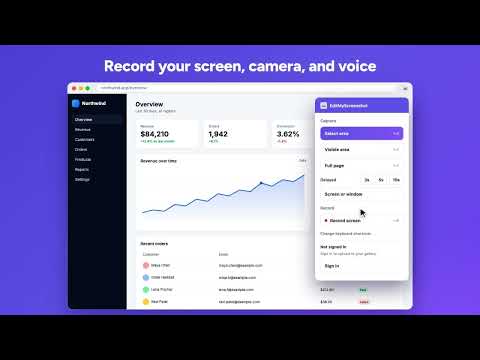
Capture, annotate, and record your screen. Screenshots and screen recordings with no watermark. Free, no account required.
EditMyScreenshot: take screenshots, mark them up, and record your screen in seconds. Grab a selected area, the visible page, the whole scrolling page, or any screen or app window. Mark it up right on the page, then copy it, download it, or open it in the full editor. Need to show instead of tell? Record your screen with your camera and voice, then download the video. No account needed to capture, record, copy, download, or edit. No watermark on your screenshots or videos. What you can do - Select any area of the page and capture it - Capture the visible part of the page in one click - Capture a full page, including the parts below the fold, stitched into one image - Capture your whole screen or any app window - Use a 3, 5, or 10 second timer to catch menus and hover states - Record a tab, an app window, or your whole screen - Add your webcam and microphone to a recording - Draw on your screenshot before saving: arrows, rectangles, circles, triangles, pencil, and text - Blur passwords, emails, and other private details - Copy the image to your clipboard and paste it into chat, email, docs, or design tools - Download a PNG or an MP4 with one click - Sign in to save screenshots to your gallery and copy a share link - Open the full editor with one click - Use keyboard shortcuts for everything Key features 1. Screen recorder Record a browser tab, an app window, or your entire screen. Turn on your microphone to narrate and your webcam to appear in a small floating window. Pause and resume any time, then download the video as MP4. Recordings stay on your computer. 2. Selected area screenshot Drag over any part of the page to capture just what you need, like a product image, a comment, a chart, or a bug. 3. Visible area and full page screenshots Capture what you see in one click, or capture the entire webpage from top to bottom. The extension scrolls and stitches the page into a single high-quality image for you. 4. Screen and window capture Take a screenshot of your desktop or any app window, not only web pages. 5. Delayed capture Start a 3, 5, or 10 second timer, open the menu or tooltip you want, and let the extension capture it. 6. Annotate on the page A toolbar appears right on your capture. Add arrows, shapes, freehand lines, and text, or blur sensitive info, before you copy or save. 7. Keyboard shortcuts Alt+Shift+V visible area, Alt+Shift+S select area, Alt+Shift+F full page, Alt+Shift+R start or stop recording. Change them any time at chrome://extensions/shortcuts. 8. Copy, download, and share Copy your screenshot with one click and paste it anywhere, or download a PNG. Sign in with your free EditMyScreenshot account to upload to your gallery and copy a share link. 9. Full online editor Click Edit to open your screenshot on EditMyScreenshot.com, where you can crop, resize, add frames and backgrounds, stickers, text, and arrows, and export PNG, JPG, or GIF. Who is it for? - Developers and QA: report bugs with a marked-up screenshot or a quick screen recording - Support and remote teams: explain things faster with visuals and short videos - Teachers and students: record lessons and add screenshots to slides and notes - Marketers and designers: capture references, campaign results, and page snippets - Content creators: make tutorials, walkthroughs, and social posts How it works 1. Install EditMyScreenshot and pin it to your toolbar. 2. Click the icon and pick Select area, Visible area, Full page, Screen or window, or Record screen. 3. Mark up your screenshot with the toolbar, or stop your recording when you are done. 4. Copy, download, or save to your gallery for a share link. Why EditMyScreenshot? - No login or sign-up needed to capture, record, copy, download, or edit - No watermark or branding on your screenshots or videos - Free to use, with an optional free account for gallery and share links Privacy first Your screenshots and recordings stay in your browser until you choose to copy, download, upload, or edit them. Recordings are never uploaded. The extension only sends an image to https://www.editmyscreenshot.com/ when you click Upload or Edit, and only uses your account when you sign in. It does not read your clipboard or track the pages you visit. Full policy: https://www.editmyscreenshot.com/privacy
5 out of 52 ratings
Details
- Version0.5.0
- UpdatedOctober 20, 2026
- Size381KiB
- LanguagesEnglish
- DeveloperWebsite
Email
adeelgill@live.com - Non-traderThis developer has not identified itself as a trader. For consumers in the European Union, please note that consumer rights do not apply to contracts between you and this developer.
Privacy

EditMyScreenshot (screenshot tool) has disclosed the following information regarding the collection and usage of your data. More detailed information can be found in the developer's privacy policy.
EditMyScreenshot (screenshot tool) handles the following:
This developer declares that your data is
- Not being sold to third parties, outside of the approved use cases
- Not being used or transferred for purposes that are unrelated to the item's core functionality
- Not being used or transferred to determine creditworthiness or for lending purposes
Support
For help with questions, suggestions, or problems, please open this page on your desktop browser