


Overview
Auto-group Chrome tabs by site with zero setup. Find pages by title keywords and switch tabs from a floating cat.
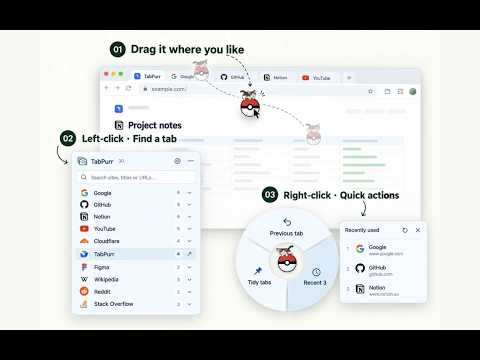
Powerful automatic tab grouping! Auto-group by website, keyword rules, a floating cat ball, workspaces and backups — for a clean, calm browser. 🚀 TabPurr: the tab manager that tidies up as you browse TabPurr is built for the moment your tabs have multiplied beyond control. Install and go — zero config: pages from the same website gather into native Chrome tab groups, so dozens of tabs make sense at a glance. A little cat on a floating ball rides along on every page: left-click for the site tree, right-click for the quick ring — find and switch in seconds. Whether you want a tidy tab strip or instant access among dozens of open pages, TabPurr is a productivity companion that never gets in your way. 🌟 Why TabPurr? ✅ Zero-config auto grouping: pages group by website registrable domain into native Chrome tab groups — works right after install, no rules to write. ✅ Keyword/regex custom rules: Pro lets keywords decide the group. Separate conditions with ;, first match wins, and see the live hit count for this window before saving. ✅ Local dev never gets lost: file:// pages and localhost/127.0.0.1 sites gather into one “Local files” group — however many ports, still one group. ✅ Floating cat ball, always at hand: a little cat on any page corner. Left-click the site tree and search titles; right-click the quick ring for the previous tab or the 3 most recent. ✅ Shortcuts that land where you type: Alt+Q opens the site tree with the cursor already in the search box; Alt+W summons the quick ring. Rebind both to your taste. ✅ Gentle sleep that saves memory: idle pages doze off on schedule and wake on click; pinned, playing and protected pages never sleep. ✅ Windows and backups, all in one: merge/split windows, save and restore workspaces, automatic backups and closed-window rescue — move to a new computer without losing anything. ✅ Local-only and private: history, workspaces and license keys never leave your device. No ads, no tracking, no account. ┈┈┈┈┈┈┈┈┈┈┈┈┈┈┈┈┈┈┈┈┈┈┈┈┈┈ 📦 Core features 1️⃣ Auto grouping: native Chrome tab groups by website domain; www/subdomains roll into the main domain. Minimum pages per group (1/2/3) and the grouping delay (default 2 s) are adjustable. 2️⃣ Aggregation rules (Pro): keyword or /regex/i conditions, several per row separated by ; (full-width ; works too), first match wins; a live “N pages in this window” preview while typing. 3️⃣ Local files group (free): local HTML and localhost/127.0.0.1/[::1] dev-server pages gather together — a single page can form its own group. 4️⃣ Temporary group: ⌘/Ctrl-click several tabs, right-click “Merge into temporary group” — keep them together without writing rules or being split by auto-tidy. 5️⃣ Floating ball and shortcuts: drag the cat ball anywhere; left-click = site-tree search, right-click = quick ring (previous tab / recent 5 / tidy, Pro); Alt+Q / Alt+W jump straight in, cursor lands in the search box. 6️⃣ Idle auto-sleep: background pages untouched for 30 minutes (default) sleep to free memory; duration adjustable or off; manual “Suspend this site” anytime. 7️⃣ Window management: moving pages to existing windows is free; batch split and multi-window merge (Pro) re-group automatically. 8️⃣ Workspaces and backups: save the current window and restore later (1 free / 50 Pro); automatic backups, closed-window rescue and full export/import, down to a single tab. ┈┈┈┈┈┈┈┈┈┈┈┈┈┈┈┈┈┈┈┈┈┈┈┈┈┈ ⁉️ FAQ 💬 How do I turn auto grouping off? 🌲 Switch off “Auto-organize the Chrome tab strip” in Settings — existing groups stay as they are; “Organize this window” runs a manual pass anytime. 💬 How do I write custom rules? 🌴 One per row: group name + conditions. Separate conditions with ; (full-width ; works too); write regexes as /expression/i; each row shows its live hit count before saving, so zero matches are obvious. 💬 Do local dev pages mix with normal websites? 🌵 No. file://, localhost and 127.0.0.1 pages all go to the “📁 Local files” group, separate from online sites. 💬 Do I have to pay? 🍀 Core features stay free forever: auto grouping, local files group, floating ball, search and switching, suspend/sleep, 1 workspace and all backup restore/import/export. Pro (one-time purchase) unlocks custom rules, batch window operations, more workspaces and backup slots, cat outfits and more. 💬 Does it upload my browsing history? 🍀 Never. Everything stays in your browser on this device; export files stay in your hands. ┈┈┈┈┈┈┈┈┈┈┈┈┈┈┈┈┈┈┈┈┈┈┈┈┈┈ 📦 What’s new (1.0.0) ✅ New Pro keyword/regex aggregation rules: ; (including full-width ;) separators, first match wins, live hit preview, instant reminder for unwrapped regexes. ✅ New “Local files” group: file://, localhost/127.0.0.1/[::1] and IP pages gather together; legacy per-port groups merge automatically. ✅ New shortcuts Alt+Q (site tree, cursor lands in the search box) and Alt+W (quick ring), both rebindable. ✅ New idle auto-sleep that saves memory (default 5 minutes, adjustable or off) plus per-site manual suspend. ✅ New adjustable settings: grouping delay (default 2 s) and minimum pages per group (default 2). ✅ New install and update interactive tour; six interface languages (English, Chinese, German, French, Japanese). 📦 What’s new (1.1.0) ✅ Sites on LAN/public IP addresses now keep their own tab groups (IP + port) instead of sharing one group with file:// and localhost pages; everything re-sorts automatically after updating. ✅ New setting “Show icons on tab groups” (on by default): switch the icon prefix off to save tab-strip width — the tab strip reacts instantly. ✅ The quick ring now reaches the 5 most recent tabs (previously 3). ✅ Idle auto-sleep now defaults to 30 minutes; still adjustable or fully switchable off. ┈┈┈┈┈┈┈┈┈┈┈┈┈┈┈┈┈┈┈┈┈┈┈┈┈┈ 🍺 Productivity starts with a tidy tab strip. Let TabPurr put your tabs away while you just browse. Install TabPurr now and feel “tidy from the moment you open it”. 📨 Questions or ideas? Visit savechrometabs.com. Local-only · No ads · No account
5 out of 511 ratings
Details
- Version1.1.1
- UpdatedNovember 12, 2026
- FeaturesOffers in-app purchases
- Size3.67MiB
- Languages6 languages
- DeveloperWebsite
Email
tantesirlcx@gmail.com - Non-traderThis developer has not identified itself as a trader. For consumers in the European Union, please note that consumer rights do not apply to contracts between you and this developer.
Privacy

TabPurr – Save Tabs: Auto Group & Restore has disclosed the following information regarding the collection and usage of your data. More detailed information can be found in the developer's privacy policy.
TabPurr – Save Tabs: Auto Group & Restore handles the following:
This developer declares that your data is
- Not being sold to third parties, outside of the approved use cases
- Not being used or transferred for purposes that are unrelated to the item's core functionality
- Not being used or transferred to determine creditworthiness or for lending purposes
Support
For help with questions, suggestions, or problems, visit the developer's support site