

Audio Tab Finder – Find, Mute & Close Noisy Tabs
3 ratings
)
Overview
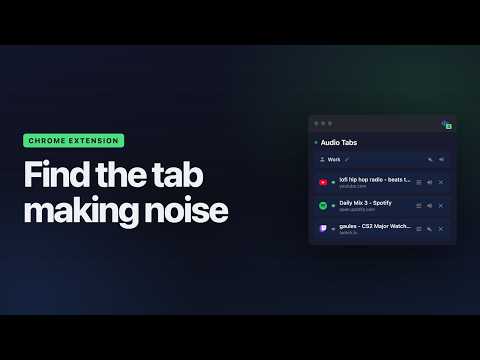
Instantly find which tab is playing sound. Jump to it, mute it, or close it in one click. No more hunting for noisy tabs.
WHERE IS THAT SOUND COMING FROM?! You’re working, browsing, or in a meeting, and suddenly… sound starts playing. A video. Music. An ad. Somewhere. One of your many open tabs is making noise — and you have no idea which one. You start clicking tab by tab trying to find it. Your focus is gone. Audio Tab Finder fixes this in one click. Open the popup and every tab playing sound is right there. Jump to it, mute it, turn it down, pause it, or close it — without hunting for it first. No more guessing. No more tab hunting. Full control over sound in your browser. 🔊 FIND IT • See all audio tabs at a glance — A clean list of every tab currently playing sound • Jump to any tab instantly — Go straight to the source • Badge counter — See how many tabs are playing audio right on the extension icon • Works on any site — YouTube, Spotify, Netflix, Twitch, news sites, autoplay ads, and more 🔇 SILENCE IT • Mute or unmute any tab — Without leaving the tab you’re on • Mute all, unmute all — With the scope you actually mean: this window, your other windows, one Chrome profile, or everything at once. Each scope has its own switch, right where it belongs. • Mute all other tabs — One click to hear only the tab you care about, and it unmutes that one for you • Close it — Kill the noise completely 🎚️ TURN IT DOWN — OR STOP IT • Volume per tab — A real 0 to 100% slider for every tab, independent of mute. Turn a loud tab down instead of silencing it. • Pause playback — Muting leaves the video running. Pausing actually stops it. Paused tabs stay in your list with a play button, so you can pick them back up whenever you want. About the permission these two need: nothing extra is requested when you install. The first time you open a volume slider, the extension asks — and that access does exactly one thing: set the volume on, or pause, the audio and video elements of the page you chose. No page content is ever read. Nothing ever leaves your computer. If you never use volume or pause, you are never asked. ⌨️ KEYBOARD Everything works from the keyboard, inside the popup: • Arrow keys, Home, End — move between tabs • Enter — switch to the selected tab • M — mute or unmute it • S — mute every other tab • P — pause or resume it • V — open its volume slider • Delete — close it • Shift+M / Shift+U — mute or unmute everything, everywhere 🌐 USE MULTIPLE CHROME PROFILES? (OPTIONAL HELPER) If you keep more than one Chrome profile open at the same time — work, personal, school, dev — Audio Tab Finder can detect and control audio across ALL of them, not just the profile you’re currently in. To enable cross-profile detection, install our free open-source companion: the Audio Tab Finder native helper. It’s a tiny local program that lets the extension see what’s happening in your other Chrome profiles. How to install: Open the Audio Tab Finder popup Click the “Detect audio across profiles?” banner at the bottom Follow the link to GitHub Releases and download the installer for your OS: – macOS: signed and notarized .pkg (no Gatekeeper warning, just double-click) – Linux: .deb / .rpm / .tar.gz for Debian, Ubuntu, Fedora, openSUSE, etc. – Windows: .zip with a PowerShell installer (no admin rights needed) Reload the extension at chrome://extensions Once installed, the popup automatically shows: • Which Chrome profile is making each sound • A combined badge counter for ALL profiles (“3” instead of just “1”) • An “Other profiles” section listing audio tabs from other profiles • Mute, unmute, solo, close or jump to audio tabs in any profile — without switching profiles first • Mute all or unmute all in a specific profile, from a switch next to its name Two honest notes on what crosses profiles and what doesn’t. The volume slider works on another profile’s tabs, but it can’t read that tab’s current level back, so it opens where you last left it — and that profile needs to have enabled volume control itself. Pause and resume work in your current profile only. The helper runs entirely on your machine. It makes ZERO network connections. It just opens a tiny local channel between Chrome profiles on the same computer. The full source code is on GitHub — you can read every line before installing. If you only use one Chrome profile, you can ignore all of this — the extension already works perfectly for you out of the box. 💡 WHY AUDIO TAB FINDER? • Lightweight — No bloat, no ads, no tracking • Privacy-first — We only detect which tabs are playing audio. No data collection. Ever. • Clean dark UI — Easy on the eyes, even during long sessions • Open source — Inspect the code on GitHub anytime 👌 PERFECT FOR • People who always have too many tabs open • Remote workers in meetings • Anyone tired of autoplay videos and random sounds • Anyone who wants one tab quieter, not silent • Multi-profile users who want to know which Chrome profile is making noise Stop the hunt. Control the sound. Stay focused. ☕ Enjoying Audio Tab Finder? Support the project: https://buymeacoffee.com/francisgregori
4.7 out of 53 ratings
Details
- Version2.1.0
- UpdatedJuly 31, 2026
- Offered byf-gregori
- Size42.91KiB
- Languages2 languages
- Developer
Email
contato@francisgregori.com.br - Non-traderThis developer has not identified itself as a trader. For consumers in the European Union, please note that consumer rights do not apply to contracts between you and this developer.
Privacy

This developer declares that your data is
- Not being sold to third parties, outside of the approved use cases
- Not being used or transferred for purposes that are unrelated to the item's core functionality
- Not being used or transferred to determine creditworthiness or for lending purposes
Support
For help with questions, suggestions, or problems, please open this page on your desktop browser