

Zenith Vertical Tabs

Overview
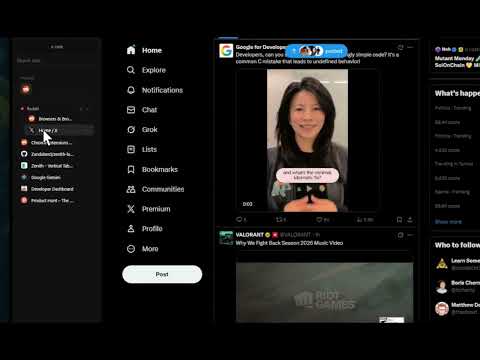
A premium Zen-inspired vertical sidebar that appears on hover or with Alt+V
🚧 EARLY BETA — Thank you for being an early adopter! 🌿 ZENITH VERTICAL TABS — A Zen-Inspired Browsing Experience Transform your Chrome browser with a sleek, minimal vertical tabs sidebar inspired by Zen Browser. Access all your tabs with a simple hover or the Alt+V shortcut. ⚠️ This extension is in early beta. You may encounter bugs or unexpected behavior. We appreciate your patience and feedback as we continue to improve! ━━━━━━━━━━━━━━━━━━━━━━━━━━━━━━━━━━ ✨ KEY FEATURES - Vertical Sidebar — Hover on the left edge or press Alt+V to reveal your tabs - Pin Sidebar — Keep it constantly visible (pushes website content so nothing is covered) - Resizable Width — Drag the edge to customize the sidebar size to your liking - Tab Search — Quickly find any tab with instant search - Smart URL Bar — Press Alt+T for new tab or Alt+K to edit current URL - Tab Groups — Organize tabs into colored groups - Drag & Drop — Reorder tabs effortlessly - Tab Previews — Hover over tabs to see page snapshots - Context Menu — Right-click for quick actions (pin, mute, duplicate, close, move to window, add to group, and more) ━━━━━━━━━━━━━━━━━━━━━━━━━━━━━━━━━━ ⌨️ KEYBOARD SHORTCUTS Alt+V → Toggle sidebar Alt+T → Open new tab with URL bar Alt+K → Edit current page URL ━━━━━━━━━━━━━━━━━━━━━━━━━━━━━━━━━━ 🎨 DESIGN PHILOSOPHY Inspired by Zen Browser and Arc, Zenith brings a premium minimal aesthetic to Chrome. The sidebar features: - Frosted glass effect with subtle blur - Smooth animations and micro-interactions - Clean typography and intuitive icons - Dark theme that complements any website ━━━━━━━━━━━━━━━━━━━━━━━━━━━━━━━━━━ 🔒 PRIVACY FIRST - No data collection - No analytics or tracking - Works entirely offline ━━━━━━━━━━━━━━━━━━━━━━━━━━━━━━━━━━ 🚀 BONUS FEATURES - Pinned tabs grid — Quick access to your favorite sites - Audio indicators — See which tabs are playing sound - Mute controls — Silence noisy tabs with one click - Tab discarding — Save memory on inactive tabs - Multi-window support — Each window has its own sidebar - Navigation controls — Back, forward, refresh, and home buttons ━━━━━━━━━━━━━━━━━━━━━━━━━━━━━━━━━━ Perfect for power users who want a cleaner, more organized browsing experience without sacrificing aesthetics. 🐛 Found a bug? Have feedback? We'd love to hear from you!
3.9 out of 57 ratings
Details
- Version1.0.2
- UpdatedJanuary 7, 2026
- Size108KiB
- LanguagesEnglish
- DeveloperWebsite
Email
aziz@briskl.tech - Non-traderThis developer has not identified itself as a trader. For consumers in the European Union, please note that consumer rights do not apply to contracts between you and this developer.
Privacy

This developer declares that your data is
- Not being sold to third parties, outside of the approved use cases
- Not being used or transferred for purposes that are unrelated to the item's core functionality
- Not being used or transferred to determine creditworthiness or for lending purposes