


개요
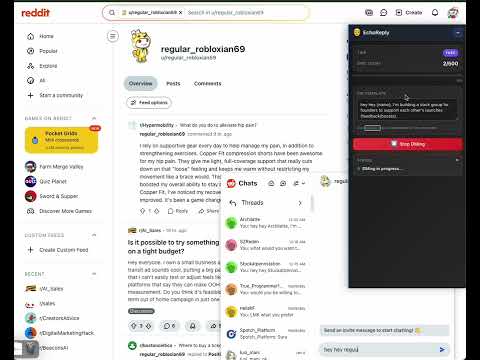
EchoReply- Reddit Outreach/DM Chrome Extension
Workflow 1. Go to a Subreddit - Navigate to any Reddit subreddit (e.g., `reddit.com/r/buildinpublic`) - Make sure you're on the subreddit's main feed page 2. Open Extension Popup - Click the EchoReply icon in your Chrome toolbar 3. Set Your DM Template - In the popup, find the "DM Template" text area - Enter your message template - Use `{name}` as a placeholder for the username - Example: `Hi {name}, I'm building a growth hack tool most solo founders miss, personal branding on X/LinkedIn and outreach on Reddit.` - The template is automatically saved 4. Click "Start DMing" - The extension will automatically: - Find new posts on the subreddit - Extract post authors and commenters - Send DMs to each user using your template - Track progress in real-time 5. Monitor Progress - Watch the sidebar overlay on Reddit pages for: - Current user being messaged - Progress (X of Y users) - Status updates - DM count 6. Stop Anytime - Click "Stop DMing" button to pause/stop the process
5점 만점에 0점평점 없음
세부정보
개인정보 보호

EchoReply- Reddit Outreach/DM에서 데이터 수집 및 사용과 관련하여 다음 정보를 공개했습니다. 더 자세한 정보는 개발자의 privacy policy을 참고하세요.
EchoReply- Reddit Outreach/DM 항목은 다음을 처리합니다.
개발자가 사용자 데이터에 관해 다음과 같이 선언했습니다
- 승인된 사용 사례를 제외하고 서드 파티에 판매하지 않음
- 항목의 핵심 기능과 관련 없는 목적으로 사용하거나 전송하지 않음
- 신용도 판단 또는 대출 목적으로 사용하거나 전송하지 않음
지원
질문, 제안 또는 문제와 관련하여 도움이 필요하면 데스크톱 브라우저에서 이 페이지를 여세요.