

Echo Captions: Video & Subtitle Translator

Overview
Translate YouTube videos, Twitch & Kick live streams and Crunchyroll anime. Auto AI subtitles & live captions in 81 languages.
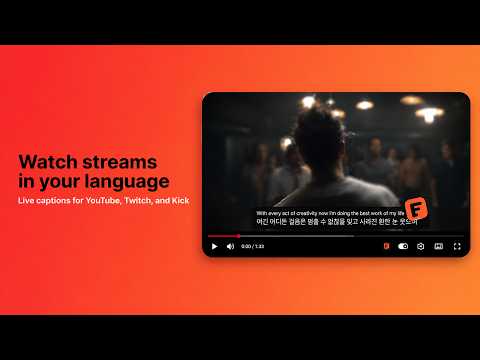
Echo Captions is a video translation and subtitle translation extension for YouTube, Twitch, Kick and Crunchyroll. No setup after install: open a YouTube video and translated captions appear by themselves. On YouTube videos Echo translates the video's captions (auto-generated ones included); on live streams, real-time AI speech recognition listens, translates what is said and shows clean translated subtitles right on top of the video — watch any video or live stream in your own language. Want to watch an English video with subtitles in your language? Need a live interpreter for a Twitch or Kick stream? Following a YouTube video or anime in a language you don't speak? Echo Captions does it for you. AFTER INSTALLING 1. Add the extension — a short welcome page and demo video let you try it in seconds. 2. Open any YouTube video — translated captions start by themselves. No clicks, no setup. Echo picks the language you read from your browser's language settings; you can change it anytime from the popup. 3. The Echo button in the player turns captions on and off anytime. On Crunchyroll, translated subtitles start by themselves too. On live streams (YouTube Live, Twitch, Kick), one click on the Echo button starts translation. WHAT YOU CAN DO • Self-starting translation — captions open automatically on YouTube videos and Crunchyroll episodes; turn them off with one click if you prefer. • YouTube video translation — translated subtitles from the video's captions, auto-generated ones included, with smart caching so rewatches load instantly. If a video has no captions at all, Echo says so on the video. • Live stream translation — YouTube Live, Twitch and Kick need no captions: Echo turns speech into translated subtitles in real time, a few seconds behind the speaker. It understands 60+ spoken languages, from Japanese and Korean to Turkish and Russian. • One color per speaker — when several people talk on a live stream, each voice gets its own color. • Crunchyroll anime subtitles — official subtitles translated into your language, built-in subtitles hidden. • Dual subtitles (bilingual) — translation and original line together; follow the meaning in your language while seeing what was said. • Transcript panel — a scrollable, searchable transcript that follows the video like a prompter. • Full subtitle customization — font, size, background opacity and position; separate styles for YouTube, live streams and Crunchyroll. • Echo in your language — menus and notices in every language Echo translates into. TRANSLATE INTO 81 LANGUAGES English, Spanish, French, German, Italian, Portuguese (Brazil and Portugal), Dutch, Polish, Ukrainian, Russian, Belarusian, Turkish, Greek, Czech, Slovak, Hungarian, Romanian, Bulgarian, Serbian, Croatian, Bosnian, Slovenian, Macedonian, Albanian, Swedish, Danish, Norwegian, Finnish, Icelandic, Estonian, Latvian, Lithuanian, Welsh, Catalan, Basque, Galician, Arabic, Hebrew, Persian, Urdu, Pashto, Hindi, Bengali, Assamese, Odia, Punjabi, Gujarati, Marathi, Tamil, Telugu, Kannada, Malayalam, Sinhala, Nepali, Japanese, Korean, Chinese (Simplified and Traditional), Vietnamese, Thai, Indonesian, Malay, Filipino, Khmer, Lao, Burmese, Mongolian, Kazakh, Kyrgyz, Uzbek, Azerbaijani, Georgian, Swahili, Amharic, Somali, Hausa, Yoruba, Igbo, Zulu and Afrikaans. For example: watch an English video with Polish subtitles, or Japanese anime with Traditional Chinese subtitles. FREE AND PAID Free every day, no card: about 5 minutes of video translation (about 25 on your first day), and about 10 when you sign in with Google. Live streams use the allowance faster. Paid plans start at $1.99 a month: echolocalize.xyz/pricing SUPPORTED PLATFORMS • YouTube videos • YouTube Live • Twitch live streams • Kick live streams • Crunchyroll episodes (anime) WHY ECHO CAPTIONS You shouldn't miss what's being said just because it's in another language. No waiting for dubs — on live streams Echo turns speech into translated subtitles as people talk, like a simultaneous interpreter. No copy-paste, no second window — most of the time, not even a click. LANGUAGE SETTINGS Echo picks the caption language from your browser's language preferences — not from the language Chrome's menus happen to be in — and you can change it anytime from the popup or the Echo panel in the player. Echo's own menus follow your language too; pick another one in Settings. One switch turns auto-start on or off. WHAT'S NEW IN 2.4.7 • Echo's menus and notices now come in every language it translates into. • Five more caption languages: Assamese, Belarusian, Kyrgyz, Odia and Welsh. • Live streams understand 60+ spoken languages, with one color per speaker. • YouTube Live captions keep going after ads, and the ads themselves are no longer transcribed. • When something goes wrong — a video without captions, captions that won't load — Echo says so on the video. ALSO IN YOUR LANGUAGE The Chrome Web Store doesn't offer a listing in these languages, so here is what Echo does, in each of them: • Afrikaans: Kyk video's en regstreekse uitsendings met Afrikaanse onderskrifte wat intyds reg op die video vertaal word. • Shqip: Shiko video dhe transmetime të drejtpërdrejta me titra në shqip, të përkthyera në kohë reale direkt mbi video. • Azərbaycanca: Videoları və canlı yayımları Azərbaycan dilində altyazılarla izlə; tərcümə real vaxtda birbaşa videonun üzərində görünür. • Euskara: Ikusi bideoak eta zuzeneko emankizunak euskarazko azpitituluekin, denbora errealean itzulita bideoaren gainean bertan. • Bosanski: Gledajte videozapise i prijenose uživo s titlovima na bosanskom jeziku, prevedenim u stvarnom vremenu direktno na videu. • မြန်မာ: ဗီဒီယိုများနှင့် တိုက်ရိုက်ထုတ်လွှင့်မှုများကို မြန်မာစာတန်းထိုးများဖြင့် ကြည့်ရှုပါ၊ ဘာသာပြန်ချက်များကို ဗီဒီယိုပေါ်တွင် အချိန်နှင့်တစ်ပြေးညီ ပြသပေးသည်။ • Galego: Mira vídeos e emisións en directo con subtítulos en galego, traducidos en tempo real sobre o propio vídeo. • ქართული: უყურეთ ვიდეოებს და პირდაპირ ეთერებს ქართული სუბტიტრებით; თარგმანი რეალურ დროში ჩნდება ვიდეოზე. • Hausa: Kalli bidiyo da shirye-shiryen kai tsaye tare da take-take cikin Hausa, waɗanda ake fassarawa nan take a kan bidiyon. • Íslenska: Horfðu á myndbönd og beinar útsendingar með íslenskum texta sem er þýddur í rauntíma beint á myndbandinu. • Igbo: Kiri vidiyo na ihe ngosi ndụ nwere ederede okwu n’asụsụ Igbo, nke a na-asụgharị ozugbo n’elu vidiyo ahụ. • Қазақша: Бейнелер мен тікелей эфирлерді қазақша субтитрлермен көріңіз, аударма нақты уақытта бейненің дәл үстінде шығады. • ខ្មែរ: មើលវីដេអូ និងការផ្សាយផ្ទាល់ជាមួយចំណងជើងរងជាភាសាខ្មែរ ដែលបកប្រែភ្លាមៗនៅលើវីដេអូ។ • ລາວ: ເບິ່ງວິດີໂອ ແລະ ການຖ່າຍທອດສົດ ພ້ອມຄຳບັນຍາຍພາສາລາວ ທີ່ແປແບບທັນທີຢູ່ເທິງວິດີໂອ • Македонски: Гледајте видеа и преноси во живо со титлови на македонски, преведени во реално време директно на видеото. • Монгол: Видео болон шууд дамжуулалтыг монгол хадмал орчуулгатай үзээрэй, орчуулга нь бодит цаг хугацаанд видеон дээр гарч ирнэ. • नेपाली: भिडियो र लाइभ स्ट्रिमहरू नेपाली सबटाइटलसहित हेर्नुहोस्, अनुवाद रियल-टाइममै सिधै भिडियोमाथि देखिन्छ। • پښتو: ویډیوګانې او ژوندۍ خپرونې د پښتو ژباړل شویو لاندې لیکنو سره وګورئ، ژباړه سمدستي پر ویډیو ښکاري. • ਪੰਜਾਬੀ: ਵੀਡੀਓ ਅਤੇ ਲਾਈਵ ਸਟ੍ਰੀਮਾਂ ਪੰਜਾਬੀ ਸਬਟਾਈਟਲਾਂ ਨਾਲ ਦੇਖੋ, ਅਨੁਵਾਦ ਰੀਅਲ-ਟਾਈਮ ਵਿੱਚ ਸਿੱਧਾ ਵੀਡੀਓ ਉੱਤੇ ਦਿਖਦਾ ਹੈ। • සිංහල: වීඩියෝ සහ සජීවී විකාශන සිංහල උපසිරැසි සමඟ නරඹන්න, පරිවර්තනය තත්ය කාලීනව වීඩියෝව මතම දිස් වේ. • Soomaali: Ku daawo muuqaallada iyo baahinta tooska ah qoraallo hoose oo Soomaali ah, oo isla markiiba lagu turjumo muuqaalka dushiisa. • اردو: ویڈیوز اور لائیو اسٹریمز اردو سب ٹائٹلز کے ساتھ دیکھیے، ترجمہ رئیل ٹائم میں سیدھا ویڈیو پر نظر آتا ہے۔ • Oʻzbekcha: Videolar va jonli efirlarni oʻzbekcha subtitrlar bilan koʻring, tarjima real vaqtda toʻgʻridan-toʻgʻri video ustida chiqadi. • Yorùbá: Wo fídíò àti ìgbéjáde tààrà pẹ̀lú àkọlé-kékeré ní èdè Yorùbá, tí a ń túmọ̀ lẹ́sẹ̀kẹsẹ̀ lórí fídíò náà. • isiZulu: Buka amavidiyo nokusakazwa bukhoma ngemibhalo engezansi yesiZulu, ehunyushwa ngesikhathi sangempela kuvidiyo uqobo. • অসমীয়া: ভিডিঅ' আৰু লাইভ ষ্ট্ৰীম অসমীয়া উপশিৰোনামৰ সৈতে চাওক; অনুবাদ বাস্তৱ সময়ত পোনপটীয়াকৈ ভিডিঅ'ৰ ওপৰত দেখা যায়। • Беларуская: Глядзіце відэа і прамыя трансляцыі з беларускімі субтытрамі, перакладзенымі ў рэальным часе проста на відэа. • Cymraeg: Gwyliwch fideos a ffrydiau byw gydag isdeitlau Cymraeg, wedi'u cyfieithu mewn amser real yn syth ar y fideo. • Кыргызча: Видеолорду жана түз эфирлерди кыргызча субтитрлер менен көрүңүз; котормо реалдуу убакытта түз эле видеонун үстүндө чыгат. • ଓଡ଼ିଆ: ଭିଡିଓ ଏବଂ ଲାଇଭ୍ ଷ୍ଟ୍ରିମ୍ ଓଡ଼ିଆ ସବଟାଇଟଲ୍ ସହିତ ଦେଖନ୍ତୁ; ଅନୁବାଦ ରିଅଲ୍-ଟାଇମରେ ସିଧାସଳଖ ଭିଡିଓ ଉପରେ ଦେଖାଯାଏ। PRIVACY On live streams, audio is processed in real time for captions only; it is never recorded or stored by the extension. Privacy policy: echolocalize.xyz/privacy Questions & feedback: echolocalize.xyz/support
4 out of 510 ratings
Details
- Version2.4.9
- UpdatedOctober 19, 2026
- FeaturesOffers in-app purchases
- Size1.21MiB
- Languages51 languages
- DeveloperWebsite
Email
cansecilmiis@gmail.com - Non-traderThis developer has not identified itself as a trader. For consumers in the European Union, please note that consumer rights do not apply to contracts between you and this developer.
Privacy

Echo Captions: Video & Subtitle Translator has disclosed the following information regarding the collection and usage of your data. More detailed information can be found in the developer's privacy policy.
Echo Captions: Video & Subtitle Translator handles the following:
This developer declares that your data is
- Not being sold to third parties, outside of the approved use cases
- Not being used or transferred for purposes that are unrelated to the item's core functionality
- Not being used or transferred to determine creditworthiness or for lending purposes
Support
For help with questions, suggestions, or problems, visit the developer's support site